> ## Documentation Index
> Fetch the complete documentation index at: https://docs.modaal.dev/llms.txt
> Use this file to discover all available pages before exploring further.
# Starting a New Project and Choosing the Right Template
> How the new-project flow works, what each template scaffolds, and how to pick between a multiplatform iOS + Android app, a quick prototype, an iPhone-only app, and a 2D game.
Every Modaal project starts from a **template**. The template determines what is created on disk before the agent's first turn: which targets exist, which platforms they run on, and — most consequentially — which **architecture** your code is written against.
This article covers both halves of that decision: the flow you click through, and how to choose the template that fits what you're building.
***
## The new-project flow
### 1. Describe what you're building
On the Modaal home screen, type your idea into the composer — the placeholder says *"Describe the app you want to build…"*. You can attach files too: a PRD, a screenshot, a design doc, a Figma link. Then press **Start new project**.
Nothing is created yet. The button opens a two-step wizard, and **cancelling at any point writes nothing to disk** — no project record, no folder, no git repository.
### 2. Pick a template
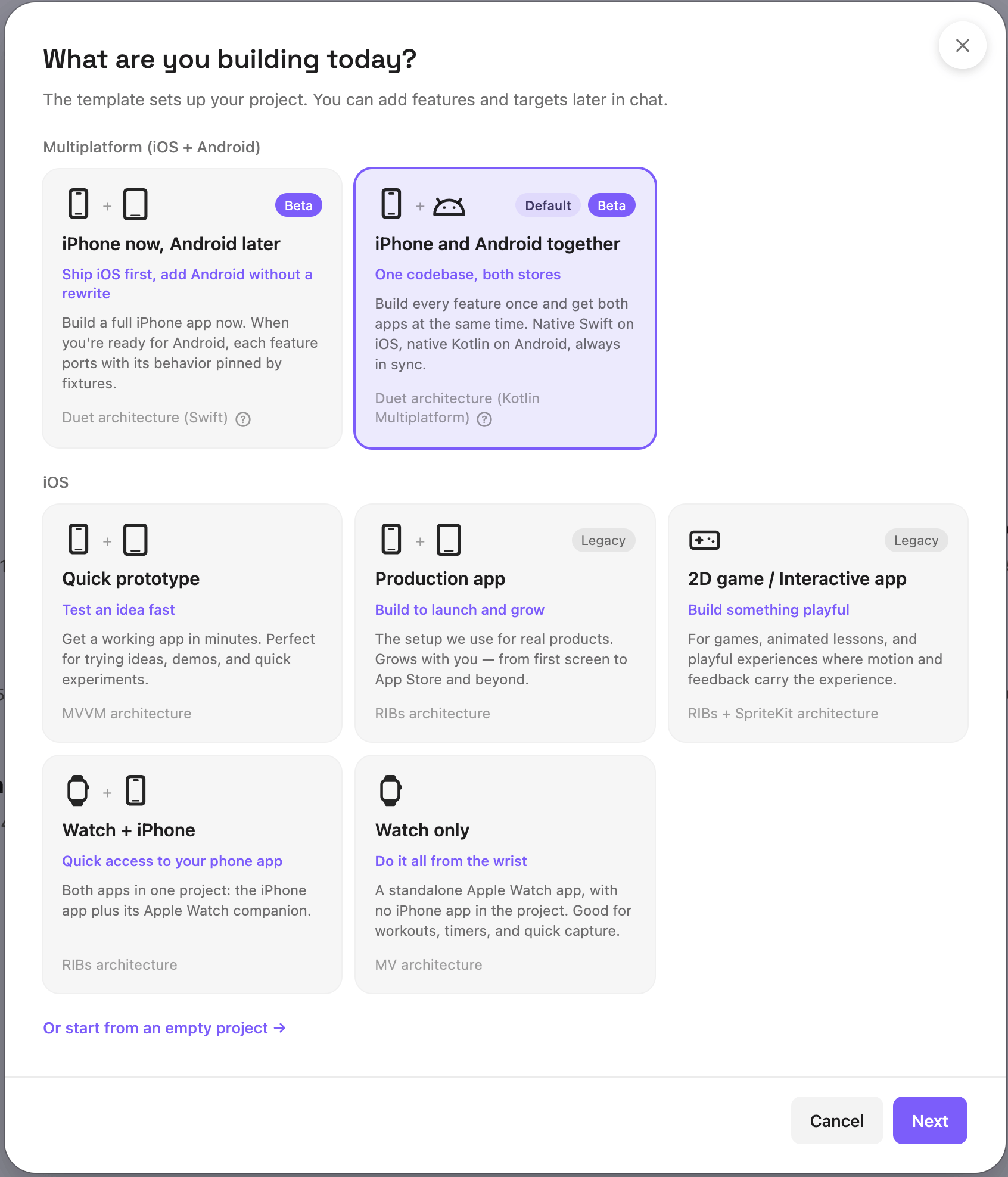 Templates sit in two lanes:
* **Multiplatform (iOS + Android)** — the two [Duet](/articles/duet) cards, which build a native iPhone app and a native Android app from one shared core.
* **iOS** — the single-platform templates: the iPhone/iPad apps first, then the Apple Watch ones.
Each card tells you three things:
* **The job** it does — *iPhone and Android together*, *Quick prototype*, *2D game / Interactive app* — with the outcome it targets on the line below (*One codebase, both stores*, *Test an idea fast*).
* **What you get** — a plain-language description of what is scaffolded.
* **The architecture** it scaffolds, in the grey line at the bottom (*Duet architecture (Kotlin Multiplatform)*, *MVVM architecture*, *RIBs architecture*, *RIBs + SpriteKit architecture*, *MV architecture*).
Three chips can appear on a card:
| Chip | What it means |
| ----------- | ---------------------------------------------------------------------------------------------------------------------------------------------------------------------------------------------------------------------------------------------------------------------------------------------------------------- |
| **Default** | Selected when the wizard opens — *iPhone and Android together*. |
| **Beta** | A newer entry in the catalog. It scaffolds and builds like the others, and the chip places no restriction on selecting it. Currently on both Duet cards and on *2D game / Interactive app*. |
| **Legacy** | A CombineRIBs template that a Duet card now covers — *Production app* and *2D game / Interactive app*. Projects already on them are fully supported and keep getting features; the chip marks that a Duet card is the one to pick for a **new** production app. See [Choosing a template](#choosing-a-template). |
Below the lanes, **"Or start from an empty project →"** creates a bare workspace with no app targets. Clicking it selects and advances in one step.
**No Multiplatform lane?** Android support is not enabled for your installation, so the wizard shows the iOS lane only, preselects **Production app**, and drops the **Legacy** chips — those cards are the production path where the Duet cards are not offered. [Join the Android open beta](https://modaal.dev/android-open-beta) to get them.
While you're looking at step 1, Modaal is reading your description in the background to suggest a project name and device types for step 2. If that takes too long or fails, step 2 opens with the defaults — you can type over anything.
### 3. Confirm the name and identifiers
Step 2 asks for the handful of things Modaal needs before it can generate a project:
Templates sit in two lanes:
* **Multiplatform (iOS + Android)** — the two [Duet](/articles/duet) cards, which build a native iPhone app and a native Android app from one shared core.
* **iOS** — the single-platform templates: the iPhone/iPad apps first, then the Apple Watch ones.
Each card tells you three things:
* **The job** it does — *iPhone and Android together*, *Quick prototype*, *2D game / Interactive app* — with the outcome it targets on the line below (*One codebase, both stores*, *Test an idea fast*).
* **What you get** — a plain-language description of what is scaffolded.
* **The architecture** it scaffolds, in the grey line at the bottom (*Duet architecture (Kotlin Multiplatform)*, *MVVM architecture*, *RIBs architecture*, *RIBs + SpriteKit architecture*, *MV architecture*).
Three chips can appear on a card:
| Chip | What it means |
| ----------- | ---------------------------------------------------------------------------------------------------------------------------------------------------------------------------------------------------------------------------------------------------------------------------------------------------------------- |
| **Default** | Selected when the wizard opens — *iPhone and Android together*. |
| **Beta** | A newer entry in the catalog. It scaffolds and builds like the others, and the chip places no restriction on selecting it. Currently on both Duet cards and on *2D game / Interactive app*. |
| **Legacy** | A CombineRIBs template that a Duet card now covers — *Production app* and *2D game / Interactive app*. Projects already on them are fully supported and keep getting features; the chip marks that a Duet card is the one to pick for a **new** production app. See [Choosing a template](#choosing-a-template). |
Below the lanes, **"Or start from an empty project →"** creates a bare workspace with no app targets. Clicking it selects and advances in one step.
**No Multiplatform lane?** Android support is not enabled for your installation, so the wizard shows the iOS lane only, preselects **Production app**, and drops the **Legacy** chips — those cards are the production path where the Duet cards are not offered. [Join the Android open beta](https://modaal.dev/android-open-beta) to get them.
While you're looking at step 1, Modaal is reading your description in the background to suggest a project name and device types for step 2. If that takes too long or fails, step 2 opens with the defaults — you can type over anything.
### 3. Confirm the name and identifiers
Step 2 asks for the handful of things Modaal needs before it can generate a project:
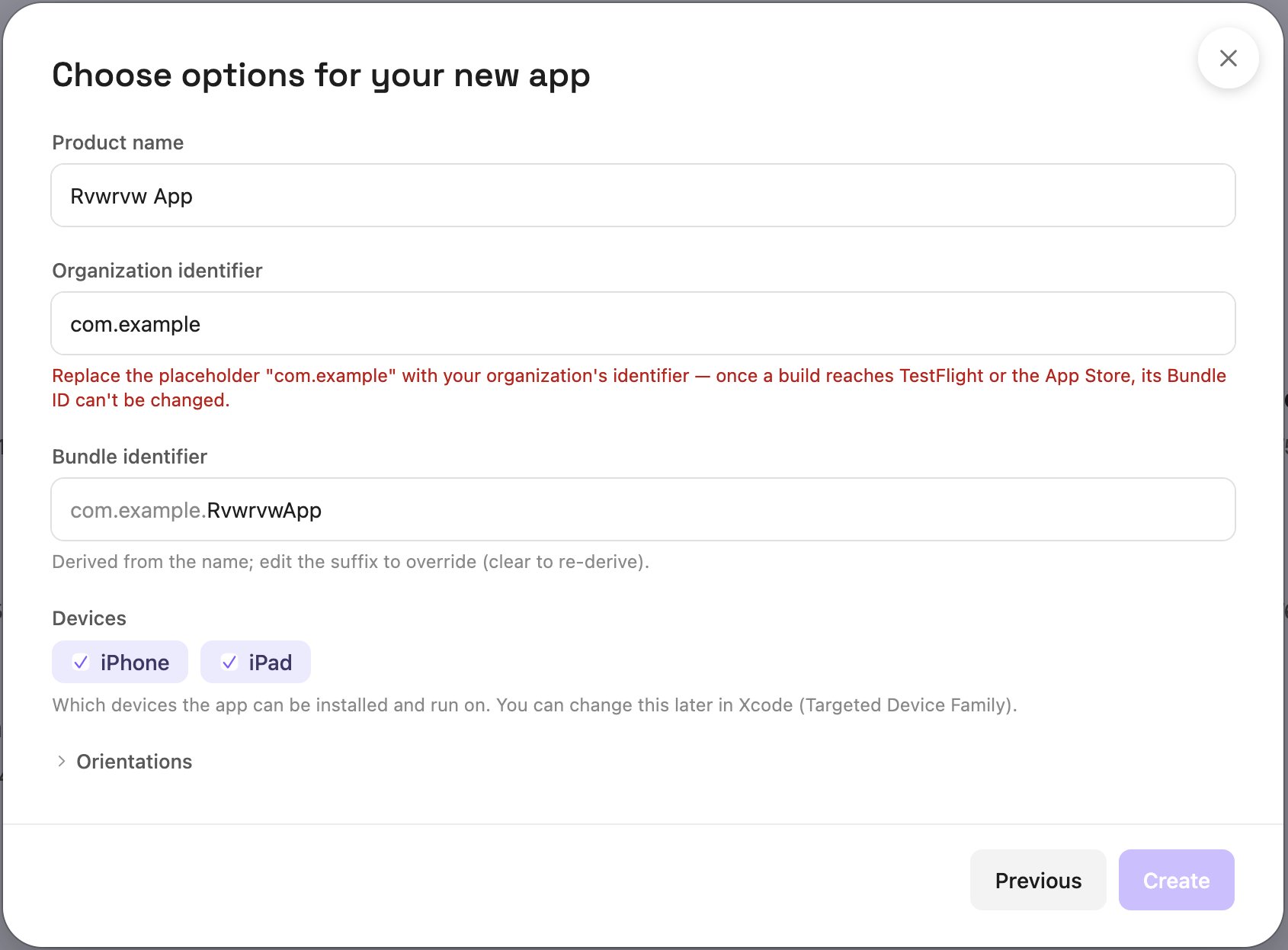 | Field | What it is |
| --------------------------- | --------------------------------------------------------------------------------------------------------------------------------------------------------------------------------------------------------------------------------------------------------------------------------------------------------------------------------------------------------------------------------- |
| **Product name** | Your app's name, prefilled from your description. Editable — anything you type is never overwritten by a late suggestion. |
| **Organization identifier** | Reverse-DNS prefix for your organization, e.g. `com.acme`. |
| **Bundle identifier** | Derived as `.`. The organization part mirrors the field above; you can override just the suffix (clear it to go back to the derived form). |
| **Devices** | iPhone, iPad, or both. Shown for templates with an iOS target. On **iPhone and Android together** the list also carries **Android**, and there it is a *target* toggle rather than an install setting: unchecking it creates the project without the Android app, and unchecking both iPhone and iPad creates it without the iOS app. Ask the agent to add the missing one later. |
| **Orientations** | Collapsed by default. Expand it to set Portrait / Upside Down / Landscape Left / Landscape Right per device family. Unchecking a device under **Devices** greys out that family's orientations but keeps the selection, so re-checking the device restores it. |
| **Android orientations** | On **iPhone and Android together** only: Portrait and Landscape. Both checked — the default — lets the app rotate freely. Portrait alone locks it to portrait; Landscape alone allows both landscape rotations. Android has no per-rotation list, so this control is coarser than the iOS one. |
Replace the placeholder `com.example` with your own organization identifier. **Once a build reaches TestFlight or the App Store, its Bundle ID can never be changed** — you'd have to ship a new app. Modaal blocks **Create** while the placeholder is still there.
Devices and orientations are both editable after creation. `TARGETED_DEVICE_FAMILY` lives in your project's `xcodegen.yml` and the orientations are two `Info.plist` keys — ask the agent to change either later, edit them in Xcode, or use Modaal's iOS project settings panel.
### 4. Create
Pressing **Create** runs three steps:
A folder, a project record, and a git repository, all created under the name you entered. The final name is used from the first write, so there is no temporary project and no rename part-way through.
Targets, SPM modules, `xcodegen.yml`, build configurations, an app icon, and a passing test suite. Any files you attached are copied into the project.
The agent receives it with Plan mode on, and continues from where the wizard finished.
### 5. The first turn: PRD and first feature spec
The wizard has already answered the structural questions, so the agent's first turn starts at product scope. It:
1. Reads your description (and any attachments — images, PDFs, Figma links).
2. Writes a structured **`PRD.md`** at the project root.
3. Plans a workable **first iteration** and writes it to `specs/001-/spec.md`.
The architecture and the target layout are already recorded in `.modaal/project.json`, so that turn neither asks which architecture to use nor re-scaffolds. It may ask a product question if your scope is ambiguous.
When the plan looks right, turn **Plan** off and say *"let's build this"*. See [Modes and prompts](/articles/modes-and-prompts) for how the Plan toggle works from there on.
***
## The templates at a glance
| Lane | Card | Best for | Targets | Architecture |
| ------------- | -------------------------------------- | ------------------------------------------------------------------------- | --------------------- | --------------------------- |
| Multiplatform | **iPhone and Android together** | Products that ship on both stores | iOS app + Android app | Duet (Kotlin Multiplatform) |
| Multiplatform | **iPhone now, Android later** | iPhone-first products that expect Android | iOS app | Duet (Swift) |
| iOS | **Quick prototype** | Trying an idea, demos, experiments | iOS app | MVVM |
| iOS | **Production app** — Legacy | Real products meant to ship and grow | iOS app | RIBs |
| iOS | **2D game / Interactive app** — Legacy | Games, animated lessons, and screens drawn from sprites rather than views | iOS app | RIBs + SpriteKit |
| iOS | **Watch only** | Standalone watch apps — workouts, timers, quick capture | watchOS app | MV |
| iOS | **Watch + iPhone** | A phone app with a glanceable watch companion | iOS app + watchOS app | RIBs (iOS) + MV (watch) |
| — | **Empty project** | A workspace to add targets to later, or non-app work | none | — |
Some things every template with an iOS target gives you, whichever card you pick: [XcodeGen](https://github.com/yonaskolb/XcodeGen)-generated project files, `.xcconfig`-based build configurations (Debug / AdHoc / AppStore), an Icon Composer app icon, a localization catalog (`Localizable.xcstrings` + SwiftGen), a theming module with semantic design tokens, and a test suite that passes from the first build (Swift Testing in **Quick prototype**, XCTest in the RIBs templates, scenario tests and recorded fixtures in the Duet ones).
***
## What each template scaffolds
A native iPhone app and a native Android app in one repository, with each feature's logic written once as a pure Kotlin reducer that both apps consume.
```text theme={null}
src-kmp/ # the shared Kotlin core
├── / # one module per feature: State, Action, Effect, reducer
├── services/ # cross-cutting ports, log vocabulary, consent state
├── telemetry/ # the closed analytics event grammar
├── theming/ # design tokens, shared by both apps
├── apple-umbrella/ # one Kotlin/Native framework aggregating every feature
├── replay-runner/ # replays fixtures on the JVM
└── app/ # the Android app: Compose shell, workers, Activity edge
src-ios/
├── App/ # the iPhone app target; xcodegen.yml is the source
└── Libraries/ # Kit (links the framework), Main (composition root),
# Theming, ThemedControls
parity/
├── manifest.yaml # the declared features, fixtures and generators
├── authoring.md # this repo's own front door for feature work
├── feature-specs/ # one one-pager per feature
└── fixtures/ # recorded behavior — build products, never hand-edited
tools/duet # the CLI that records and verifies
```
**How you'll write features:** a feature spec, then a `Given`/`When`/`Then` scenario, then `tools/duet record` to compile it into fixtures, then the reducer until the scenario passes, then a SwiftUI screen and a Compose screen that read state and send actions. `tools/duet verify` replays every fixture on both platforms and compares byte-for-byte; the same gate runs in CI on every push.
The iPhone app consumes the *same compiled Kotlin logic* as the Android app, so there is no second implementation of a reducer to keep in step.
See [Duet](/articles/duet) for the full picture and [Handling platform-specific UI](/articles/cross-platform-ui-parity) for where the shared/native line falls.
One iPhone app, pure SwiftPM — no Kotlin, no Gradle, no Android SDK needed to build or ship it. Each feature is a pair of Swift packages.
```text theme={null}
src-ios/
├── Subtrees// # one directory per feature:
│ ├── Feature/ # the reducer, its types, the worker, the scenarios
│ └── Node/ # the builder and the SwiftUI shell
├── App/ # the iPhone app target
└── Libraries/ # Main (composition root), Theming, ThemedControls
parity/
├── manifest.yaml
├── authoring.md
├── feature-specs/ # the porting source of truth
└── fixtures/ # recorded behavior — build products, never hand-edited
tools/duet
```
**How you'll write features:** the same loop as the Kotlin Multiplatform flavor, with the reducer in Swift and one shell instead of two.
Every feature is recorded and specced exactly as in the two-platform flavor. That corpus is what makes Android a **per-feature, fixture-gated migration** later — the Kotlin core and Android shell are added to this same repository, and each feature's Kotlin twin is verified against fixtures recorded when the feature was first built. The iPhone app keeps building and shipping throughout.
Pure SwiftUI, with the smallest module structure that still keeps the ViewModels unit-testable.
```text theme={null}
src-ios/
├── App/
│ ├── MyApp/ # @main App entry, Info.plist, app icon, assets
│ ├── xcconfig/ # Base / Debug / AdHoc / AppStore
│ └── xcodegen.yml
├── Libraries/
│ ├── MyAppMain/
│ │ ├── App/AppRootView.swift
│ │ ├── Navigation/Route.swift # NavigationStack routes
│ │ ├── Features/Main/MainView.swift
│ │ ├── Features/Main/MainViewModel.swift
│ │ └── Localizable.xcstrings
│ └── Theming/ # semantic design tokens
└── SharedLibraries/
├── CombineExtensions/
└── SharedUtility/
```
**How you'll write features:** one folder per feature under `Features/`, each with a SwiftUI `View` and an `@Observable` `ViewModel`. Navigation is a `Route` enum driving a `NavigationStack`. Services are injected through `@Environment`. Tests target the ViewModels.
An explicit module tree, protocol boundaries between every module, and a navigation tree that is explicit in the router hierarchy. This card carries a **Legacy** chip where the Duet cards are offered — see [What the Legacy chip means](#what-the-legacy-chip-means).
```text theme={null}
src-ios/
├── App/
│ ├── MyApp/ # AppDelegate, SceneDelegate, SceneComponent (composition root)
│ ├── xcconfig/
│ └── xcodegen.yml
├── Libraries/
│ ├── MyAppMain/
│ │ ├── RIBs/Root/ # Builder · Router · Interactor
│ │ ├── RIBs/Splash/
│ │ ├── RIBs/Main/
│ │ ├── Workers/
│ │ └── Localizable.xcstrings
│ └── Theming/
├── SharedLibraries/
│ ├── AppServices/ # app-lifecycle & shared service protocols
│ ├── CombineExtensions/
│ ├── Diagnostics/
│ ├── RIBsExtensions/
│ ├── SharedUtility/
│ └── SimpleTheming/
└── AllTests.xcworkspace # runs every module's tests together
```
**How you'll write features:** one RIB per screen or flow — `Builder` (constructs it), `Router` (attaches and detaches children), `Interactor` (business logic), `View` (SwiftUI or UIKit). Children attach to parents, so the router hierarchy is where the app's navigation state lives, and you can read the whole app off it. Mocks are generated automatically by [Sourcery](https://github.com/krzysztofzablocki/Sourcery) from `/// sourcery: CreateMock` annotations, so every module is unit-testable in isolation.
A Splash RIB and a Main RIB come pre-wired under Root, so the app runs the moment it's created.
The **Production app** structure with the view layer swapped for a SpriteKit scene tree. Builders, Interactors, Routers, Components and Sourcery mocks are identical; what changes is that a RIB's presenter is an `SKScene` or an `SKNode` instead of a SwiftUI view, and the whole app has exactly one view controller — the scene navigator that owns the `SKView`.
```text theme={null}
src-ios/
├── App/
│ ├── MyApp/ # AppDelegate, SceneDelegate, SceneComponent
│ ├── xcconfig/
│ └── xcodegen.yml
├── Art/Game/ # source PNGs — the artwork you edit
├── Scripts/pack-atlases.sh # packs Art/ into the texture atlas
├── Libraries/
│ ├── MyAppMain/
│ │ ├── RIBs/Root/ # the app's one view controller (SceneNavigator)
│ │ ├── RIBs/Splash/ # SplashScene — waits on the resource loader
│ │ ├── RIBs/Menu/ # MenuScene — hosts the node RIBs below
│ │ ├── RIBs/Game/ # GameNode — the sample game
│ │ ├── RIBs/Settings/ # SettingsNode — sound volume, persisted
│ │ ├── Layout/ # SceneLayout, SceneNodes, ZPlane
│ │ ├── Content/ # sprite, atlas and sound catalogs
│ │ ├── Workers/ # ResourcesLoadingWorker
│ │ └── Resources/ # packed atlas + sound effects
│ └── Theming/
└── AllTests.xcworkspace
```
**How you'll write features:** two scenes (Splash and Menu) and everything deeper as **node RIBs** — an `SKNode` subclass you `addChild` into the host scene. A node reads no ambient state (`self.scene`, `UIScreen`, the view) and lays out against the metrics its host hands it, so the same node can be attached into a different scene without edits. Animation is `SKAction` choreography rather than a per-frame game loop, and `layoutScene()` runs on presentation, on rotation and on every safe-area change.
The SpriteKit machinery — `BaseScene`, the scene navigator, the routing protocols, the sound pool, the atlas loader, the button control — is the open-source [modaal-foundation-spritekit](https://github.com/modaal-agent/modaal-foundation-spritekit) package, pinned by URL in the app module's `Package.swift`. It is a versioned dependency: you import its products, and it is upgraded by moving the pin.
The scaffolded app runs immediately: splash → menu → a tap-the-target sample game with a score and a sound effect, plus a settings screen that persists sound volume. The sample game and the four placeholder sprites in `Art/Game/` are there to be replaced — only the sample game in `RIBs/Game` uses them.
See [Building 2D games with SpriteKit](/articles/spritekit-games) for what this looks like in practice.
A standalone Apple Watch app with **no iPhone app in the project**. It runs independently of a companion — good for workouts, timers, and quick capture.
```text theme={null}
src-ios/
└── App/
├── MyAppWatchApp/ # @main App entry, ContentView, assets, Info.plist
├── xcconfig/
└── xcodegen.yml
```
**MV (Model-View)** is a simplified MVVM: there is no ViewModel layer. Views observe `@Observable` services directly through `@Environment`. At watch-screen scope a ViewModel per screen adds a layer without adding testable logic, so MV omits it. Tests target the services.
A watch-only project has no `Libraries/` or `SharedLibraries/` yet — the watch target holds its own sources, and the SPM structure appears the moment an iOS target is added.
Both apps in one project: a full iPhone app plus its Apple Watch companion, with the companion bundle identifiers already wired up.
The iPhone target gets the complete **RIBs** structure described above. The watch target gets the **MV** structure. That split is deliberate: a watch app is a handful of small, glanceable screens, and a Builder/Router/Interactor unit per screen adds structure those screens have no use for.
Pick this when the watch is the companion to a product that mainly lives on the phone. If the watch **is** the product, pick **Watch only**.
A project folder and a git repository. There is no Xcode project and no scheme, so there is nothing to build or run until you add a target.
Useful when you want to add targets deliberately in chat, or when the work isn't an app to begin with. The agent is told the workspace is empty; ask it to add a target when you're ready.
What was chosen is recorded in `.modaal/project.json` — the template at the project level, and the architecture per target. Both the agent and Modaal's tooling read it, which is why you never have to restate your architecture in a prompt.
***
## Choosing a template
Four questions, in this order. The first is the one that decides the most: platform reach comes before architecture.
### 1. Will this ship on Android, now or later?
**Yes, or probably** → a **Multiplatform** card. Both scaffold [Duet](/articles/duet): each feature's logic is written once, both apps render it natively, and recorded fixtures gate the two against each other in CI.
| | **iPhone and Android together** | **iPhone now, Android later** |
| -------------------------- | ------------------------------------- | --------------------------------------------------------------- |
| Targets on day one | iPhone app + Android app | iPhone app |
| Feature logic | Kotlin, consumed by both apps | Swift |
| Toolchain on your Mac | Xcode, plus the Android SDK and a JDK | Xcode |
| Getting the other platform | Already there | A per-feature, fixture-gated migration into the same repository |
Pick **iPhone and Android together** when Android is in scope now, or when you want both stores at launch. Pick **iPhone now, Android later** when Android is a "probably", or when you want the iPhone app in users' hands before taking on a second toolchain — its features are recorded and specced exactly as in the two-platform flavor, which is what makes the later port bounded work.
**No, and I'm certain** → question 2.
**Platform reach is a creation-time decision.** A template fixes the architecture for the life of the project. A **Quick prototype** (MVVM) project has no migration path to Duet — Android there means a second project, written again. A **Production app** (CombineRIBs) project does have one, taken feature by feature, but it is work a Duet card avoids entirely. When Android is even a maybe, a Multiplatform card costs less.
### 2. Is this a prototype or a product?
**A prototype** — idea validation, an investor demo, a personal utility with a fixed scope → **Quick prototype**. Pure SwiftUI, a View and a ViewModel per screen, no module boilerplate beyond that, and a working app in hours.
**A product** — something that will live long, grow past a dozen screens, or earn money → a **Multiplatform** card, even when only iPhone is planned. **iPhone now, Android later** is the production template for an Apple-only product.
**A Quick prototype project is a throwaway by design.** MVVM has no migration path in Modaal: going to production means starting a second project and carrying the behavior across by hand. Before picking it for something that "might eventually go to production", ask whether you are ready to write it again. If the answer is "probably not" or "I hadn't thought about that", pick a Multiplatform card.
The extra structure a production template needs is written by the agent, not by you — generating a Duet feature and generating an MVVM screen differ by seconds of agent time. What differs later is the cost of having picked wrong, and you pay that one.
### 3. Is the screen drawn rather than laid out?
Sprite artwork placed at coordinates, animated per frame, hit-tested where it is drawn → **2D game / Interactive app**. It is the only card that scaffolds a SpriteKit scene host, so it is the answer for a game even though it carries a **Legacy** chip. [The section below](#when-to-pick-the-2d-game-card) covers where that line falls.
### 4. Does the product live on the wrist?
**Watch only** for a standalone watch app, **Watch + iPhone** for a companion to a phone app. watchOS targets are MV, and that is not configurable.
### Quick reference
| Your situation | Template |
| ------------------------------------------------ | ------------------------------------------------------- |
| Android planned, now or later | **iPhone and Android together** |
| Both stores at launch | **iPhone and Android together** |
| iPhone first, Android a likely follow-up | **iPhone now, Android later** |
| Production app with growth potential, Apple-only | **iPhone now, Android later** |
| Fintech, healthtech, regulated industry | a Multiplatform card |
| Complex navigation, auth gates, multi-step flows | a Multiplatform card |
| Utility with a fixed, bounded scope | **Quick prototype** |
| Prototype for idea validation | **Quick prototype**, knowing there is no migration path |
| Game, arcade, puzzle, animated lesson | **2D game / Interactive app** |
| Apple Watch target | **MV** — always, not configurable |
| You are bringing your own project structure | **Empty project** |
### What the Legacy chip means
**Production app** and **2D game / Interactive app** scaffold **RIBs** (Router-Interactor-Builder, via CombineRIBs): explicit module boundaries, a navigation tree that lives in the router hierarchy, and protocol contracts between modules. Four things follow from the chip:
* **Projects already on them are fully supported.** Features written today follow the same RIBs patterns, the agent knows them, and nothing about the templates has been withdrawn.
* **The chip is about new projects.** For a new production app, a Duet card gives you comparable structural support plus a recorded behavior corpus and a route to Android.
* **A game is the exception.** No Duet card scaffolds a SpriteKit scene host, so **2D game / Interactive app** is the card for a game regardless of the chip.
* **There is a way across.** A CombineRIBs project can be carried to the Duet shape feature by feature, in place — [Migrating a CombineRIBs app to Duet](/articles/combineribs-to-duet) walks through the stages, what each one costs, and where you can stop. That work is real, and avoiding it is what the chip is pointing at.
***
## When to pick the 2D game card
**Pick it when the screen is drawn rather than laid out** — sprite artwork placed at coordinates, animated per frame, hit-tested where it is drawn. Games, arcade and puzzle apps, animated lessons, and kids' apps where the play is the product.
**Stay on a conventional card for a conventional app, including an animation-heavy one.** Rich SwiftUI animation is not a reason to move to SpriteKit. Building a single playful screen on a scene tree means that screen takes on the scene lifecycle, the layout pass and the atlas pipeline, and its UI is assembled from `SKNode` subclasses rather than from your existing SwiftUI views.
**RIBs → RIBs + SpriteKit is additive.** The RIB tree, the modules and the tests keep their shape; what gets added is the SpriteKit packages and a scene host. So if the graphics requirement is uncertain and you have picked **Production app**, ask the agent to add the SpriteKit surface at the point you need it.
A Duet project has no equivalent move — no Duet card scaffolds a scene host. If the product is a game, pick **2D game / Interactive app** at creation and take CombineRIBs with it.
[Building 2D games with SpriteKit](/articles/spritekit-games) walks through what the template gives you and what the first turn looks like.
***
## Case studies
**Context.** Max wants a simple interval training app. Three screens: workout templates, interval settings, and the timer itself with start / pause / stop. A personal project he might share with friends. No cloud — data stored locally in SwiftData.
**Prototype or product?** A personal utility. Even on the App Store it's unlikely to reach 50 screens. No Android plans, three screens, linear navigation (list → settings → timer). Nothing points at a production template.
**Decision: Quick prototype (MVVM).** A production template would add per-feature module structure — and, on a Duet card, a spec and a recorded fixture corpus per feature — that three linear screens never use. MVVM covers the whole app: a `TimerViewModel` with `@Observable` holding timer state, a `NavigationStack` with `NavigationLink` and `.sheet()`, `@Environment` for the persistence service, and tests against the ViewModel with zero navigation mocks.
A few hours after describing the idea, Max has a working MVP. If he later adds a WidgetKit widget or a watch companion, the main app's architecture doesn't constrain them — those targets run on pure SwiftUI either way.
**Takeaway.** For 3–10 screens with a clear, bounded scope, MVVM is the right call. Don't "play it safe" with a heavier architecture just in case.
**Context.** A fintech building a mobile bank: registration with KYC verification, balances, P2P and IBAN transfers, filtered transaction history, profile settings, push notifications, biometric auth. Android planned in six months.
**Prototype or product?** Production. A regulated industry, real money, and a codebase that will be maintained for years.
* **Android in six months.** **iPhone and Android together** is the only card that emits an Android app target. Picking it at creation makes Android a target rather than a migration, and the six-month date stops being a second project plan.
* **Navigation.** KYC is a multi-step flow with branches (document photo → selfie → verification → waiting → result, with back-navigation). Transfers are another flow behind an auth gate. In Duet those transitions are reducer state, recorded as fixtures — so the flow is pinned byte-for-byte and both apps replay the same recording.
* **Regulatory scrutiny.** Every flow ends up with a written spec under `parity/feature-specs/` and an executable recording of what it does. That corpus is produced by ordinary feature work, not by a separate documentation effort.
* **Security.** Features are separate modules with typed boundaries. The payments module has no access to KYC's internal state, and the compiler enforces that rather than convention.
* **Native SDK work.** Biometrics, document-verification SDKs and custom PIN entry live in workers behind ports, with one implementation per platform. The reducer names the effect; the platform supplies the I/O.
**Decision: iPhone and Android together (Duet, Kotlin Multiplatform).** This isn't about team size — it is the right pick for a solo developer with an agent, because the agent generates each feature against a clear contract and the fixture gate catches a behavior change on the commit that caused it.
**Takeaway.** When a product must exist on both stores and is judged on whether it behaves correctly, write the behavior once and let CI prove the two apps agree.
**Context.** A solo founder building a marketplace for plumbers, electricians and cleaners: an offerings feed, provider profiles, booking with a date/time picker, in-app chat, Stripe payments, order history, user profile. Android is coming, but "not now." The business model anticipates growth.
**Prototype or product?** There's a business model with payments and growth plans — production.
* **"Android not now"** commonly becomes an urgent requirement 6–8 months after launch. On a Duet card that is a scheduled port; on **Quick prototype** it is a second project.
* **Navigation** is a real flow: pick service → pick date → confirm → pay → result, with an auth gate (browse without an account, book with one). Chat is a separate real-time flow.
* **Integrations**: Stripe, WebSockets, push, geolocation.
**Decision: iPhone now, Android later (Duet, Swift flavor).** One toolchain and one set of screens to launch with, and every feature recorded and specced as it is written. When Android is scheduled, the Kotlin core and Android shell are added to the same repository and features cross one at a time, each verified against fixtures recorded months earlier.
**The line between the two Duet cards:** if Android has to ship within roughly six months, pick **iPhone and Android together** at creation instead — the Android app is then built alongside the iPhone one rather than ported after it.
**Takeaway.** When a project shows signs of growth — a business model, non-trivial navigation, possible Android — pick a Multiplatform card from the start. Which of the two depends on when Android has to exist, not on whether it will.
**Context.** An internal app for \~500 employees: contact directory, office map, meeting-room booking, news feed. Tight budget, results needed fast. Data from a corporate REST API. No Android — everyone has an iPhone.
**Prototype or product?** Less clear-cut than the others. It's used in production, but it doesn't *grow* — the scope is fixed. It will never become a marketplace or a social network. Navigation is linear: tab bar → list → detail, with booking as a simple form sheet.
**Decision: Quick prototype (MVVM).** Fixed scope, linear navigation, no Android. A production template would add module structure the fixed scope never uses.
The distinction that matters: the key question in the decision tree isn't "will this be in production?" — it's **"will it grow?"** A corporate directory with a clear spec doesn't. If someone asks for vacation requests and expense tracking a year later, *that's* when you decide whether the next version starts as a new project on a Multiplatform card. Deciding now, just in case, is premature optimization.
**Takeaway.** Not every "real" app needs a production architecture. Bounded scope means MVVM delivers a better result in less time — corporate projects included.
**Context.** Anna built a habit tracker — three screens: habit list, add habit, stats. She picked **Quick prototype**, correctly, and the agent generated a working version in hours. She shipped it and started gaining users.
Four months later: 50,000 users, an investor interested, and new requirements — social challenges, a subscription paywall, CloudKit sync, widgets, a watch companion, five languages.
**What she's facing.** This is the classic "throwaway prototype that accidentally became the product." Two options:
* **A — Evolve the MVVM codebase.** Keep adding features, and for complex flows (paywall, challenge onboarding) add lightweight flow coordinators: `@Observable` state machines that own navigation for a single flow. Not full MVVM+C — no coordinator protocol, no coordinator tree, no parent-child lifecycle. Just one concrete object per complex flow.
* **B — Restart on a Multiplatform card.** MVVM has no migration path in Modaal, so this is a new project rather than a conversion: the agent rebuilds the app on a Duet card, and the business logic — models, services, CloudKit code — carries across as-is, because it lives in SPM modules rather than the architectural layer. The screens are written again.
**Recommendation.** If a few days can be set aside: **B**, now, while the app is three screens plus the new requirements rather than thirty. With an agent that rebuild is days of work, and it is the point at which Android stops being a separate project.
If there's genuinely no time and the product is growing daily: **A** as a stopgap. Flow coordinators for the paywall and onboarding hold for a few months. Record the restart as the next planned piece of work — the longer it waits, the more screens it has to cover.
Worth noting: **widgets and watch targets are pure SwiftUI either way**, so they carry across untouched.
**Takeaway.** Two rules apply. At the start, be honest that **Quick prototype** means throwaway — if there's even a 30% chance of growth, start on a Multiplatform card. When it takes off, restart while the codebase is still small.
***
## Changing your mind later
Not everything the wizard asks is permanent. Here's what is:
| Decision | Changing it later |
| --------------------------------------------------------- | ---------------------------------------------------------------------------------------------------------------------------------------------------------------------------------------------------------------------------------------------------------------------------------------- |
| **Product name** | Ask the agent — it's a rename across the project. |
| **Devices (iPhone / iPad)** | Easy. One setting in `xcodegen.yml`; just ask. |
| **Bundle identifier** | Editable until you ship; fixed once a build reaches TestFlight or the App Store. |
| **Adding targets** — watch companion, widgets, extensions | Ask in chat; the agent scaffolds and wires them. |
| **The Android app**, on a Duet project | Unchecked at creation on **iPhone and Android together**: ask the agent to add the target. On **iPhone now, Android later**: a per-feature migration into the same repository — see [Adding Android to an iPhone-only project](/articles/duet#adding-android-to-an-iphone-only-project). |
| **Architecture** | The one real commitment. MVVM has no migration path — going to production means a second project. [CombineRIBs → Duet](/articles/combineribs-to-duet) is per-feature and in place. RIBs → RIBs + SpriteKit is additive. Duet projects stay Duet projects. |
Everything else — features, screens, navigation, integrations, pivots — is ordinary work you do in chat. See [Modes and prompts](/articles/modes-and-prompts) for how to drive it.
**Need help deciding?** Ask in our [community](https://discord.gg/KyQzDXxgU3) — describe what you're building and someone will sanity-check the template choice with you.
***
*Modaal currently supports Duet in two flavors for multiplatform projects, MVVM, RIBs and RIBs + SpriteKit for iOS, and MV for watchOS. Duet is pre-release and its cards carry a Beta chip; Android is in open beta, with general availability in September 2026.*
| Field | What it is |
| --------------------------- | --------------------------------------------------------------------------------------------------------------------------------------------------------------------------------------------------------------------------------------------------------------------------------------------------------------------------------------------------------------------------------- |
| **Product name** | Your app's name, prefilled from your description. Editable — anything you type is never overwritten by a late suggestion. |
| **Organization identifier** | Reverse-DNS prefix for your organization, e.g. `com.acme`. |
| **Bundle identifier** | Derived as `.`. The organization part mirrors the field above; you can override just the suffix (clear it to go back to the derived form). |
| **Devices** | iPhone, iPad, or both. Shown for templates with an iOS target. On **iPhone and Android together** the list also carries **Android**, and there it is a *target* toggle rather than an install setting: unchecking it creates the project without the Android app, and unchecking both iPhone and iPad creates it without the iOS app. Ask the agent to add the missing one later. |
| **Orientations** | Collapsed by default. Expand it to set Portrait / Upside Down / Landscape Left / Landscape Right per device family. Unchecking a device under **Devices** greys out that family's orientations but keeps the selection, so re-checking the device restores it. |
| **Android orientations** | On **iPhone and Android together** only: Portrait and Landscape. Both checked — the default — lets the app rotate freely. Portrait alone locks it to portrait; Landscape alone allows both landscape rotations. Android has no per-rotation list, so this control is coarser than the iOS one. |
Replace the placeholder `com.example` with your own organization identifier. **Once a build reaches TestFlight or the App Store, its Bundle ID can never be changed** — you'd have to ship a new app. Modaal blocks **Create** while the placeholder is still there.
Devices and orientations are both editable after creation. `TARGETED_DEVICE_FAMILY` lives in your project's `xcodegen.yml` and the orientations are two `Info.plist` keys — ask the agent to change either later, edit them in Xcode, or use Modaal's iOS project settings panel.
### 4. Create
Pressing **Create** runs three steps:
A folder, a project record, and a git repository, all created under the name you entered. The final name is used from the first write, so there is no temporary project and no rename part-way through.
Targets, SPM modules, `xcodegen.yml`, build configurations, an app icon, and a passing test suite. Any files you attached are copied into the project.
The agent receives it with Plan mode on, and continues from where the wizard finished.
### 5. The first turn: PRD and first feature spec
The wizard has already answered the structural questions, so the agent's first turn starts at product scope. It:
1. Reads your description (and any attachments — images, PDFs, Figma links).
2. Writes a structured **`PRD.md`** at the project root.
3. Plans a workable **first iteration** and writes it to `specs/001-/spec.md`.
The architecture and the target layout are already recorded in `.modaal/project.json`, so that turn neither asks which architecture to use nor re-scaffolds. It may ask a product question if your scope is ambiguous.
When the plan looks right, turn **Plan** off and say *"let's build this"*. See [Modes and prompts](/articles/modes-and-prompts) for how the Plan toggle works from there on.
***
## The templates at a glance
| Lane | Card | Best for | Targets | Architecture |
| ------------- | -------------------------------------- | ------------------------------------------------------------------------- | --------------------- | --------------------------- |
| Multiplatform | **iPhone and Android together** | Products that ship on both stores | iOS app + Android app | Duet (Kotlin Multiplatform) |
| Multiplatform | **iPhone now, Android later** | iPhone-first products that expect Android | iOS app | Duet (Swift) |
| iOS | **Quick prototype** | Trying an idea, demos, experiments | iOS app | MVVM |
| iOS | **Production app** — Legacy | Real products meant to ship and grow | iOS app | RIBs |
| iOS | **2D game / Interactive app** — Legacy | Games, animated lessons, and screens drawn from sprites rather than views | iOS app | RIBs + SpriteKit |
| iOS | **Watch only** | Standalone watch apps — workouts, timers, quick capture | watchOS app | MV |
| iOS | **Watch + iPhone** | A phone app with a glanceable watch companion | iOS app + watchOS app | RIBs (iOS) + MV (watch) |
| — | **Empty project** | A workspace to add targets to later, or non-app work | none | — |
Some things every template with an iOS target gives you, whichever card you pick: [XcodeGen](https://github.com/yonaskolb/XcodeGen)-generated project files, `.xcconfig`-based build configurations (Debug / AdHoc / AppStore), an Icon Composer app icon, a localization catalog (`Localizable.xcstrings` + SwiftGen), a theming module with semantic design tokens, and a test suite that passes from the first build (Swift Testing in **Quick prototype**, XCTest in the RIBs templates, scenario tests and recorded fixtures in the Duet ones).
***
## What each template scaffolds
A native iPhone app and a native Android app in one repository, with each feature's logic written once as a pure Kotlin reducer that both apps consume.
```text theme={null}
src-kmp/ # the shared Kotlin core
├── / # one module per feature: State, Action, Effect, reducer
├── services/ # cross-cutting ports, log vocabulary, consent state
├── telemetry/ # the closed analytics event grammar
├── theming/ # design tokens, shared by both apps
├── apple-umbrella/ # one Kotlin/Native framework aggregating every feature
├── replay-runner/ # replays fixtures on the JVM
└── app/ # the Android app: Compose shell, workers, Activity edge
src-ios/
├── App/ # the iPhone app target; xcodegen.yml is the source
└── Libraries/ # Kit (links the framework), Main (composition root),
# Theming, ThemedControls
parity/
├── manifest.yaml # the declared features, fixtures and generators
├── authoring.md # this repo's own front door for feature work
├── feature-specs/ # one one-pager per feature
└── fixtures/ # recorded behavior — build products, never hand-edited
tools/duet # the CLI that records and verifies
```
**How you'll write features:** a feature spec, then a `Given`/`When`/`Then` scenario, then `tools/duet record` to compile it into fixtures, then the reducer until the scenario passes, then a SwiftUI screen and a Compose screen that read state and send actions. `tools/duet verify` replays every fixture on both platforms and compares byte-for-byte; the same gate runs in CI on every push.
The iPhone app consumes the *same compiled Kotlin logic* as the Android app, so there is no second implementation of a reducer to keep in step.
See [Duet](/articles/duet) for the full picture and [Handling platform-specific UI](/articles/cross-platform-ui-parity) for where the shared/native line falls.
One iPhone app, pure SwiftPM — no Kotlin, no Gradle, no Android SDK needed to build or ship it. Each feature is a pair of Swift packages.
```text theme={null}
src-ios/
├── Subtrees// # one directory per feature:
│ ├── Feature/ # the reducer, its types, the worker, the scenarios
│ └── Node/ # the builder and the SwiftUI shell
├── App/ # the iPhone app target
└── Libraries/ # Main (composition root), Theming, ThemedControls
parity/
├── manifest.yaml
├── authoring.md
├── feature-specs/ # the porting source of truth
└── fixtures/ # recorded behavior — build products, never hand-edited
tools/duet
```
**How you'll write features:** the same loop as the Kotlin Multiplatform flavor, with the reducer in Swift and one shell instead of two.
Every feature is recorded and specced exactly as in the two-platform flavor. That corpus is what makes Android a **per-feature, fixture-gated migration** later — the Kotlin core and Android shell are added to this same repository, and each feature's Kotlin twin is verified against fixtures recorded when the feature was first built. The iPhone app keeps building and shipping throughout.
Pure SwiftUI, with the smallest module structure that still keeps the ViewModels unit-testable.
```text theme={null}
src-ios/
├── App/
│ ├── MyApp/ # @main App entry, Info.plist, app icon, assets
│ ├── xcconfig/ # Base / Debug / AdHoc / AppStore
│ └── xcodegen.yml
├── Libraries/
│ ├── MyAppMain/
│ │ ├── App/AppRootView.swift
│ │ ├── Navigation/Route.swift # NavigationStack routes
│ │ ├── Features/Main/MainView.swift
│ │ ├── Features/Main/MainViewModel.swift
│ │ └── Localizable.xcstrings
│ └── Theming/ # semantic design tokens
└── SharedLibraries/
├── CombineExtensions/
└── SharedUtility/
```
**How you'll write features:** one folder per feature under `Features/`, each with a SwiftUI `View` and an `@Observable` `ViewModel`. Navigation is a `Route` enum driving a `NavigationStack`. Services are injected through `@Environment`. Tests target the ViewModels.
An explicit module tree, protocol boundaries between every module, and a navigation tree that is explicit in the router hierarchy. This card carries a **Legacy** chip where the Duet cards are offered — see [What the Legacy chip means](#what-the-legacy-chip-means).
```text theme={null}
src-ios/
├── App/
│ ├── MyApp/ # AppDelegate, SceneDelegate, SceneComponent (composition root)
│ ├── xcconfig/
│ └── xcodegen.yml
├── Libraries/
│ ├── MyAppMain/
│ │ ├── RIBs/Root/ # Builder · Router · Interactor
│ │ ├── RIBs/Splash/
│ │ ├── RIBs/Main/
│ │ ├── Workers/
│ │ └── Localizable.xcstrings
│ └── Theming/
├── SharedLibraries/
│ ├── AppServices/ # app-lifecycle & shared service protocols
│ ├── CombineExtensions/
│ ├── Diagnostics/
│ ├── RIBsExtensions/
│ ├── SharedUtility/
│ └── SimpleTheming/
└── AllTests.xcworkspace # runs every module's tests together
```
**How you'll write features:** one RIB per screen or flow — `Builder` (constructs it), `Router` (attaches and detaches children), `Interactor` (business logic), `View` (SwiftUI or UIKit). Children attach to parents, so the router hierarchy is where the app's navigation state lives, and you can read the whole app off it. Mocks are generated automatically by [Sourcery](https://github.com/krzysztofzablocki/Sourcery) from `/// sourcery: CreateMock` annotations, so every module is unit-testable in isolation.
A Splash RIB and a Main RIB come pre-wired under Root, so the app runs the moment it's created.
The **Production app** structure with the view layer swapped for a SpriteKit scene tree. Builders, Interactors, Routers, Components and Sourcery mocks are identical; what changes is that a RIB's presenter is an `SKScene` or an `SKNode` instead of a SwiftUI view, and the whole app has exactly one view controller — the scene navigator that owns the `SKView`.
```text theme={null}
src-ios/
├── App/
│ ├── MyApp/ # AppDelegate, SceneDelegate, SceneComponent
│ ├── xcconfig/
│ └── xcodegen.yml
├── Art/Game/ # source PNGs — the artwork you edit
├── Scripts/pack-atlases.sh # packs Art/ into the texture atlas
├── Libraries/
│ ├── MyAppMain/
│ │ ├── RIBs/Root/ # the app's one view controller (SceneNavigator)
│ │ ├── RIBs/Splash/ # SplashScene — waits on the resource loader
│ │ ├── RIBs/Menu/ # MenuScene — hosts the node RIBs below
│ │ ├── RIBs/Game/ # GameNode — the sample game
│ │ ├── RIBs/Settings/ # SettingsNode — sound volume, persisted
│ │ ├── Layout/ # SceneLayout, SceneNodes, ZPlane
│ │ ├── Content/ # sprite, atlas and sound catalogs
│ │ ├── Workers/ # ResourcesLoadingWorker
│ │ └── Resources/ # packed atlas + sound effects
│ └── Theming/
└── AllTests.xcworkspace
```
**How you'll write features:** two scenes (Splash and Menu) and everything deeper as **node RIBs** — an `SKNode` subclass you `addChild` into the host scene. A node reads no ambient state (`self.scene`, `UIScreen`, the view) and lays out against the metrics its host hands it, so the same node can be attached into a different scene without edits. Animation is `SKAction` choreography rather than a per-frame game loop, and `layoutScene()` runs on presentation, on rotation and on every safe-area change.
The SpriteKit machinery — `BaseScene`, the scene navigator, the routing protocols, the sound pool, the atlas loader, the button control — is the open-source [modaal-foundation-spritekit](https://github.com/modaal-agent/modaal-foundation-spritekit) package, pinned by URL in the app module's `Package.swift`. It is a versioned dependency: you import its products, and it is upgraded by moving the pin.
The scaffolded app runs immediately: splash → menu → a tap-the-target sample game with a score and a sound effect, plus a settings screen that persists sound volume. The sample game and the four placeholder sprites in `Art/Game/` are there to be replaced — only the sample game in `RIBs/Game` uses them.
See [Building 2D games with SpriteKit](/articles/spritekit-games) for what this looks like in practice.
A standalone Apple Watch app with **no iPhone app in the project**. It runs independently of a companion — good for workouts, timers, and quick capture.
```text theme={null}
src-ios/
└── App/
├── MyAppWatchApp/ # @main App entry, ContentView, assets, Info.plist
├── xcconfig/
└── xcodegen.yml
```
**MV (Model-View)** is a simplified MVVM: there is no ViewModel layer. Views observe `@Observable` services directly through `@Environment`. At watch-screen scope a ViewModel per screen adds a layer without adding testable logic, so MV omits it. Tests target the services.
A watch-only project has no `Libraries/` or `SharedLibraries/` yet — the watch target holds its own sources, and the SPM structure appears the moment an iOS target is added.
Both apps in one project: a full iPhone app plus its Apple Watch companion, with the companion bundle identifiers already wired up.
The iPhone target gets the complete **RIBs** structure described above. The watch target gets the **MV** structure. That split is deliberate: a watch app is a handful of small, glanceable screens, and a Builder/Router/Interactor unit per screen adds structure those screens have no use for.
Pick this when the watch is the companion to a product that mainly lives on the phone. If the watch **is** the product, pick **Watch only**.
A project folder and a git repository. There is no Xcode project and no scheme, so there is nothing to build or run until you add a target.
Useful when you want to add targets deliberately in chat, or when the work isn't an app to begin with. The agent is told the workspace is empty; ask it to add a target when you're ready.
What was chosen is recorded in `.modaal/project.json` — the template at the project level, and the architecture per target. Both the agent and Modaal's tooling read it, which is why you never have to restate your architecture in a prompt.
***
## Choosing a template
Four questions, in this order. The first is the one that decides the most: platform reach comes before architecture.
### 1. Will this ship on Android, now or later?
**Yes, or probably** → a **Multiplatform** card. Both scaffold [Duet](/articles/duet): each feature's logic is written once, both apps render it natively, and recorded fixtures gate the two against each other in CI.
| | **iPhone and Android together** | **iPhone now, Android later** |
| -------------------------- | ------------------------------------- | --------------------------------------------------------------- |
| Targets on day one | iPhone app + Android app | iPhone app |
| Feature logic | Kotlin, consumed by both apps | Swift |
| Toolchain on your Mac | Xcode, plus the Android SDK and a JDK | Xcode |
| Getting the other platform | Already there | A per-feature, fixture-gated migration into the same repository |
Pick **iPhone and Android together** when Android is in scope now, or when you want both stores at launch. Pick **iPhone now, Android later** when Android is a "probably", or when you want the iPhone app in users' hands before taking on a second toolchain — its features are recorded and specced exactly as in the two-platform flavor, which is what makes the later port bounded work.
**No, and I'm certain** → question 2.
**Platform reach is a creation-time decision.** A template fixes the architecture for the life of the project. A **Quick prototype** (MVVM) project has no migration path to Duet — Android there means a second project, written again. A **Production app** (CombineRIBs) project does have one, taken feature by feature, but it is work a Duet card avoids entirely. When Android is even a maybe, a Multiplatform card costs less.
### 2. Is this a prototype or a product?
**A prototype** — idea validation, an investor demo, a personal utility with a fixed scope → **Quick prototype**. Pure SwiftUI, a View and a ViewModel per screen, no module boilerplate beyond that, and a working app in hours.
**A product** — something that will live long, grow past a dozen screens, or earn money → a **Multiplatform** card, even when only iPhone is planned. **iPhone now, Android later** is the production template for an Apple-only product.
**A Quick prototype project is a throwaway by design.** MVVM has no migration path in Modaal: going to production means starting a second project and carrying the behavior across by hand. Before picking it for something that "might eventually go to production", ask whether you are ready to write it again. If the answer is "probably not" or "I hadn't thought about that", pick a Multiplatform card.
The extra structure a production template needs is written by the agent, not by you — generating a Duet feature and generating an MVVM screen differ by seconds of agent time. What differs later is the cost of having picked wrong, and you pay that one.
### 3. Is the screen drawn rather than laid out?
Sprite artwork placed at coordinates, animated per frame, hit-tested where it is drawn → **2D game / Interactive app**. It is the only card that scaffolds a SpriteKit scene host, so it is the answer for a game even though it carries a **Legacy** chip. [The section below](#when-to-pick-the-2d-game-card) covers where that line falls.
### 4. Does the product live on the wrist?
**Watch only** for a standalone watch app, **Watch + iPhone** for a companion to a phone app. watchOS targets are MV, and that is not configurable.
### Quick reference
| Your situation | Template |
| ------------------------------------------------ | ------------------------------------------------------- |
| Android planned, now or later | **iPhone and Android together** |
| Both stores at launch | **iPhone and Android together** |
| iPhone first, Android a likely follow-up | **iPhone now, Android later** |
| Production app with growth potential, Apple-only | **iPhone now, Android later** |
| Fintech, healthtech, regulated industry | a Multiplatform card |
| Complex navigation, auth gates, multi-step flows | a Multiplatform card |
| Utility with a fixed, bounded scope | **Quick prototype** |
| Prototype for idea validation | **Quick prototype**, knowing there is no migration path |
| Game, arcade, puzzle, animated lesson | **2D game / Interactive app** |
| Apple Watch target | **MV** — always, not configurable |
| You are bringing your own project structure | **Empty project** |
### What the Legacy chip means
**Production app** and **2D game / Interactive app** scaffold **RIBs** (Router-Interactor-Builder, via CombineRIBs): explicit module boundaries, a navigation tree that lives in the router hierarchy, and protocol contracts between modules. Four things follow from the chip:
* **Projects already on them are fully supported.** Features written today follow the same RIBs patterns, the agent knows them, and nothing about the templates has been withdrawn.
* **The chip is about new projects.** For a new production app, a Duet card gives you comparable structural support plus a recorded behavior corpus and a route to Android.
* **A game is the exception.** No Duet card scaffolds a SpriteKit scene host, so **2D game / Interactive app** is the card for a game regardless of the chip.
* **There is a way across.** A CombineRIBs project can be carried to the Duet shape feature by feature, in place — [Migrating a CombineRIBs app to Duet](/articles/combineribs-to-duet) walks through the stages, what each one costs, and where you can stop. That work is real, and avoiding it is what the chip is pointing at.
***
## When to pick the 2D game card
**Pick it when the screen is drawn rather than laid out** — sprite artwork placed at coordinates, animated per frame, hit-tested where it is drawn. Games, arcade and puzzle apps, animated lessons, and kids' apps where the play is the product.
**Stay on a conventional card for a conventional app, including an animation-heavy one.** Rich SwiftUI animation is not a reason to move to SpriteKit. Building a single playful screen on a scene tree means that screen takes on the scene lifecycle, the layout pass and the atlas pipeline, and its UI is assembled from `SKNode` subclasses rather than from your existing SwiftUI views.
**RIBs → RIBs + SpriteKit is additive.** The RIB tree, the modules and the tests keep their shape; what gets added is the SpriteKit packages and a scene host. So if the graphics requirement is uncertain and you have picked **Production app**, ask the agent to add the SpriteKit surface at the point you need it.
A Duet project has no equivalent move — no Duet card scaffolds a scene host. If the product is a game, pick **2D game / Interactive app** at creation and take CombineRIBs with it.
[Building 2D games with SpriteKit](/articles/spritekit-games) walks through what the template gives you and what the first turn looks like.
***
## Case studies
**Context.** Max wants a simple interval training app. Three screens: workout templates, interval settings, and the timer itself with start / pause / stop. A personal project he might share with friends. No cloud — data stored locally in SwiftData.
**Prototype or product?** A personal utility. Even on the App Store it's unlikely to reach 50 screens. No Android plans, three screens, linear navigation (list → settings → timer). Nothing points at a production template.
**Decision: Quick prototype (MVVM).** A production template would add per-feature module structure — and, on a Duet card, a spec and a recorded fixture corpus per feature — that three linear screens never use. MVVM covers the whole app: a `TimerViewModel` with `@Observable` holding timer state, a `NavigationStack` with `NavigationLink` and `.sheet()`, `@Environment` for the persistence service, and tests against the ViewModel with zero navigation mocks.
A few hours after describing the idea, Max has a working MVP. If he later adds a WidgetKit widget or a watch companion, the main app's architecture doesn't constrain them — those targets run on pure SwiftUI either way.
**Takeaway.** For 3–10 screens with a clear, bounded scope, MVVM is the right call. Don't "play it safe" with a heavier architecture just in case.
**Context.** A fintech building a mobile bank: registration with KYC verification, balances, P2P and IBAN transfers, filtered transaction history, profile settings, push notifications, biometric auth. Android planned in six months.
**Prototype or product?** Production. A regulated industry, real money, and a codebase that will be maintained for years.
* **Android in six months.** **iPhone and Android together** is the only card that emits an Android app target. Picking it at creation makes Android a target rather than a migration, and the six-month date stops being a second project plan.
* **Navigation.** KYC is a multi-step flow with branches (document photo → selfie → verification → waiting → result, with back-navigation). Transfers are another flow behind an auth gate. In Duet those transitions are reducer state, recorded as fixtures — so the flow is pinned byte-for-byte and both apps replay the same recording.
* **Regulatory scrutiny.** Every flow ends up with a written spec under `parity/feature-specs/` and an executable recording of what it does. That corpus is produced by ordinary feature work, not by a separate documentation effort.
* **Security.** Features are separate modules with typed boundaries. The payments module has no access to KYC's internal state, and the compiler enforces that rather than convention.
* **Native SDK work.** Biometrics, document-verification SDKs and custom PIN entry live in workers behind ports, with one implementation per platform. The reducer names the effect; the platform supplies the I/O.
**Decision: iPhone and Android together (Duet, Kotlin Multiplatform).** This isn't about team size — it is the right pick for a solo developer with an agent, because the agent generates each feature against a clear contract and the fixture gate catches a behavior change on the commit that caused it.
**Takeaway.** When a product must exist on both stores and is judged on whether it behaves correctly, write the behavior once and let CI prove the two apps agree.
**Context.** A solo founder building a marketplace for plumbers, electricians and cleaners: an offerings feed, provider profiles, booking with a date/time picker, in-app chat, Stripe payments, order history, user profile. Android is coming, but "not now." The business model anticipates growth.
**Prototype or product?** There's a business model with payments and growth plans — production.
* **"Android not now"** commonly becomes an urgent requirement 6–8 months after launch. On a Duet card that is a scheduled port; on **Quick prototype** it is a second project.
* **Navigation** is a real flow: pick service → pick date → confirm → pay → result, with an auth gate (browse without an account, book with one). Chat is a separate real-time flow.
* **Integrations**: Stripe, WebSockets, push, geolocation.
**Decision: iPhone now, Android later (Duet, Swift flavor).** One toolchain and one set of screens to launch with, and every feature recorded and specced as it is written. When Android is scheduled, the Kotlin core and Android shell are added to the same repository and features cross one at a time, each verified against fixtures recorded months earlier.
**The line between the two Duet cards:** if Android has to ship within roughly six months, pick **iPhone and Android together** at creation instead — the Android app is then built alongside the iPhone one rather than ported after it.
**Takeaway.** When a project shows signs of growth — a business model, non-trivial navigation, possible Android — pick a Multiplatform card from the start. Which of the two depends on when Android has to exist, not on whether it will.
**Context.** An internal app for \~500 employees: contact directory, office map, meeting-room booking, news feed. Tight budget, results needed fast. Data from a corporate REST API. No Android — everyone has an iPhone.
**Prototype or product?** Less clear-cut than the others. It's used in production, but it doesn't *grow* — the scope is fixed. It will never become a marketplace or a social network. Navigation is linear: tab bar → list → detail, with booking as a simple form sheet.
**Decision: Quick prototype (MVVM).** Fixed scope, linear navigation, no Android. A production template would add module structure the fixed scope never uses.
The distinction that matters: the key question in the decision tree isn't "will this be in production?" — it's **"will it grow?"** A corporate directory with a clear spec doesn't. If someone asks for vacation requests and expense tracking a year later, *that's* when you decide whether the next version starts as a new project on a Multiplatform card. Deciding now, just in case, is premature optimization.
**Takeaway.** Not every "real" app needs a production architecture. Bounded scope means MVVM delivers a better result in less time — corporate projects included.
**Context.** Anna built a habit tracker — three screens: habit list, add habit, stats. She picked **Quick prototype**, correctly, and the agent generated a working version in hours. She shipped it and started gaining users.
Four months later: 50,000 users, an investor interested, and new requirements — social challenges, a subscription paywall, CloudKit sync, widgets, a watch companion, five languages.
**What she's facing.** This is the classic "throwaway prototype that accidentally became the product." Two options:
* **A — Evolve the MVVM codebase.** Keep adding features, and for complex flows (paywall, challenge onboarding) add lightweight flow coordinators: `@Observable` state machines that own navigation for a single flow. Not full MVVM+C — no coordinator protocol, no coordinator tree, no parent-child lifecycle. Just one concrete object per complex flow.
* **B — Restart on a Multiplatform card.** MVVM has no migration path in Modaal, so this is a new project rather than a conversion: the agent rebuilds the app on a Duet card, and the business logic — models, services, CloudKit code — carries across as-is, because it lives in SPM modules rather than the architectural layer. The screens are written again.
**Recommendation.** If a few days can be set aside: **B**, now, while the app is three screens plus the new requirements rather than thirty. With an agent that rebuild is days of work, and it is the point at which Android stops being a separate project.
If there's genuinely no time and the product is growing daily: **A** as a stopgap. Flow coordinators for the paywall and onboarding hold for a few months. Record the restart as the next planned piece of work — the longer it waits, the more screens it has to cover.
Worth noting: **widgets and watch targets are pure SwiftUI either way**, so they carry across untouched.
**Takeaway.** Two rules apply. At the start, be honest that **Quick prototype** means throwaway — if there's even a 30% chance of growth, start on a Multiplatform card. When it takes off, restart while the codebase is still small.
***
## Changing your mind later
Not everything the wizard asks is permanent. Here's what is:
| Decision | Changing it later |
| --------------------------------------------------------- | ---------------------------------------------------------------------------------------------------------------------------------------------------------------------------------------------------------------------------------------------------------------------------------------- |
| **Product name** | Ask the agent — it's a rename across the project. |
| **Devices (iPhone / iPad)** | Easy. One setting in `xcodegen.yml`; just ask. |
| **Bundle identifier** | Editable until you ship; fixed once a build reaches TestFlight or the App Store. |
| **Adding targets** — watch companion, widgets, extensions | Ask in chat; the agent scaffolds and wires them. |
| **The Android app**, on a Duet project | Unchecked at creation on **iPhone and Android together**: ask the agent to add the target. On **iPhone now, Android later**: a per-feature migration into the same repository — see [Adding Android to an iPhone-only project](/articles/duet#adding-android-to-an-iphone-only-project). |
| **Architecture** | The one real commitment. MVVM has no migration path — going to production means a second project. [CombineRIBs → Duet](/articles/combineribs-to-duet) is per-feature and in place. RIBs → RIBs + SpriteKit is additive. Duet projects stay Duet projects. |
Everything else — features, screens, navigation, integrations, pivots — is ordinary work you do in chat. See [Modes and prompts](/articles/modes-and-prompts) for how to drive it.
**Need help deciding?** Ask in our [community](https://discord.gg/KyQzDXxgU3) — describe what you're building and someone will sanity-check the template choice with you.
***
*Modaal currently supports Duet in two flavors for multiplatform projects, MVVM, RIBs and RIBs + SpriteKit for iOS, and MV for watchOS. Duet is pre-release and its cards carry a Beta chip; Android is in open beta, with general availability in September 2026.*