> ## Documentation Index
> Fetch the complete documentation index at: https://docs.modaal.dev/llms.txt
> Use this file to discover all available pages before exploring further.
# Building 2D Games with SpriteKit
> The 2D game template scaffolds a running SpriteKit app — scenes, sprites, sound and a sample game — on the same RIBs structure the production template uses.
SwiftUI lays out a tree of views. A game screen is a tree of sprites: artwork placed at coordinates, animated per frame, hit-tested where it is drawn, and ordered by explicit z-position. [SpriteKit](https://developer.apple.com/documentation/spritekit) — Apple's 2D scene-graph framework — models that tree directly.
The **2D game / Interactive app** template starts you on SpriteKit, wired into the same RIBs structure the [Production app](/articles/new-project) template uses.
 ## What you get on the first build
Pick the card, press **Create**, and the app runs: splash → menu → a tap-the-target sample game with a score and a sound effect, plus a settings screen that persists sound volume. Five pieces you would otherwise write yourself are already wired behind that sample:
* **A resource gate.** `ResourcesLoadingWorker` registers the fonts, makes the sprite atlas resident and warms the sound pool; the splash waits on it. If a resource fails to load, the worker records it to `Diagnostics` and publishes it on `loadingIssues` for the splash to display, then finishes loading and opens the gate anyway.
* **An artwork pipeline.** Source PNGs live in `Art//`, and `Scripts/pack-atlases.sh` packs them into the committed atlas page the app reads. Run it when the artwork changes; `Scripts/pack-atlases.sh --verify` checks the committed page against the sources without re-packing.
* **Pooled audio.** A fixed-size pool of preloaded `AVAudioPlayer`s, rotated least-recently-used. Overlapping plays each get their own player up to the pool size; past that the new sound is dropped rather than cutting off a playing one.
* **Idempotent layout.** `layoutScene()` runs on presentation, on rotation and on every safe-area change. Chrome is positioned against `safeAreaFrame` and the playfield against the full frame, so the notch and home indicator are accounted for.
* **Tests that pass from the first build**, registered in the same all-modules workspace as the other templates. The sample game's tests run its rules without instantiating SpriteKit, because the score and sound logic is Interactor state.
The SpriteKit machinery — the scene base class, the scene navigator, the routing protocols, the sound pool, the atlas loader, the button control — is the open-source [modaal-foundation-spritekit](https://github.com/modaal-agent/modaal-foundation-spritekit) package, pinned by URL in your `Package.swift`. It is a versioned dependency: you import its products, and it is upgraded by moving the pin rather than by editing files in your project.
## What changes from the Production app template
A RIB's presenter is an `SKScene` or an `SKNode` subclass instead of a SwiftUI view. The rest is the same: Builder, Interactor, Router and Component, the same protocol boundaries, the same generated mocks.
One rule follows from that: **build screens as node RIBs, not scene RIBs.** Presenting a scene runs a transition and discards the outgoing scene's node tree. Attaching a node RIB is an `addChild` into the scene already on screen, and the node remains attachable elsewhere afterwards — it reads no ambient state (`self.scene`, `UIScreen`, the view) and lays out against the metrics its host hands it, so the same node can be attached into a different scene, or into a host app's scene, without edits.
The scaffolded app is built that way: two scenes, Splash and Menu, with the game and settings screens as nodes attached into the Menu scene.
Ask the agent for a new screen and it scaffolds the RIB for you — the right variant, plus the artwork wiring when the screen draws sprites.
## Starting one
Describe the game in the composer, pick **2D game / Interactive app**, and press **Create**. The first turn writes a `PRD.md` and a first feature spec, as it does for every template. The architecture is already recorded in `.modaal/project.json`, so that turn goes straight to product scope.
Two prompts with enough detail for the agent to plan from:
```text theme={null}
A puzzle game where you tap falling blocks to match colors.
Three lives, a combo multiplier, and a game-over screen with a high score.
```
```text theme={null}
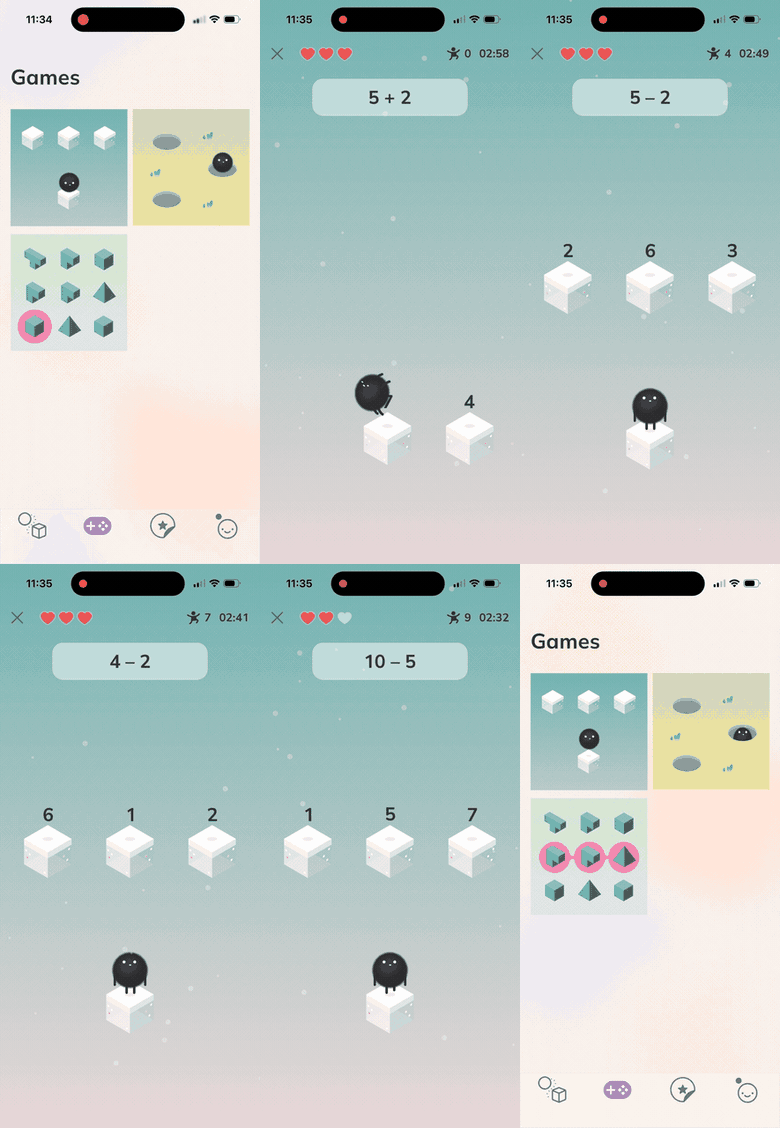
An arithmetic practice game for kids: a character hops between numbered
blocks to answer the sum at the top. Hearts for lives, a timer, and a
star score that persists between sessions.
```
The sample game and the four placeholder sprites in `Art/Game/` are there to be replaced. Only the sample game in `RIBs/Game` uses them, and deleting them and re-running `Scripts/pack-atlases.sh` also drops the \~1 MiB atlas page they occupy.
The card carries a **Beta** chip. It marks the newest entry in the template catalog. The template scaffolds, builds and tests like the others, and the chip places no restriction on what you can build with it.
## When not to use it
Stay on **Production app** for a conventional app, including an animation-heavy one — rich SwiftUI animation is not a reason to move to SpriteKit. Building a single playful screen on a scene tree means that screen takes on the scene lifecycle, the layout pass and the atlas pipeline, and its UI is assembled from `SKNode` subclasses rather than from your existing SwiftUI views.
If the graphics requirement is uncertain, start on **Production app**. **RIBs → RIBs + SpriteKit is additive, not a rewrite:** the RIB tree, the modules and the tests keep their shape, and what gets added is the SpriteKit packages and a scene host. Ask the agent to add the game surface at the point you need it.
***
More on picking a template: [Starting a new project](/articles/new-project). For a second opinion on your idea, ask in the [community](https://discord.gg/KyQzDXxgU3).
## What you get on the first build
Pick the card, press **Create**, and the app runs: splash → menu → a tap-the-target sample game with a score and a sound effect, plus a settings screen that persists sound volume. Five pieces you would otherwise write yourself are already wired behind that sample:
* **A resource gate.** `ResourcesLoadingWorker` registers the fonts, makes the sprite atlas resident and warms the sound pool; the splash waits on it. If a resource fails to load, the worker records it to `Diagnostics` and publishes it on `loadingIssues` for the splash to display, then finishes loading and opens the gate anyway.
* **An artwork pipeline.** Source PNGs live in `Art//`, and `Scripts/pack-atlases.sh` packs them into the committed atlas page the app reads. Run it when the artwork changes; `Scripts/pack-atlases.sh --verify` checks the committed page against the sources without re-packing.
* **Pooled audio.** A fixed-size pool of preloaded `AVAudioPlayer`s, rotated least-recently-used. Overlapping plays each get their own player up to the pool size; past that the new sound is dropped rather than cutting off a playing one.
* **Idempotent layout.** `layoutScene()` runs on presentation, on rotation and on every safe-area change. Chrome is positioned against `safeAreaFrame` and the playfield against the full frame, so the notch and home indicator are accounted for.
* **Tests that pass from the first build**, registered in the same all-modules workspace as the other templates. The sample game's tests run its rules without instantiating SpriteKit, because the score and sound logic is Interactor state.
The SpriteKit machinery — the scene base class, the scene navigator, the routing protocols, the sound pool, the atlas loader, the button control — is the open-source [modaal-foundation-spritekit](https://github.com/modaal-agent/modaal-foundation-spritekit) package, pinned by URL in your `Package.swift`. It is a versioned dependency: you import its products, and it is upgraded by moving the pin rather than by editing files in your project.
## What changes from the Production app template
A RIB's presenter is an `SKScene` or an `SKNode` subclass instead of a SwiftUI view. The rest is the same: Builder, Interactor, Router and Component, the same protocol boundaries, the same generated mocks.
One rule follows from that: **build screens as node RIBs, not scene RIBs.** Presenting a scene runs a transition and discards the outgoing scene's node tree. Attaching a node RIB is an `addChild` into the scene already on screen, and the node remains attachable elsewhere afterwards — it reads no ambient state (`self.scene`, `UIScreen`, the view) and lays out against the metrics its host hands it, so the same node can be attached into a different scene, or into a host app's scene, without edits.
The scaffolded app is built that way: two scenes, Splash and Menu, with the game and settings screens as nodes attached into the Menu scene.
Ask the agent for a new screen and it scaffolds the RIB for you — the right variant, plus the artwork wiring when the screen draws sprites.
## Starting one
Describe the game in the composer, pick **2D game / Interactive app**, and press **Create**. The first turn writes a `PRD.md` and a first feature spec, as it does for every template. The architecture is already recorded in `.modaal/project.json`, so that turn goes straight to product scope.
Two prompts with enough detail for the agent to plan from:
```text theme={null}
A puzzle game where you tap falling blocks to match colors.
Three lives, a combo multiplier, and a game-over screen with a high score.
```
```text theme={null}
An arithmetic practice game for kids: a character hops between numbered
blocks to answer the sum at the top. Hearts for lives, a timer, and a
star score that persists between sessions.
```
The sample game and the four placeholder sprites in `Art/Game/` are there to be replaced. Only the sample game in `RIBs/Game` uses them, and deleting them and re-running `Scripts/pack-atlases.sh` also drops the \~1 MiB atlas page they occupy.
The card carries a **Beta** chip. It marks the newest entry in the template catalog. The template scaffolds, builds and tests like the others, and the chip places no restriction on what you can build with it.
## When not to use it
Stay on **Production app** for a conventional app, including an animation-heavy one — rich SwiftUI animation is not a reason to move to SpriteKit. Building a single playful screen on a scene tree means that screen takes on the scene lifecycle, the layout pass and the atlas pipeline, and its UI is assembled from `SKNode` subclasses rather than from your existing SwiftUI views.
If the graphics requirement is uncertain, start on **Production app**. **RIBs → RIBs + SpriteKit is additive, not a rewrite:** the RIB tree, the modules and the tests keep their shape, and what gets added is the SpriteKit packages and a scene host. Ask the agent to add the game surface at the point you need it.
***
More on picking a template: [Starting a new project](/articles/new-project). For a second opinion on your idea, ask in the [community](https://discord.gg/KyQzDXxgU3).