> ## Documentation Index
> Fetch the complete documentation index at: https://docs.modaal.dev/llms.txt
> Use this file to discover all available pages before exploring further.

# Submit to the App Store Now, Stay iPhone Duo-Ready

> Guard iOS 27.1 SDK code so one project builds the iPhone Duo layout in Xcode 27.1 beta and archives in Xcode 27.0 for App Store review, with a ready agent prompt.

<Info>
  Written on September 25, 2026, when Xcode 27.0 is the current release and Xcode 27.1 is in beta. The same method applies whenever an app uses APIs from an SDK that is still in beta at the time you need to submit.
</Info>

iPhone Duo ships with iOS 27.1. Its layout APIs — `ArrangementView`, `GeometryProxy.reservedRegions(kind:)` and `UIView.reservedRegions(kind:options:)` — exist only in the iOS 27.1 SDK, which comes with Xcode 27.1 beta. A project that adopts them hits two restrictions at once:

* **Xcode 27.1 beta** builds the project and runs it on the iPhone Duo simulator, but App Store Connect sends a build to review only if it was made with the current public (GM) Xcode or its release candidate. A build from Xcode 27.1 beta uploads, then cannot be added for review.
* **Xcode 27.0** produces builds that App Store Connect accepts for review, but its iOS 27.0 SDK does not declare the iPhone Duo APIs, so the project does not compile.

Wrapping the new code in `if #available(iOS 27.1, *)` does not fix the Xcode 27.0 build. `#available` chooses a code path when the app runs; the compiler still has to find every symbol in the SDK it builds against.

This guide changes the project so that the same source compiles under both Xcodes. Xcode 27.1 beta compiles the iPhone Duo layout; Xcode 27.0 compiles the layout the app had before, and that build can go to App Store review today. When App Store Connect starts accepting Xcode 27.1 builds for review, you archive the same code with Xcode 27.1 and submit it again.

|                                             | Xcode 27.0         | Xcode 27.1 beta                            |
| ------------------------------------------- | ------------------ | ------------------------------------------ |
| Released                                    | September 14, 2026 | September 18, 2026 (beta)                  |
| iOS SDK                                     | 27.0               | 27.1                                       |
| Declares the iPhone Duo APIs                | No                 | Yes                                        |
| Build can be submitted for App Store review | Yes                | No                                         |
| Use it for                                  | Archive & Upload   | Building and testing the iPhone Duo layout |

The screenshots follow one app, Memory Lane (the **Modaal WikiMemory** project), through every step.

***

## Why the usual pre-approval steps fail for this project

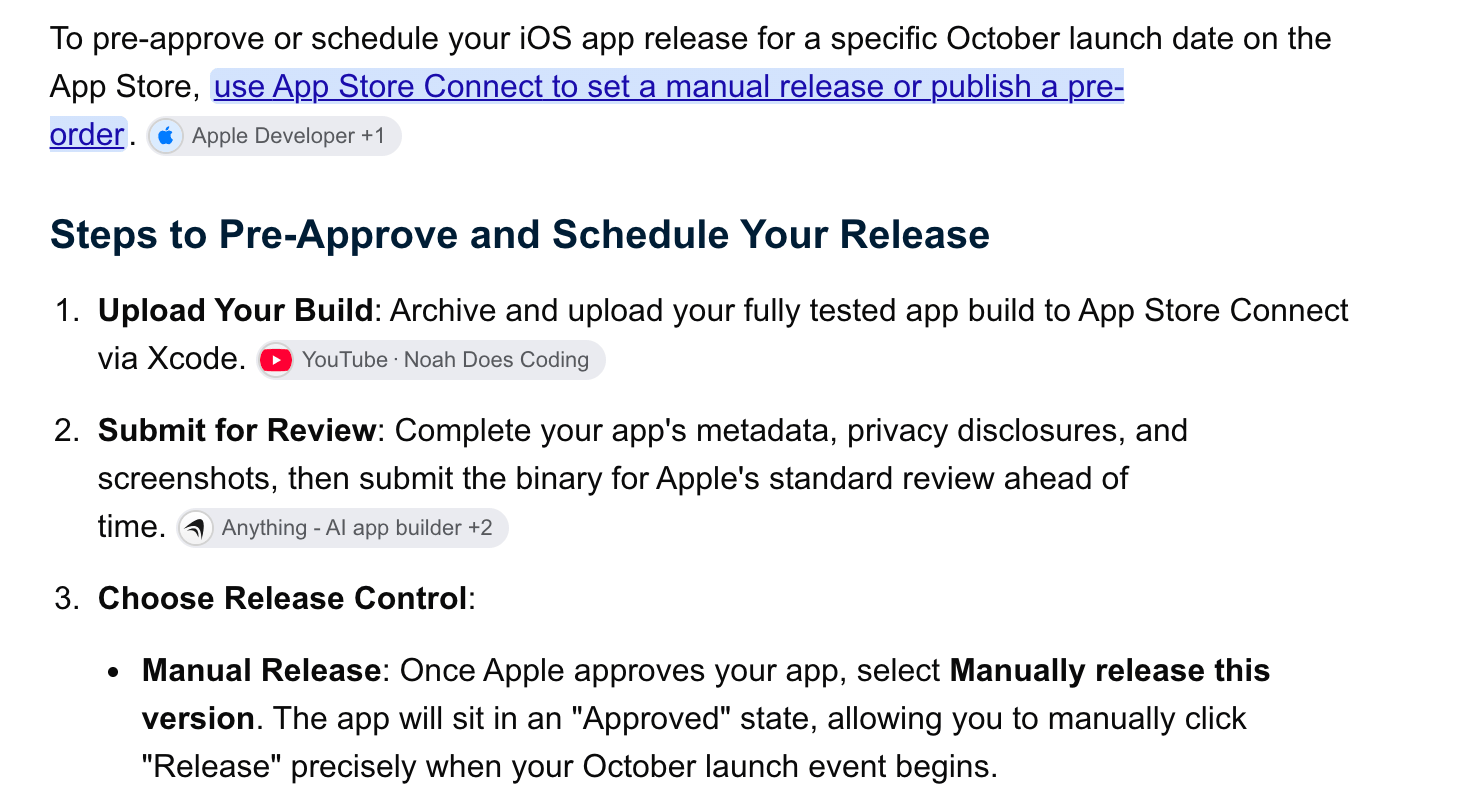
The common advice for getting an app approved ahead of a launch date is three steps in App Store Connect: upload a build, submit it for review, and select **Manually release this version** so the approved version waits until you release it.

<Frame caption="The common advice for pre-approving a release. For a build made with Xcode 27.1 beta, step 2 fails.">
  <img src="https://mintcdn.com/modaal/S5ZFd8qCljVug09H/images/iphone-duo-presubmission-1-general-advice.png?fit=max&auto=format&n=S5ZFd8qCljVug09H&q=85&s=c274421dad37c51f90a052d499d3cff4" alt="Search result listing three steps to pre-approve an App Store release: upload your build, submit for review, choose manual release" style={{ width: "620px" }} width="1458" height="808" data-path="images/iphone-duo-presubmission-1-general-advice.png" />
</Frame>

With a build from Xcode 27.1 beta, the upload in step 1 goes through and step 2 fails: App Store Connect refuses to add the build for review.

<Frame caption="App Store Connect, Add for Review, with a build from Xcode 27.1 beta: “This build is using a beta version of Xcode and can’t be submitted.”">
  <img src="https://mintcdn.com/modaal/D5HK9ts7AOiIpger/images/iphone-duo-presubmission-1b-unable-to-add-for-review.png?fit=max&auto=format&n=D5HK9ts7AOiIpger&q=85&s=25238e5985488bc2530c2c8e67c8017e" alt="App Store Connect error Unable to Add for Review: new apps and app updates must be built with the latest public (GM) versions of Xcode and the SDKs, and apps built with beta versions aren't allowed" width="2286" height="382" data-path="images/iphone-duo-presubmission-1b-unable-to-add-for-review.png" />
</Frame>

The same project built with Xcode 27.0 stops with compile errors, shown in [step 4](#step-4). Steps 1–7 below produce a build from Xcode 27.0 that App Store Connect accepts for review, in which the iPhone Duo code is left out at compile time and kept in the source.

***

<h2 id="step-1">
  Step 1 — Install Xcode 27.0 and Xcode 27.1 beta side by side
</h2>

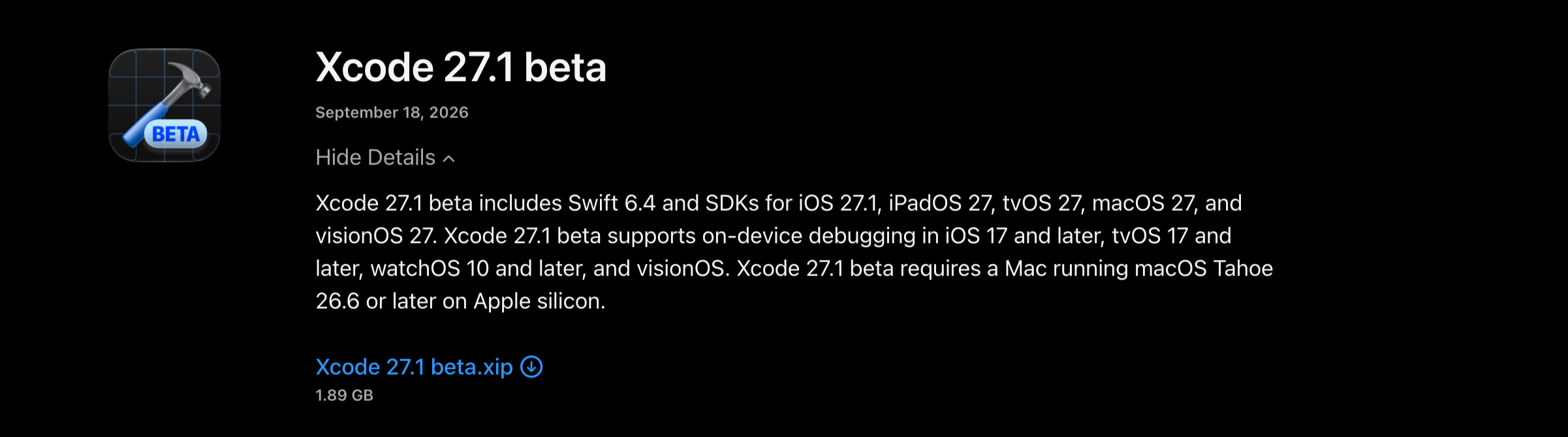
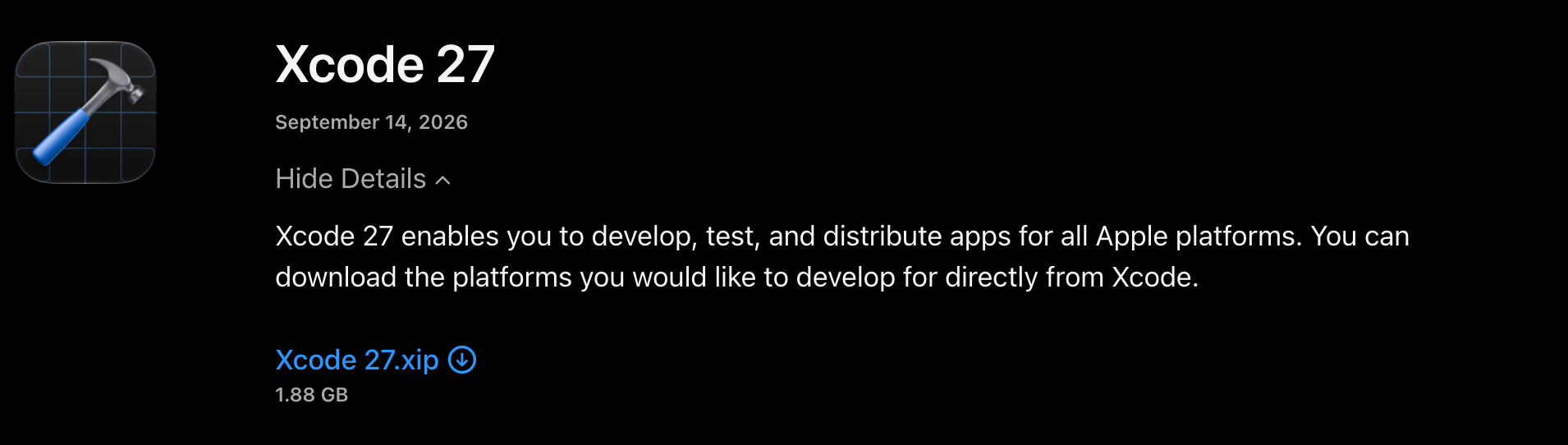
Download both from [Apple Developer downloads](https://developer.apple.com/download/all/?q=xcode). Sign in with your Apple Account.

<Frame caption="Xcode 27.1 beta: Swift 6.4 and the iOS 27.1 SDK. It requires macOS Tahoe 26.6 or later on an Apple silicon Mac.">
  <img src="https://mintcdn.com/modaal/S5ZFd8qCljVug09H/images/iphone-duo-presubmission-2a-xcode-27-1-beta-download.png?fit=max&auto=format&n=S5ZFd8qCljVug09H&q=85&s=7c4b2d6da297a7b458eed87716dcb0d5" alt="Apple Developer download entry for Xcode 27.1 beta, dated September 18, 2026, 1.89 GB" width="2402" height="669" data-path="images/iphone-duo-presubmission-2a-xcode-27-1-beta-download.png" />
</Frame>

<Frame caption="Xcode 27, the current release. App Store Connect accepts builds made with it for review.">
  <img src="https://mintcdn.com/modaal/S5ZFd8qCljVug09H/images/iphone-duo-presubmission-2b-xcode-27-0-download.png?fit=max&auto=format&n=S5ZFd8qCljVug09H&q=85&s=c71331ea1f0abaeb8cc59f72840d3308" alt="Apple Developer download entry for Xcode 27, dated September 14, 2026, 1.88 GB" width="1910" height="542" data-path="images/iphone-duo-presubmission-2b-xcode-27-0-download.png" />
</Frame>

Expand each `.xip` and move both apps into `/Applications` under different names. The prompt in [step 5](#step-5) uses `/Applications/Xcode_27_0.app` and `/Applications/Xcode_27_1_beta.app`. If yours are named differently, the agent finds them with `ls /Applications | grep -i xcode`, which is the first thing the prompt tells it to run.

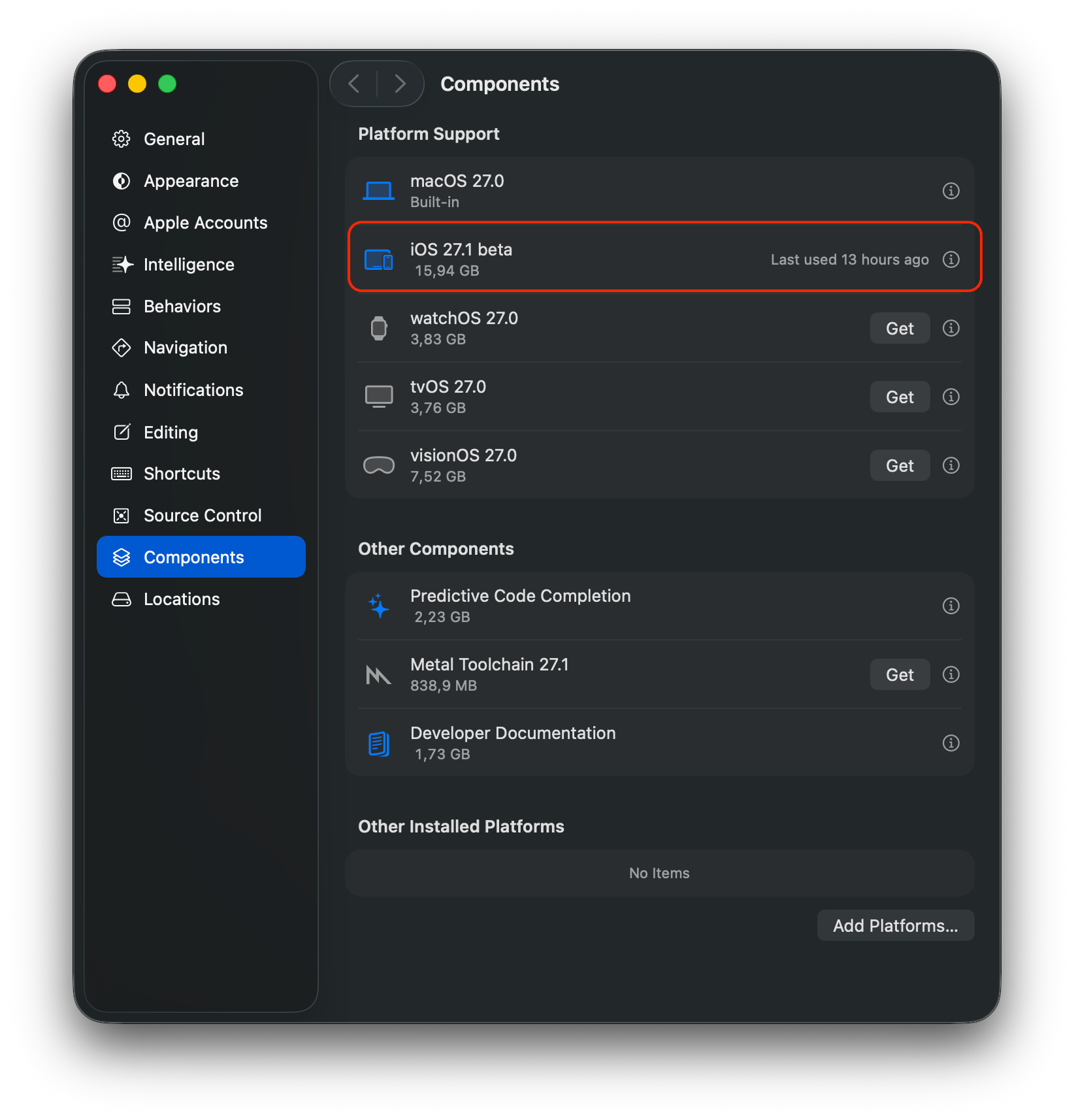
Open each Xcode once and download its iOS platform in **Xcode → Settings… → Components**. [Set up Xcode](/guides/setup-xcode#step-2) covers the first launch and the license prompt.

<Frame caption="Xcode 27.1 beta, Settings → Components: the iOS 27.1 beta platform is installed.">
  <img src="https://mintcdn.com/modaal/S5ZFd8qCljVug09H/images/iphone-duo-presubmission-3a-xcode-27-1-beta-components.png?fit=max&auto=format&n=S5ZFd8qCljVug09H&q=85&s=e0ad488f1e503c1698e7065ee42b8374" alt="Xcode 27.1 beta Components settings with the iOS 27.1 beta platform highlighted, 15.94 GB" style={{ width: "440px" }} width="1644" height="1714" data-path="images/iphone-duo-presubmission-3a-xcode-27-1-beta-components.png" />
</Frame>

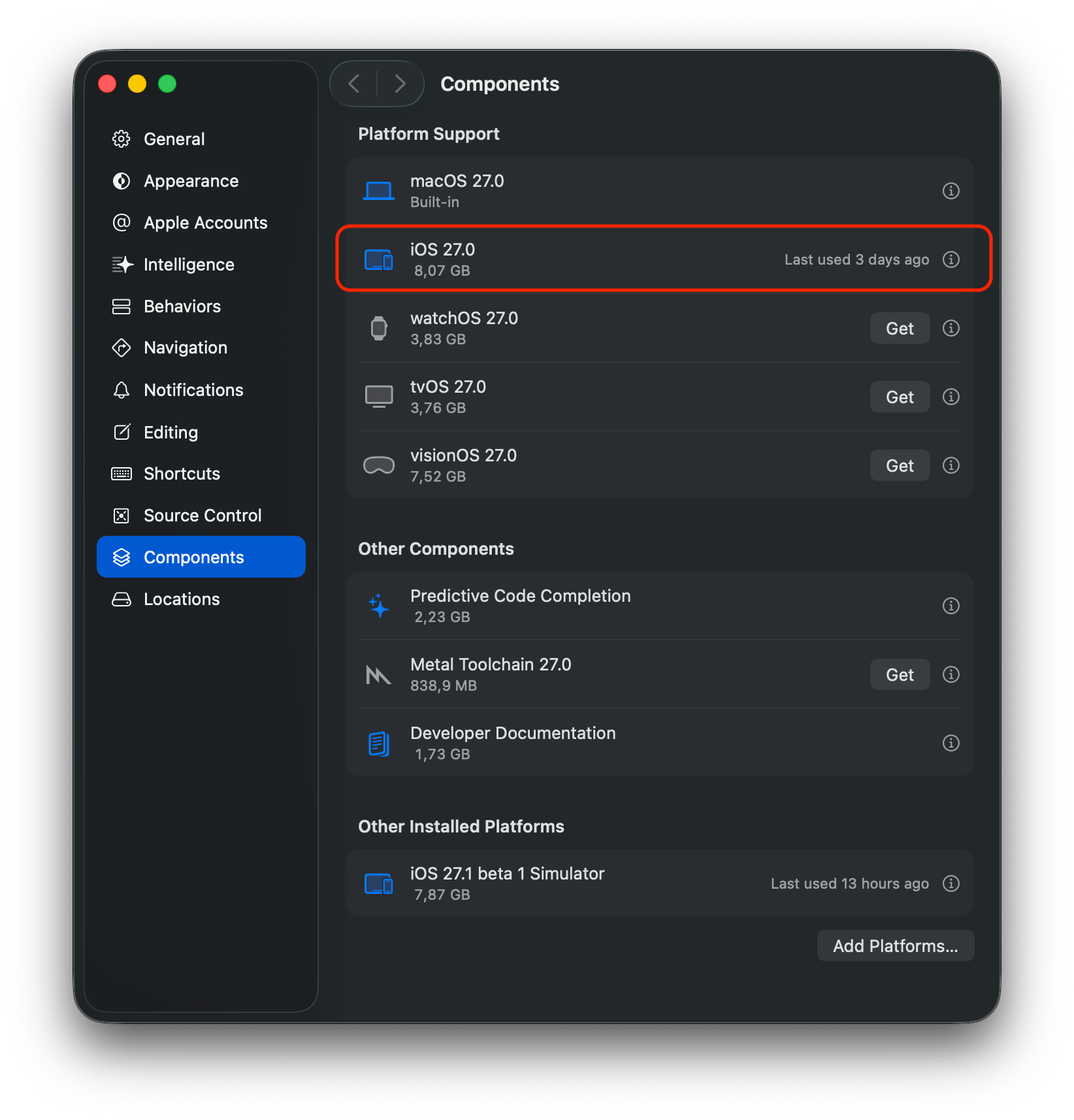
<Frame caption="Xcode 27.0, Settings → Components: iOS 27.0 is installed. The iOS 27.1 beta simulator that the other Xcode installed is listed under Other Installed Platforms.">
  <img src="https://mintcdn.com/modaal/S5ZFd8qCljVug09H/images/iphone-duo-presubmission-3b-xcode-27-0-components.png?fit=max&auto=format&n=S5ZFd8qCljVug09H&q=85&s=29145c0dcf5777f9f41a45684192dcfc" alt="Xcode 27.0 Components settings with the iOS 27.0 platform highlighted and iOS 27.1 beta 1 Simulator under Other Installed Platforms" style={{ width: "440px" }} width="1644" height="1714" data-path="images/iphone-duo-presubmission-3b-xcode-27-0-components.png" />
</Frame>

Simulator runtimes are shared between Xcode installations on the same Mac, which is why Modaal lists both the iOS 27.0 and iOS 27.1 runtimes under each Xcode in the next step.

***

<h2 id="step-2">
  Step 2 — Set Xcode 27.1 beta as active in Modaal
</h2>

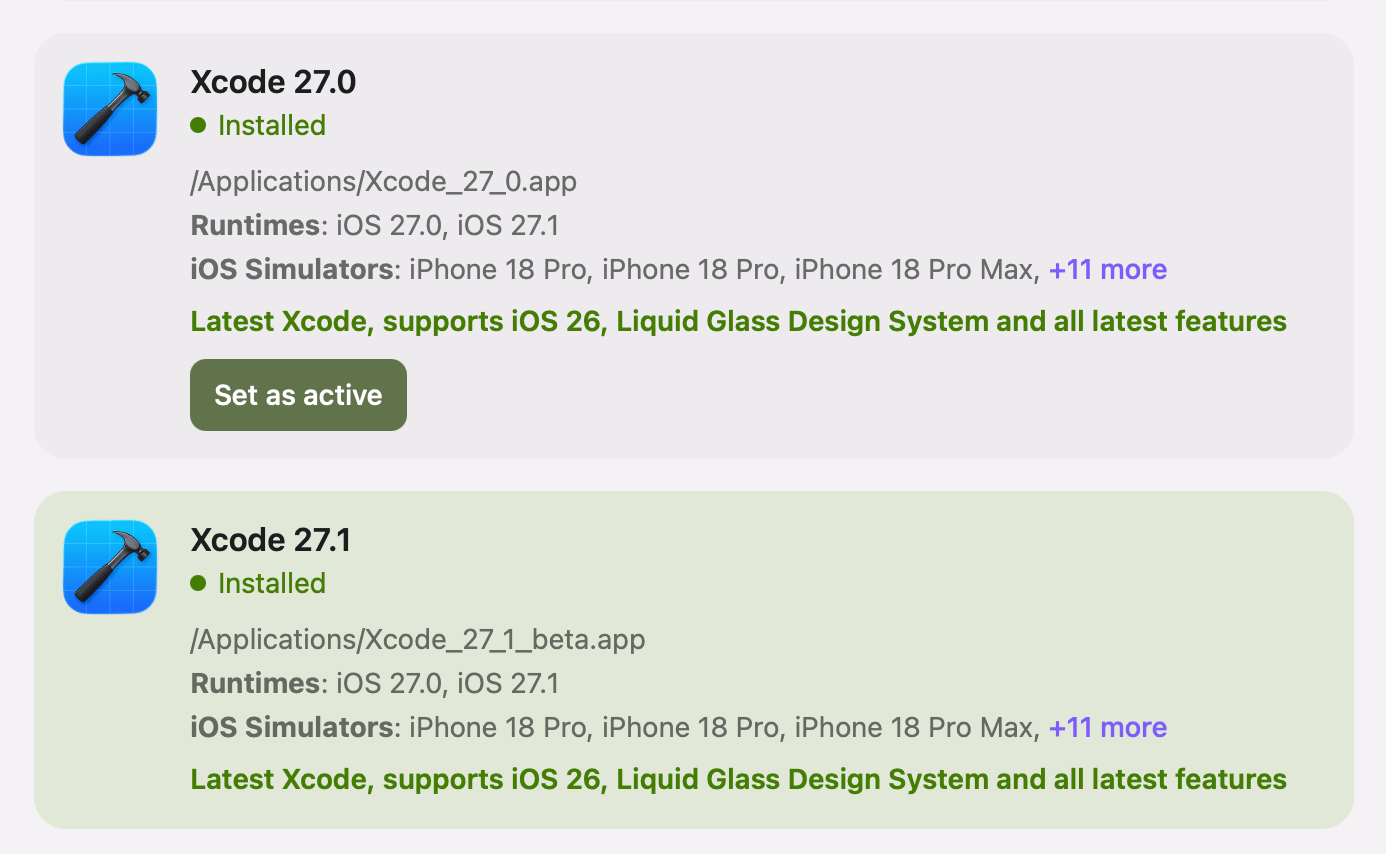
Click your profile avatar, choose **Set up Xcode**, and click **Set as active** on the installation at `/Applications/Xcode_27_1_beta.app`. Modaal builds, runs and archives with the active Xcode. [Have more than one Xcode installed?](/guides/setup-xcode#multiple-xcode) explains the switch and the administrator password it asks for.

<Frame caption="Xcode 27.1 beta is active: its card is highlighted and has no Set as active button. The panel shows the beta as “Xcode 27.1”; the path identifies which installation is which.">
  <img src="https://mintcdn.com/modaal/S5ZFd8qCljVug09H/images/iphone-duo-presubmission-4a-modaal-xcode-27-1-active.png?fit=max&auto=format&n=S5ZFd8qCljVug09H&q=85&s=85048df37e998bde91c6b77a8952ba82" alt="Modaal Set up Xcode panel with Xcode 27.1 at /Applications/Xcode_27_1_beta.app active and a Set as active button on Xcode 27.0" style={{ width: "560px" }} width="1386" height="854" data-path="images/iphone-duo-presubmission-4a-modaal-xcode-27-1-active.png" />
</Frame>

***

<h2 id="step-3">
  Step 3 — Build and test the iPhone Duo layout
</h2>

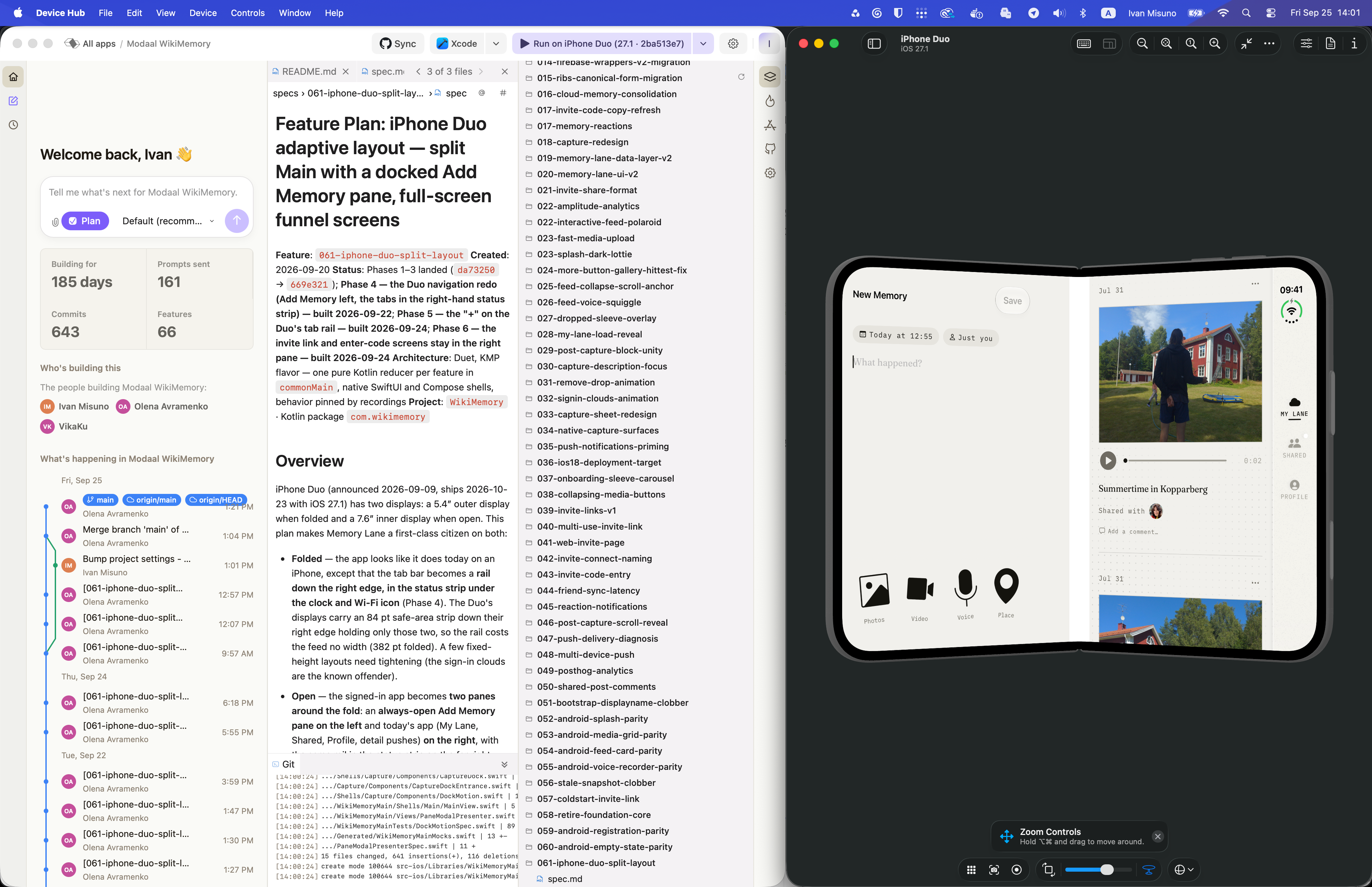
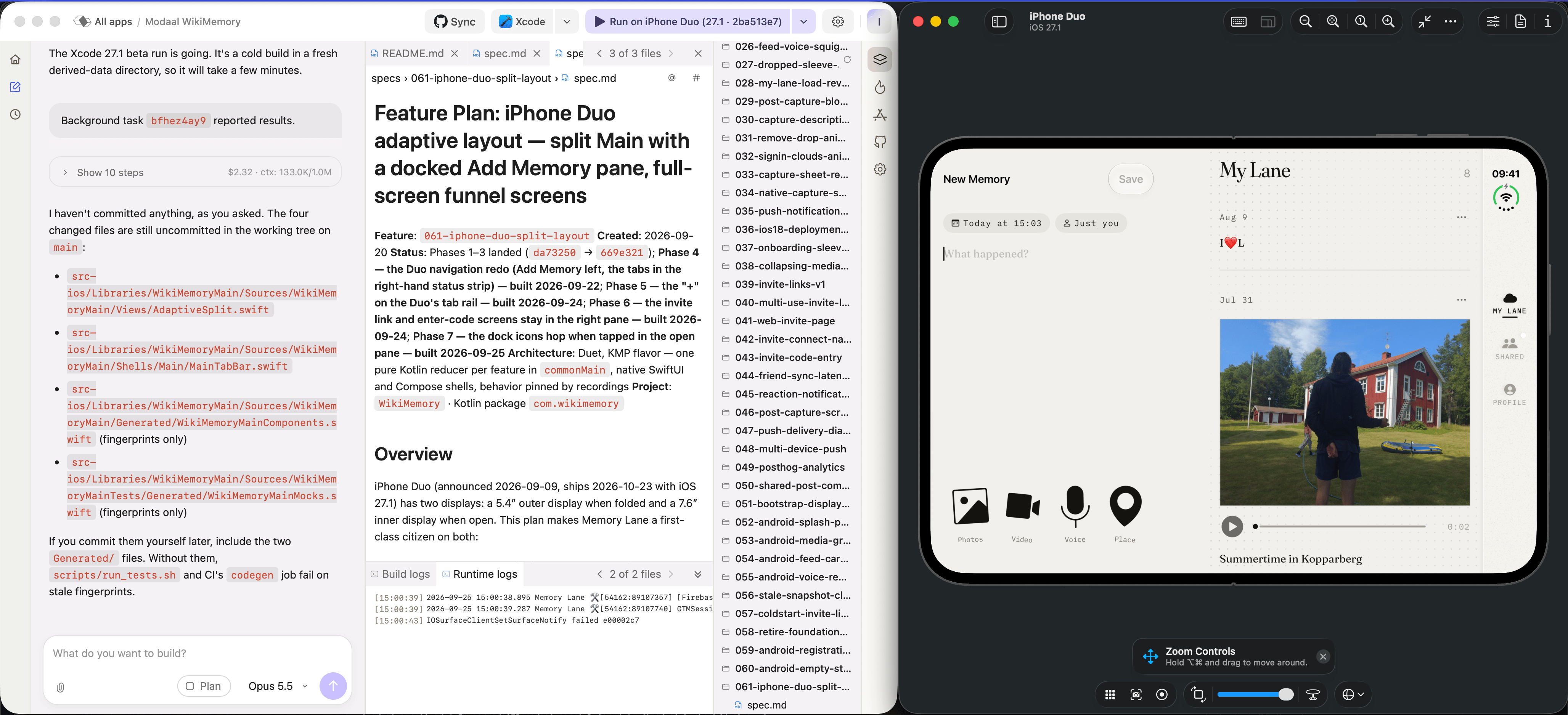
Build the iPhone Duo features with the iOS 27.1 APIs: `ArrangementView` with its `.split` and `.overlay` styles, `GeometryProxy.reservedRegions(kind:)`, and `UIView.reservedRegions(kind:options:)` in UIKit code. Choose the **iPhone Duo** simulator in the menu next to the **Run** button and test the layout there.

<Frame caption="Memory Lane built with Xcode 27.1 beta on the iPhone Duo simulator (iOS 27.1), open: the New Memory pane left of the fold, the feed on the right, the tabs in a rail down the right edge.">
  <img src="https://mintcdn.com/modaal/S5ZFd8qCljVug09H/images/iphone-duo-presubmission-5-iphone-duo-simulator.png?fit=max&auto=format&n=S5ZFd8qCljVug09H&q=85&s=caa88a70b0e1f7ed7b2e7912e49581b6" alt="Modaal running Memory Lane on the iPhone Duo simulator with a two-pane layout, next to the feature spec for the iPhone Duo split layout" width="4112" height="2658" data-path="images/iphone-duo-presubmission-5-iphone-duo-simulator.png" />
</Frame>

***

<h2 id="step-4">
  Step 4 — Set Xcode 27.0 as active and archive
</h2>

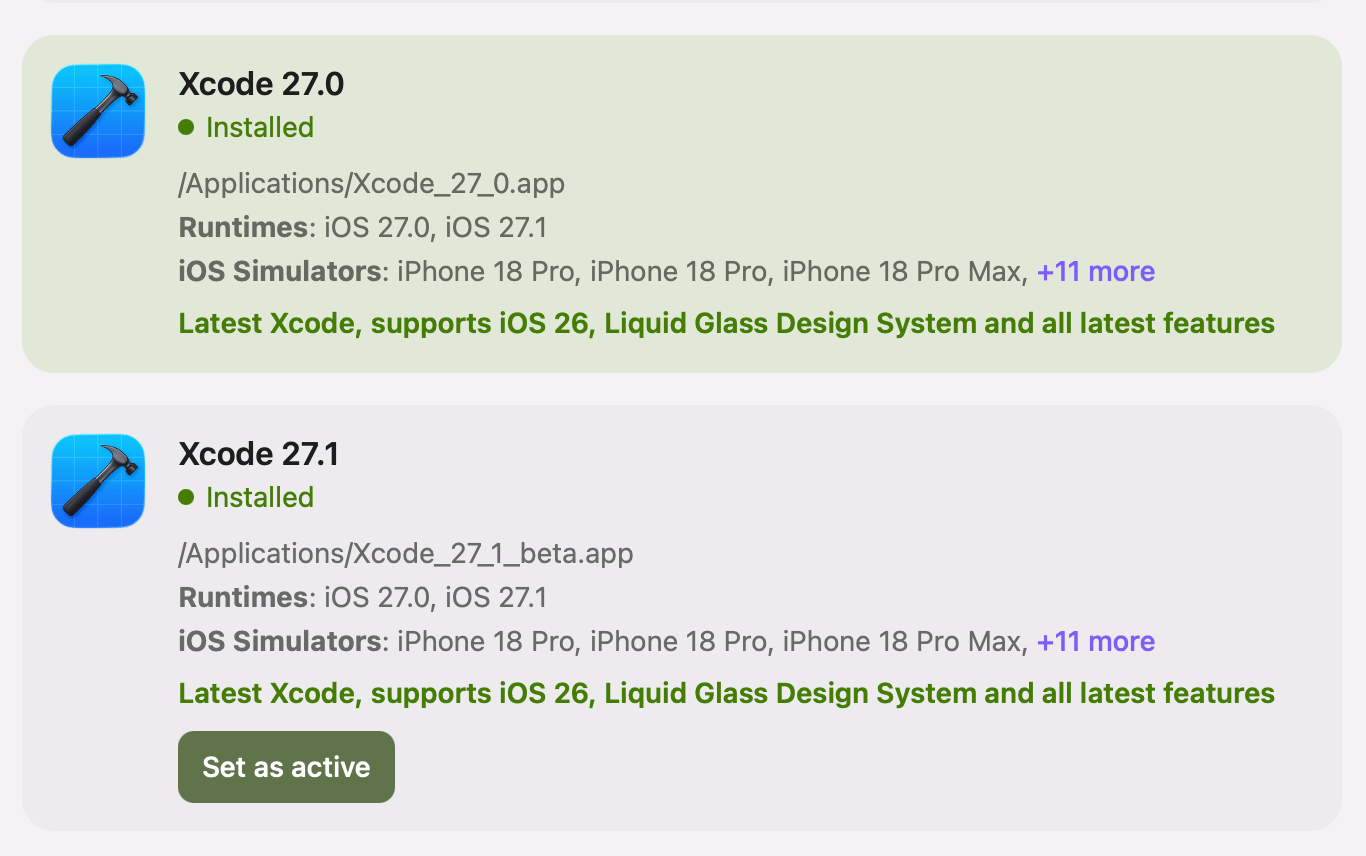
When you are ready to submit, open **Set up Xcode** again and click **Set as active** on Xcode 27.0.

<Frame caption="Xcode 27.0 is active. Archive & Upload now builds with the iOS 27.0 SDK.">
  <img src="https://mintcdn.com/modaal/S5ZFd8qCljVug09H/images/iphone-duo-presubmission-4b-modaal-xcode-27-0-active.png?fit=max&auto=format&n=S5ZFd8qCljVug09H&q=85&s=8bdd9a5c6fb0a700dce1aaef80dcc726" alt="Modaal Set up Xcode panel with Xcode 27.0 at /Applications/Xcode_27_0.app active and a Set as active button on Xcode 27.1" style={{ width: "560px" }} width="1366" height="856" data-path="images/iphone-duo-presubmission-4b-modaal-xcode-27-0-active.png" />
</Frame>

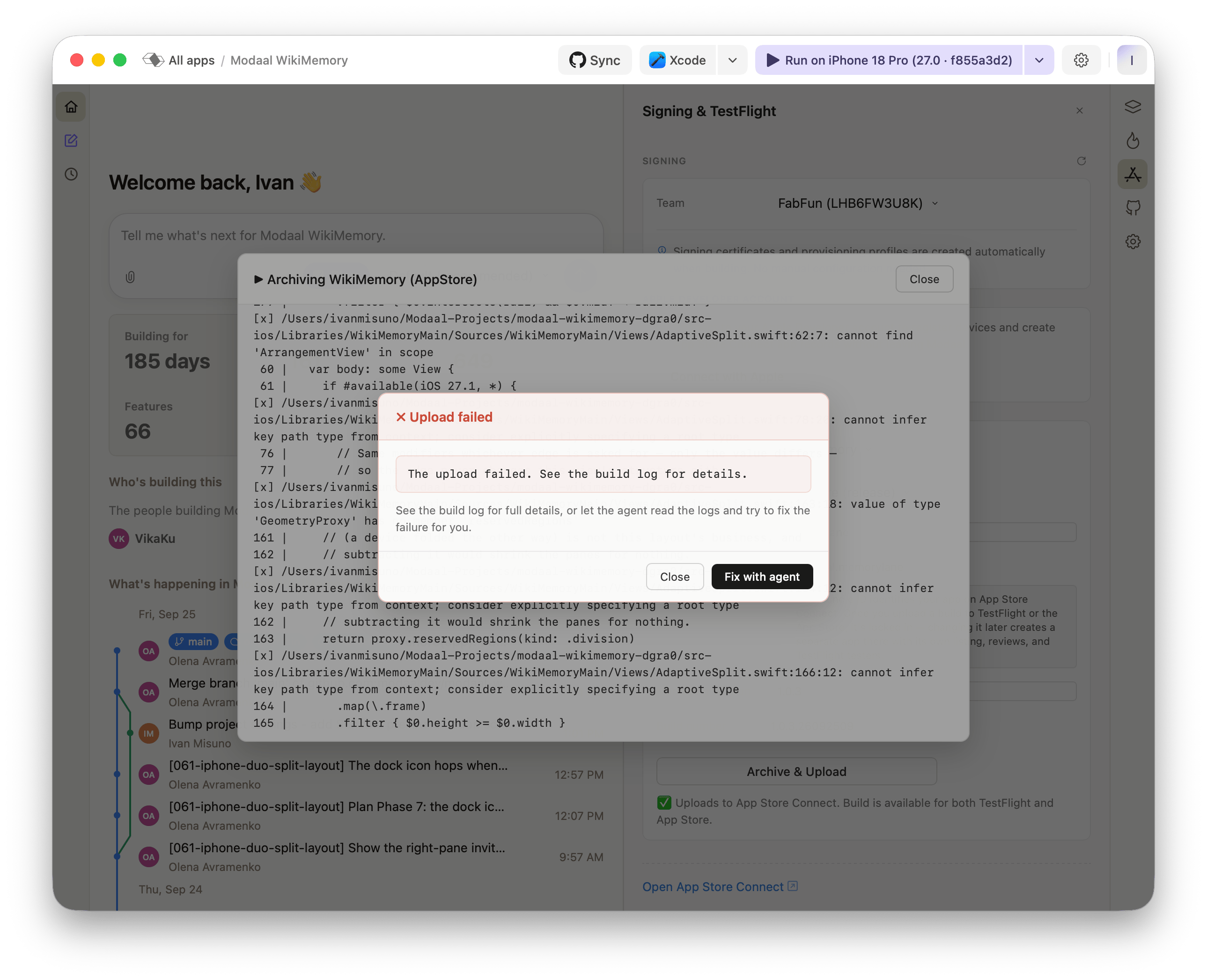
Open **Signing & TestFlight** and click **Archive & Upload**. The first archive fails:

<Frame caption="Archive & Upload with Xcode 27.0. AdaptiveSplit.swift uses ArrangementView and reservedRegions, which the iOS 27.0 SDK does not declare, so compilation stops and nothing is uploaded.">
  <img src="https://mintcdn.com/modaal/S5ZFd8qCljVug09H/images/iphone-duo-presubmission-6a-archive-upload-failed.png?fit=max&auto=format&n=S5ZFd8qCljVug09H&q=85&s=2259628fb29ff31b4ee8701637a57862" alt="Modaal Upload failed dialog over the archive log, showing compile errors in AdaptiveSplit.swift" width="2578" height="2094" data-path="images/iphone-duo-presubmission-6a-archive-upload-failed.png" />
</Frame>

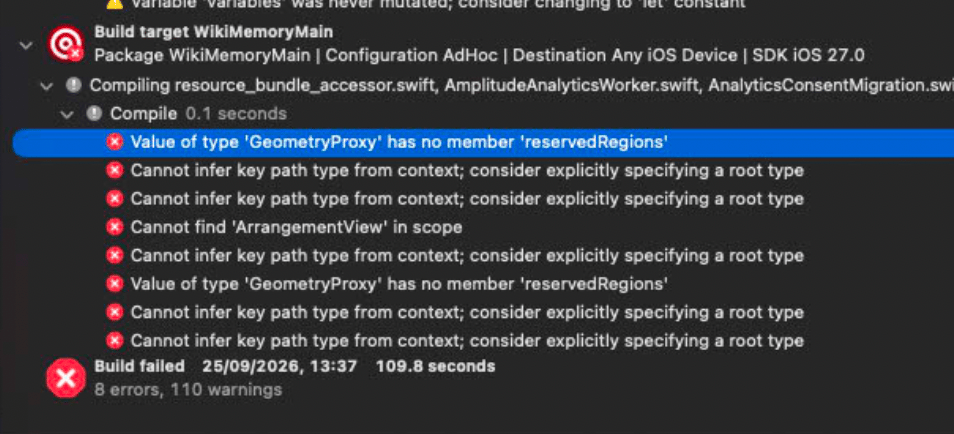
Building the same project in Xcode 27.0 directly gives the same errors, so the cause is the SDK and not the way Modaal archives:

<Frame caption="The same project built in Xcode 27.0 against SDK iOS 27.0: 8 errors.">
  <img src="https://mintcdn.com/modaal/S5ZFd8qCljVug09H/images/iphone-duo-presubmission-6b-xcode-27-0-build-errors.png?fit=max&auto=format&n=S5ZFd8qCljVug09H&q=85&s=27a68927e7cefc97dd8b62c01169fd43" alt="Xcode build log for target WikiMemoryMain with SDK iOS 27.0, showing 8 errors" style={{ width: "560px" }} width="954" height="434" data-path="images/iphone-duo-presubmission-6b-xcode-27-0-build-errors.png" />
</Frame>

The errors are of three kinds:

* `Value of type 'GeometryProxy' has no member 'reservedRegions'`
* `Cannot find 'ArrangementView' in scope`
* `Cannot infer key path type from context; consider explicitly specifying a root type`, on the `.map(\.frame)` line after each `reservedRegions` call. It is caused by the first error, and the same fix removes it.

Every error is in code that uses an iOS 27.1 API. The failure dialog's **Fix with agent** button sends the build log to the agent. A request to fix the build errors without further instructions can be met by deleting the iPhone Duo code. Use the prompt in step 5 instead: it tells the agent to keep that code and exclude it from the Xcode 27.0 build.

***

<h2 id="step-5">
  Step 5 — Give the agent the prompt
</h2>

Paste the prompt below as-is, either into Modaal's prompt box or into any coding agent session opened at the root of the project's repository. The prompt names the missing APIs, the SDK versions that tell the two Xcodes apart, the guard to put around each use, and how to verify both builds. Its last section covers Modaal and Duet projects: building with the `run_target` tool, running `scripts/run_tests.sh`, and regenerating mocks.

<div className="scroll-code">
  ````markdown Agent prompt wrap theme={null}
  # Task: make an iOS project build with the iOS 27.0 SDK (Xcode 27.0) without losing its iOS 27.1-SDK code

  ## Why the build fails
  - The code was written against the Xcode 27.1 beta (iOS 27.1 SDK). App Store submission needs Xcode 27.0 final, and its SDK doesn't declare the 27.1 APIs.
  - `if #available(iOS 27.1, *)`, `guard #available` and `@available(iOS 27.1, *)` only choose a path **at run time**. The compiler still has to find every symbol in the SDK it builds against, so these checks can't hide a missing API.
  - Typical errors (the last one is a knock-on error that the same fix removes):
    - `value of type 'GeometryProxy' has no member 'reservedRegions'`
    - `cannot find 'ArrangementView' in scope`
    - `cannot infer key path type from context` on the following `.map(\.frame)` lines
  - iOS 27.1-only APIs seen so far:
    - **SwiftUI** (declared in SwiftUICore, re-exported by SwiftUI): `ArrangementView`, `.arrangementViewStyle(_:)`, `.split` / `.overlay` (`SplitArrangementViewStyle`, `OverlayArrangementViewStyle`), `ArrangementViewStyleConfiguration`, `GeometryProxy.reservedRegions(kind:options:layoutDirectionBehavior:)`, `ReservedRegion` (`.occlusion`, `.division`, `QueryOptions.includeInactive`)
    - **UIKit**: `UIView.reservedRegions(kind:options:)`, `UIView.ReservedRegion`

  ## What can tell the two SDKs apart (verified)
  - `#if compiler(>=…)` / `#if swift(>=…)` **cannot**. Xcode 27.0 and 27.1 beta ship the identical compiler, Apple Swift 6.4 (swiftlang-6.4.0.34.1).
  - The framework module versions **do** differ. Each is the `-user-module-version` in the header of the framework's `.swiftinterface`:

    | Module | iOS 27.0 SDK | iOS 27.1 beta SDK | Guard |
    |---|---|---|---|
    | SwiftUI / SwiftUICore (same version) | 8.0.84.1.104 | 8.0.85.27 | `#if canImport(SwiftUI, _version: 8.0.85)` |
    | UIKit | 9127.0.84.1.116 | 9127.0.85.28 | `#if canImport(UIKit, _version: 9127.0.85)` |

  ## The pattern: compile-time guard outside, run-time guard inside
  ```swift
  #if canImport(SwiftUI, _version: 8.0.85)   // iOS 27.1 SDK or newer
  if #available(iOS 27.1, *) { newPath } else { fallback }
  #else
  fallback                                    // built from the 27.0 SDK
  #endif
  ```
  Keep the `#available` check. The deployment target doesn't change, and older OSes still need the fallback.

  ### How to apply it
  1. **Function returning a value**:
     ```swift
     private func divisionWidth(in proxy: GeometryProxy) -> CGFloat {
       #if canImport(SwiftUI, _version: 8.0.85)
       guard #available(iOS 27.1, *) else { return 0 }
       return proxy.reservedRegions(kind: .division).map(\.frame)
         .filter { $0.height >= $0.width }.map(\.width).max() ?? 0
       #else
       return 0
       #endif
     }
     ```
  2. **A `ViewBuilder` body choosing between a new view and a fallback**: move each branch into its own property so the fallback is written once.
     ```swift
     var body: some View {
       #if canImport(SwiftUI, _version: 8.0.85)
       if #available(iOS 27.1, *) { arrangement } else { fallback }
       #else
       fallback
       #endif
     }

     #if canImport(SwiftUI, _version: 8.0.85)
     @available(iOS 27.1, *)
     private var arrangement: some View { ArrangementView { … } secondary: { … } }
     // put helpers that only the new path uses here too, so the 27.0 build has no dead code
     #endif

     private var fallback: some View { … }
     ```
     `#if` is resolved at compile time. Unlike `if #available`, it adds no conditional content and doesn't change view identity at run time.
  3. **Types, extensions or stored properties that name new types**: wrap the whole declaration in the same `#if` and keep its `@available`.
  4. Explain the guard once, in a doc comment on the main type, and point the other sites to it (e.g. `// The 27.1 SDK guard: see AdaptiveSplit`). Always use exactly the same condition text so the guards are easy to grep and remove later.

  ### Pitfalls
  - If `canImport(M, _version:)` can't read the module's version, it **ignores the version and evaluates to true** (the compiler warns "cannot find user version number"). The 27.0 build is the test: if the guard were ignored, the same errors would come back.
  - The compiler keeps only the first 4 parts of a version (8.0.84.1.104 → 8.0.84.1). Use the newer SDK's first three parts as the threshold (`8.0.85`), not the beta's full build number, which a final release could fall below.
  - Check against the module the file imports (`SwiftUI`). SwiftUI and SwiftUICore always carry the same version.
  - **What ships:** an App Store binary built with the 27.0 SDK always takes the fallback, even on iOS 27.1 devices. Make sure the fallback is acceptable and check it on a device. It comes back automatically once you archive with Xcode 27.1.
  - The compiler stops at the first module that fails, so the log may not list every problem. Search the **whole** tree (all packages, extensions/widgets, test targets) for the symbols and for `#available(iOS 27.1`.

  ## Procedure
  1. **Collect the errors** from the failed build/archive log (`grep -n "error:" <raw log>`). List the symbols and files, then search the whole source tree as above.
  2. **Find the installed Xcodes:** `ls /Applications | grep -i xcode`; `xcode-select -p`.
  3. **Find which module declares each missing symbol** in the newer SDK:
     ```sh
     NEW=/Applications/Xcode_27_1_beta.app/Contents/Developer/Platforms/iPhoneSimulator.platform/Developer/SDKs/iPhoneSimulator.sdk
     grep -lE "ArrangementView|reservedRegions" \
       $NEW/System/Library/Frameworks/*/Modules/*.swiftmodule/arm64-apple-ios-simulator.swiftinterface
     ```
  4. **Compare the compilers and module versions** of both Xcodes:
     ```sh
     for x in Xcode_27_0 Xcode_27_1_beta; do
       D=/Applications/$x.app/Contents/Developer
       $D/Toolchains/XcodeDefault.xctoolchain/usr/bin/swift --version 2>&1 | head -1
       F=$D/Platforms/iPhoneSimulator.platform/Developer/SDKs/iPhoneSimulator.sdk/System/Library/Frameworks
       for m in SwiftUI SwiftUICore UIKit; do
         echo "$x $m $(grep -m1 -o 'user-module-version [0-9.]*' $F/$m.framework/Modules/$m.swiftmodule/arm64-apple-ios-simulator.swiftinterface)"
       done
     done
     ```
     Different compiler versions: `#if compiler(>=…)` also works. Same compiler: use `canImport(_version:)` with the newer SDK's first three version parts.
  5. **Apply the guards** at every site.
  6. **Verify with both SDKs:**
     - Build and run the tests with **Xcode 27.0**. This must succeed.
     - Build and run the tests with **Xcode 27.1 beta**, without changing `xcode-select`: set `DEVELOPER_DIR=/Applications/Xcode_27_1_beta.app/Contents/Developer` and use a **separate** derived-data directory.
     - Confirm that each build compiled the path you expect: the 27.1 build's object files must reference the new API, the 27.0 build's must not.
       ```sh
       nm -u <DerivedData>/Build/Intermediates.noindex/<Pkg>.build/Debug-iphonesimulator/<Target>.build/Objects-normal/arm64/<File>.o | grep -c ArrangementView
       ```
     - Delete the temporary derived data afterwards.
  7. **Commit.** In the message, say which build takes which path. Once the app ships from the 27.1 SDK, delete the guards (grep for the condition).

  ## If the repo is a Modaal / Duet project
  - Build with the `run_target` MCP tool. It uses the Xcode currently selected (`xcode-select` / Modaal's Xcode settings). Never call `xcodebuild` or `xcodegen` directly.
  - Run tests with `scripts/run_tests.sh`. It respects `DEVELOPER_DIR` and `DERIVED_DATA_PATH`, so this compiles the 27.1 branch without touching the selected Xcode:
    `DEVELOPER_DIR=/Applications/Xcode_27_1_beta.app/Contents/Developer DERIVED_DATA_PATH=/tmp/dd-27-1 scripts/run_tests.sh`
  - The mock generator fingerprints every source file it scans. After editing any Swift file, `run_tests.sh` fails with `content differs from the recorded hash`. Run `scripts/generate-mocks.sh` and commit the `Generated/` files; the diff should be fingerprints only. Never hand-edit `Generated/`.
  - Files under `src-ios/Libraries/<App>Main` are app-tree code, not covered by the parity gates (`tools/duet scope <path>` confirms). They need the test suite and a build, not `tools/duet verify`.
  - Run the repo's commit-confirmation step before committing.
  ````
</div>

[What the prompt changes](#what-the-prompt-changes) explains the guard it adds.

***

<h2 id="step-6">
  Step 6 — Archive and upload with Xcode 27.0
</h2>

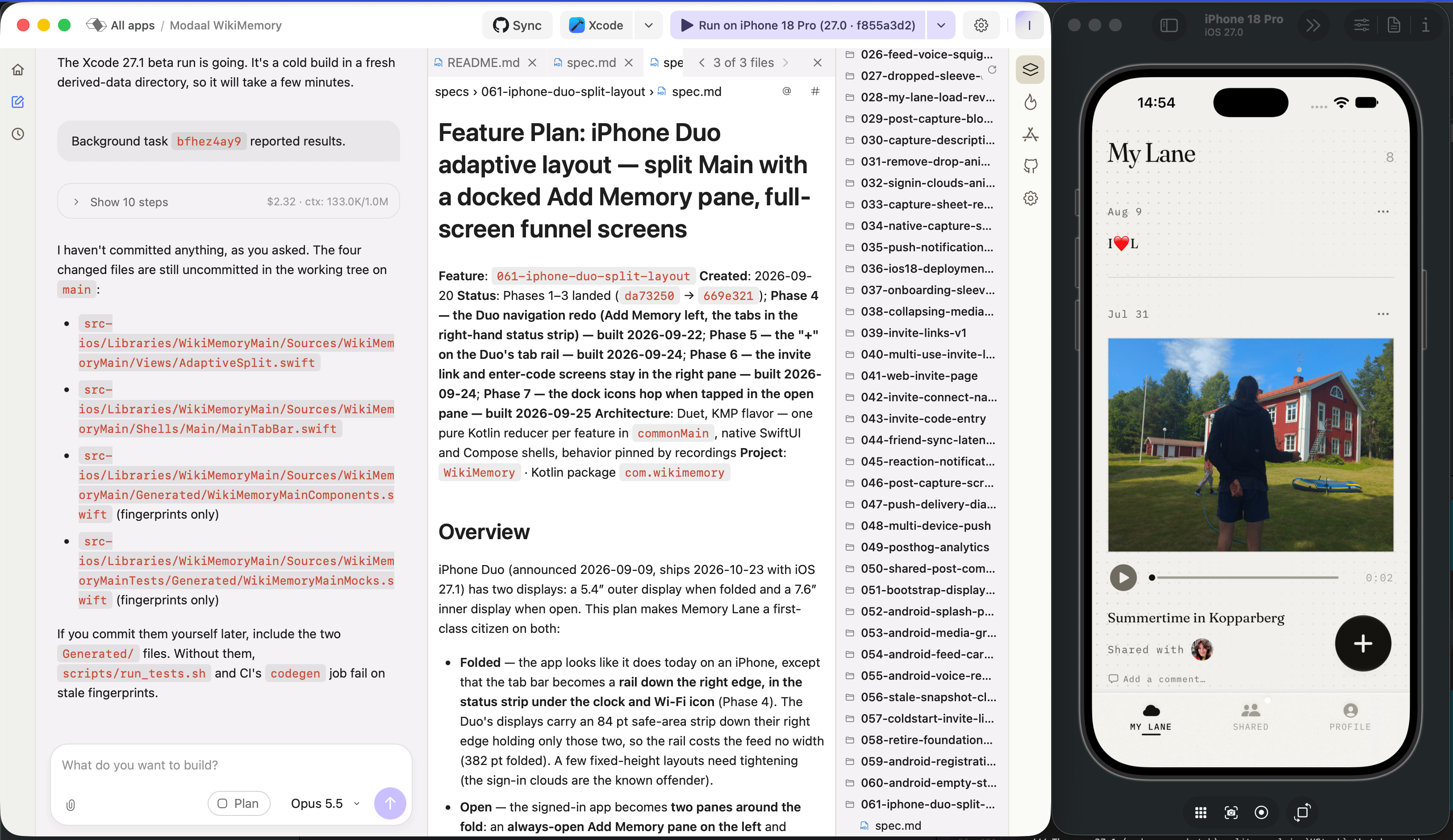
With Xcode 27.0 still active, run the app on an iOS 27.0 simulator. It shows the layout the app had before iPhone Duo support.

<Frame caption="After the agent's change, built with Xcode 27.0 and running on iPhone 18 Pro (iOS 27.0): one pane and the tab bar at the bottom. The agent lists the four files it changed; two of them are generated files whose only change is their fingerprints.">
  <img src="https://mintcdn.com/modaal/S5ZFd8qCljVug09H/images/iphone-duo-presubmission-7a-xcode-27-0-build-fixed.png?fit=max&auto=format&n=S5ZFd8qCljVug09H&q=85&s=8f3b7a540b8d89cab3f880ae9af3337e" alt="Modaal chat listing four changed files next to Memory Lane running on the iPhone 18 Pro simulator with iOS 27.0" width="3254" height="1882" data-path="images/iphone-duo-presubmission-7a-xcode-27-0-build-fixed.png" />
</Frame>

Review the diff and commit it. In a Duet project, include the files under `Generated/`: without their updated fingerprints, `scripts/run_tests.sh` and the CI `codegen` job fail. Then click **Archive & Upload** again.
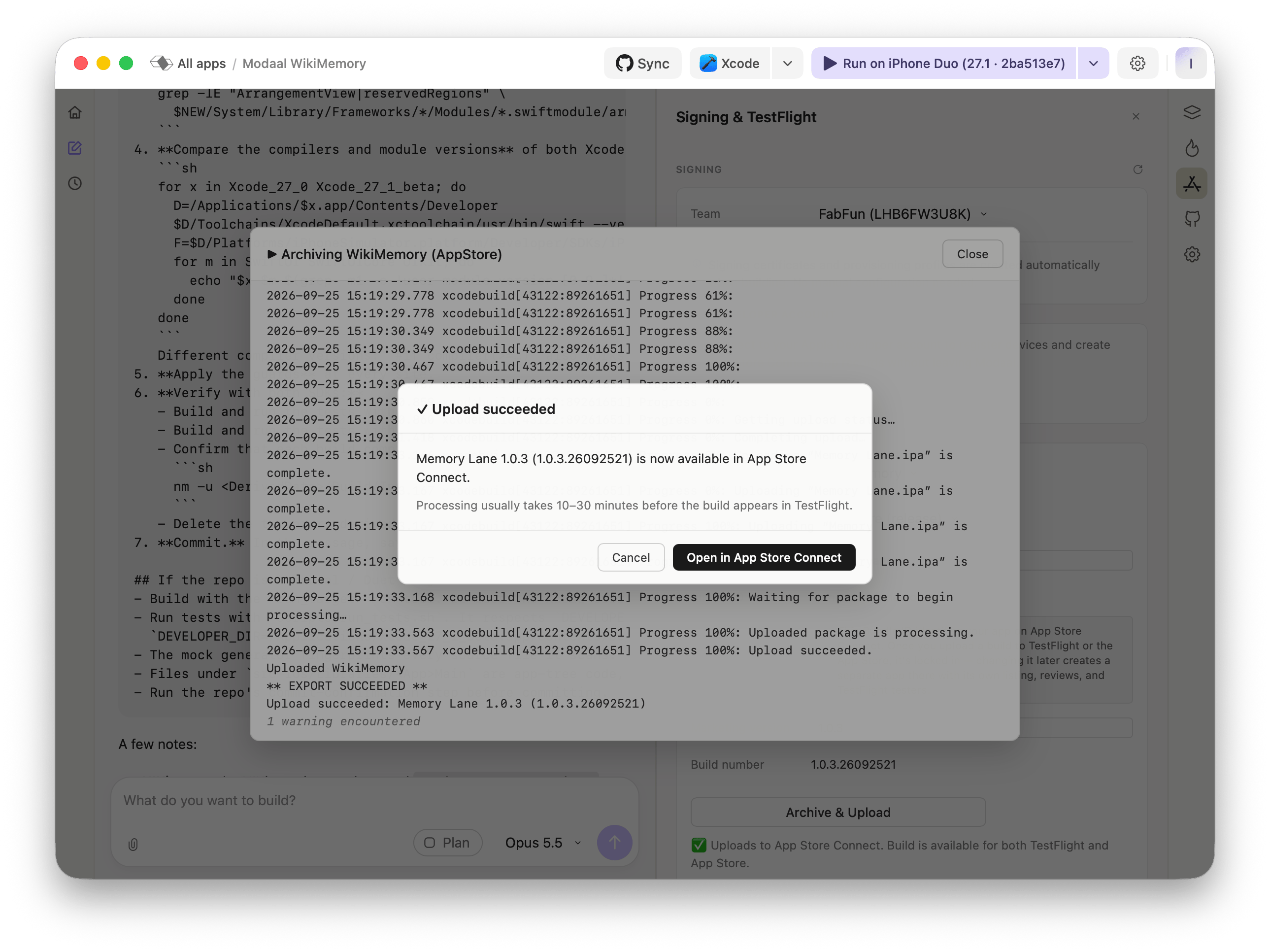
<Frame caption="Archive & Upload with Xcode 27.0 succeeds: Memory Lane 1.0.3 (1.0.3.26092521) is in App Store Connect. Processing usually takes 10–30 minutes before the build appears in TestFlight.">
  <img src="https://mintcdn.com/modaal/S5ZFd8qCljVug09H/images/iphone-duo-presubmission-7b-upload-succeeded.png?fit=max&auto=format&n=S5ZFd8qCljVug09H&q=85&s=ed047539dfafc2810cfa38f55509a941" alt="Modaal Upload succeeded dialog for Memory Lane 1.0.3 over the archive log" width="2578" height="1932" data-path="images/iphone-duo-presubmission-7b-upload-succeeded.png" />
</Frame>

In App Store Connect, add the build to a new version and submit it for review. Select **Manually release this version** if the approved version should wait until you release it.
<Warning>
  This build contains only the fallback code path. It shows the layout from before iPhone Duo support on every device, including an iPhone Duo running iOS 27.1. Check that layout on a physical device before you release the build.
</Warning>

***

<h2 id="step-7">
  Step 7 — Check that Xcode 27.1 beta still builds the iPhone Duo layout
</h2>

Set Xcode 27.1 beta as active again and run the app on the iPhone Duo simulator. Without any source change, the build compiles the iOS 27.1 code path.

<Frame caption="The same source built with Xcode 27.1 beta on the iPhone Duo simulator: the two-pane layout from step 3.">
  <img src="https://mintcdn.com/modaal/S5ZFd8qCljVug09H/images/iphone-duo-presubmission-8-xcode-27-1-beta-iphone-duo.png?fit=max&auto=format&n=S5ZFd8qCljVug09H&q=85&s=8e1d6c9e34cf19037a1ad4c454686bee" alt="Memory Lane on the iPhone Duo simulator with iOS 27.1, showing the New Memory pane and the feed side by side" width="4112" height="1876" data-path="images/iphone-duo-presubmission-8-xcode-27-1-beta-iphone-duo.png" />
</Frame>

The prompt already has the agent check both paths without changing the active Xcode: it builds a second time with `DEVELOPER_DIR` set to Xcode 27.1 beta and a separate derived-data directory, then uses `nm -u` on the object files to confirm that only the Xcode 27.1 build references `ArrangementView`.

***

<h2 id="what-the-prompt-changes">
  What the prompt changes
</h2>

The guard has to be decided at compile time, and the compiler version cannot decide it: Xcode 27.0 and Xcode 27.1 beta ship the same compiler, Apple Swift 6.4 (swiftlang-6.4.0.34.1), so `#if compiler(>=…)` and `#if swift(>=…)` evaluate the same in both. The SDK frameworks differ. Each framework's `.swiftinterface` file records a module version, and `#if canImport(Module, _version:)` compares against it:

| Module                  | iOS 27.0 SDK    | iOS 27.1 beta SDK | Guard                                       |
| ----------------------- | --------------- | ----------------- | ------------------------------------------- |
| SwiftUI and SwiftUICore | 8.0.84.1.104    | 8.0.85.27         | `#if canImport(SwiftUI, _version: 8.0.85)`  |
| UIKit                   | 9127.0.84.1.116 | 9127.0.85.28      | `#if canImport(UIKit, _version: 9127.0.85)` |

The agent wraps every use of an iOS 27.1 API in the compile-time guard and keeps the `#available` check inside it:

```swift theme={null}
#if canImport(SwiftUI, _version: 8.0.85)   // iOS 27.1 SDK or newer
if #available(iOS 27.1, *) { newPath } else { fallback }
#else
fallback                                    // built from the 27.0 SDK
#endif
```

`#if` decides which code is compiled. `#available` decides which code runs, and is still needed in the Xcode 27.1 build because the deployment target stays the same and devices on older iOS versions take the fallback. The threshold `8.0.85` is the first three parts of the newer SDK's version rather than the beta's full build number, so the final Xcode 27.1 release also passes it.

***

<h2 id="when-xcode-27-1-is-released">
  When Xcode 27.1 is released
</h2>

When Apple releases Xcode 27.1 as a release candidate or final version and App Store Connect accepts builds made with it for review:

1. Install it and set it as active in **Set up Xcode**.
2. Click **Archive & Upload**. The guard evaluates to true against the iOS 27.1 SDK, so this build contains the iPhone Duo code path.
3. Submit the build for review as a new version.

None of these steps changes the source. Once you no longer need to build with Xcode 27.0, remove the guards. Every guard uses the same condition text, so one search finds them all:

```bash theme={null}
grep -rnE "canImport\((SwiftUI|UIKit), _version:" .
```

***

To install and switch Xcode versions, see [Set up Xcode](/guides/setup-xcode). For how to write prompts like the one in step 5, see [Modes and prompts](/articles/modes-and-prompts).

<Note>
  **Questions about your project?** Ask in our [community on Discord](https://discord.gg/ng84Jm92tm).
</Note>