
.svg?fit=max&auto=format&n=rBROILWhBGfA_4EY&q=85&s=0185f3e9df88428c430b0b130b94d569)
What you get
Feature logic written once
Fully native interfaces
Parity is a build gate
Android is added feature by feature
How Duet compares to other cross-platform approaches
Starting a Duet project
1. Say you’re building a production app
The Modaal home screen opens with one sentence above the composer: I’m building akind for platform. Production app is the kind that creates a Duet project, and the platform word picks the flavor:
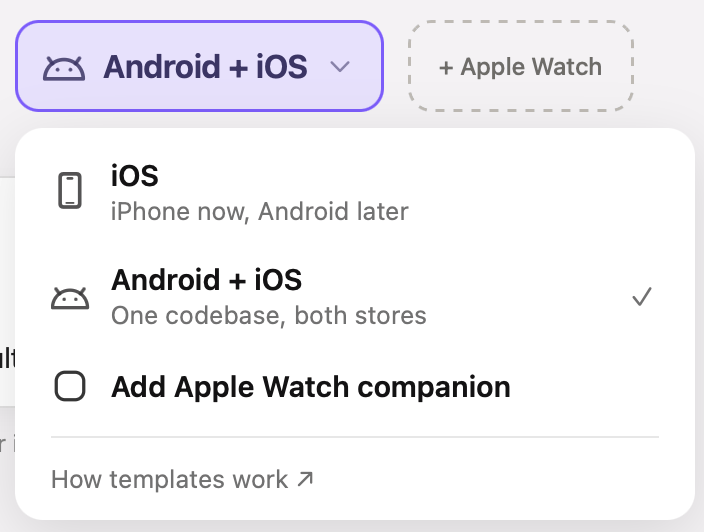
Word 2 of the sentence — the platform menu on a Production app. Each row names a Duet flavor.
2. Describe what you’re building
Type your idea into the composer and press Start new project. You can attach a PRD, screenshots, a design doc, or a Figma link. Nothing is written to disk until you press the button — no project, no folder, no git repository. There is no second step either: the app’s name, its identifiers and its device families are all derived from your description.3. Modaal creates the project
The project is created
The Duet template is scaffolded
Your original prompt is sent as the first message
4. Check the bundle identifier before you ship
The bundle identifier is derived as<organization identifier>.<product name without spaces> — the organization identifier being the reverse-DNS prefix your last project used, or one suggested from your account. It is what App Store Connect, TestFlight and Firebase register.
5. The first turn: PRD and first feature spec
The sentence has already fixed the structure, so the agent’s first turn starts at product scope. It reads your description and attachments, writes a structuredPRD.md at the project root, then plans a workable first iteration into specs/001-<feature>/spec.md.
It never asks which architecture to use — the template and the per-target architecture are recorded in .modaal/project.json and read on every turn.
When the plan looks right, turn Plan off and say “let’s build this”. See Modes and prompts for how the Plan toggle works from there.
The two Duet templates
Both platform words scaffold the same architecture, the same authoring loop and the same gates. They differ in how many app targets exist on day one, and in which language holds the feature logic.Production app for Android + iOS: the Kotlin Multiplatform flavor
Template id:duet-kmp · Emits: an iPhone app and an Android app · Feature logic: Kotlin commonMain
Feature logic is one Kotlin module per feature under src-kmp/. The Android app consumes it directly. The iPhone app consumes the same compiled logic through a Kotlin/Native framework — there is no second implementation of a reducer to keep in step, and no hand-written Swift copy of any Kotlin rule.
The iPhone app links the Kotlin/Native runtime, including its garbage collector, and Swift reaches the core through SKIE’s generated Swift layer; Kotlin/Native GC and Swift ARC explains who frees what.
Production app for iOS: the Swift flavor
Template id:duet-swift-ios · Emits: one iPhone app · Feature logic: Swift packages
Feature logic is one pair of Swift packages per feature under src-ios/Subtrees/<Name>/ — the gated half holding the reducer, its types and its scenario tests, and the app-facing half holding the builder and the SwiftUI shell. Pure SwiftPM: no Gradle, no Kotlin, no Android SDK needed to build or ship it.
parity/feature-specs/<name>.md is the porting source of truth. Both are in place from the first feature, before there is an Android app to port to.
Pick it when Android is a “probably, later”, when you want the smallest tree that still converges, or when you want the iPhone app in users’ hands before taking on a second toolchain. What it needs: Xcode only.
Choosing between them
Adding Android to an iPhone-only project
The route available today moves the Swift flavor onto the Kotlin Multiplatform flavor. Android arrives as a per-feature, fixture-gated migration into the same repository, not a second tree kept in step by hand.The Kotlin core and the Android app shell are added to the repo
Features cross one at a time
The manifest records how far you are
parity/manifest.yaml declares the ported side per feature, so a half-migrated repository is an ordinary, shippable state. You can stop between any two features and keep the work finished so far.How a feature gets built
This is the loop the agent runs for every behavior change, in either flavor, and the one you run yourself if you work in the repo directly:Write the feature spec
parity/feature-specs/<name>.md: the states, the transitions, and a row per ending the feature can reach.Write the scenario
Given / When / Then — a branch per ending. This is the executable form of the spec.Record the fixtures
tools/duet record --feature <name> compiles the scenario into fixture files. Fixtures are build products: they are never edited by hand, and where a fixture and the prose disagree, the fixture is authoritative.Implement the reducer
Wire the shells
Verify
tools/duet verify — the same gate CI runs. It replays every fixture on every platform and compares byte-for-byte.parity/authoring.md, so you can run them yourself at any time.What Duet requires of you
Stated plainly, so nothing is a surprise later:- Views are written twice. Two screen implementations per feature, one per toolkit. The logic, the navigation decisions, the effect handling and the test corpus are written once.
- The architecture is fixed at creation. Duet projects stay Duet projects. Modaal has no command that converts a target from one architecture to another; the migrations that exist run into Duet, feature by feature.
- No game template. No Duet template scaffolds a SpriteKit scene host. A game starts from 2D game, which is CombineRIBs.
- Building both platforms is a Pro feature. Free builds one platform of your choice. See Plans & pricing.
- You still need a Mac. Modaal builds and runs through Xcode, so macOS with Xcode 26 or newer is required for the iOS half. See Set up Xcode.
- Duet is pre-release. The framework, both flavors and the toolchain have landed and the contracts are versioned alongside the code, but no artifacts are published yet. Treat the API surface as a preview.
Common questions
Is this Kotlin Multiplatform?
Is this Kotlin Multiplatform?
commonMain, and the iPhone app consumes it through a Kotlin/Native framework. What Duet adds on top is the part KMP leaves to you — the feature shape, the recorded fixtures, and the CI gate that compares the two platforms’ behavior. Production app for iOS is pure Swift with no Kotlin or Gradle in the tree.How does Duet handle lifecycle differences between SwiftUI and Compose?
How does Duet handle lifecycle differences between SwiftUI and Compose?
- Stores live outside the view tree. On Android the app’s single Activity keeps the root of the store tree in a retained object,
RetainedRoot, held by Essenty’sInstanceKeeper. A rotation recreates the Activity and the composition, andgetOrCreatereturns the same root with every store still running. Finishing the Activity is the only teardown. On iOS the scene delegate holds the root and tears it down insceneDidDisconnect. - Views report what happened, and reducers decide. A composable or a SwiftUI view sends actions such as
Appeared. Compose re-runs its effects after a rotation, and SwiftUI callsonAppearagain when a tab is shown again, so a reducer that receivesAppearedignores a repeat. That guard is part of the recorded behavior both platforms replay. - Navigation is state, so restoring it means restoring data. Before the process can be killed, each app saves the route spine: every level’s route value, encoded by one Kotlin function. Android writes it in
onSaveInstanceStateand iOS in the scene’sstateRestorationActivity. On relaunch the tree is rebuilt with the spine as each store’s initial state. Back presses, sheet dismissals and deep links also enter the shared logic as actions.
RootFlowTest on the JVM and RootCompositionSpec in Swift each build the tree, tear it down, and rebuild it from a saved spine. Tutorial 2 writes the retained root, Tutorial 5 adds the route spine and back handling on Android, and Inside a Duet Android app walks through the Activity of a shipped app.Does a parent reducer know its children's state?
Does a parent reducer know its children's state?
ChildSlot builds the child the parent’s state names and tears down the previous one, and composables render whichever child is mounted:- Up: a child’s delegate event, received by the parent as one of its actions.
- Down, once: a seed value passed to the child’s Builder when the child is mounted, such as the display name above.
- Down, while mounted: a slice. The parent publishes one value from its state, and the child receives each change as an action of its own. The child reads the value and never writes it back.
- Between siblings: lateral state, a worker owned by the siblings’ nearest common parent.
Can I ship an App Store app from the Swift flavor?
Can I ship an App Store app from the Swift flavor?
What happens when one platform can't do what the other does?
What happens when one platform can't do what the other does?
parity/manifest.yaml records the divergence. Apple sign-in has no Android counterpart: the Android environment maps that path to a failure the reducer already handles, and the Android UI has no Apple sign-in button. The shared half needs no contract change, because it never assumed the button was there.Can I open the project in Xcode and Android Studio?
Can I open the project in Xcode and Android Studio?
Can I add Android to a project that isn't on a Duet template?
Can I add Android to a project that isn't on a Duet template?