
.svg?fit=max&auto=format&n=rBROILWhBGfA_4EY&q=85&s=0185f3e9df88428c430b0b130b94d569)
commonMain, the Android app module holds only what is platform work by nature — the entry activity, the screens, the I/O workers — and recorded fixtures pin what the logic does. Duet, Modaal’s cross-platform parity framework for native iOS and Android apps, scaffolds this shape as one repository holding two native apps: the Android app this page walks, and an iOS twin that consumes the identical compiled core. Each section below names the iOS counterpart of the part it describes. This page walks the tree the way How Android apps work walks a standard Android project — read that page first if manifests, activities and Gradle modules are new vocabulary.
The worked example throughout is Memory Lane, a shared-memories app whose production iOS app was joined by a full Android twin built on Duet — the same codebase Handling platform-specific UI quotes. Memory Lane is live on the App Store; every file name and count below comes from that repository.
What does the tree look like?
One repository holds both apps and the contract between them. The Android-relevant parts of Memory Lane’s tree:src-kmp/ is an ordinary Gradle build you can open in Android Studio. The one module with no Android role is apple-umbrella, which packages the same feature modules as a Kotlin/Native framework for the iPhone app.
Where does feature logic live?
Each feature is one Gradle module undersubtrees/, compiled to commonMain — Kotlin with no Android or iOS imports. A feature is three declarations and a function: a serializable state, the actions that can change it, the effects it may request, and a pure reducer. Memory Lane’s smallest feature, the notification soft-ask, in skeleton (the full file is 103 lines):
PrimingFeature.kt (commonMain)
parity/fixtures/priming.*, and both the Android app’s JVM test lane and the iPhone app’s Swift lane replay those exact bytes in CI. This layer has no hand-written iOS counterpart: the same module compiles into the apple-umbrella framework, and the iPhone app calls the same reducer through it.
The app module consumes the features as ordinary project dependencies — this is the whole wiring, from Memory Lane’s app/build.gradle.kts:
app/build.gradle.kts
What is in the Android app module?
app/ holds the three kinds of code that are platform work by nature:
- The Android edge. One activity. It owns exactly what only an activity can: the splash window, intent ingress (deep links, notification taps), saved-instance
BundleI/O, and the handle to a retained component tree that survives rotation. Its iOS counterpart is the scene component in the iPhone app target — the same thin glue, owning only what the platform’s entry object must. Memory Lane’sMainActivity, trimmed to its structure:
MainActivity.kt
- Builders and shells. One builder per mounted feature (
TimelineBuilder.kt,CaptureBuilder.kt, …) constructs the feature’s store and its Compose shell — the screen that reads state and sends actions. Navigation hosts likeMainNavHost.ktbind each shared navigation kind to a Material renderer. The iOS counterparts are the SwiftUI builders and shells in the iPhone app —MainNavHost.kt’s twin isMainNavShell.swift, binding the same kinds to sheets and stacks; Handling platform-specific UI shows the two tables side by side. - Workers. Everything that touches the world — repositories over the backend, push messaging, media capture, image downscaling — implements a port the reducers name as effects (worker in the glossary). Memory Lane’s
workers/directory is Firebase clients,MediaRecordersessions and notification plumbing: ordinary Android code behind interfaces the shared core defines. The iOS twin implements the same ports in Swift — AVFoundation sessions and Apple push plumbing behind the identical interfaces.
commonMain module, where the iPhone app compiles the identical code. When Memory Lane’s sixteen Android screens were written against the already-recorded core, zero logic files changed.

Memory Lane's registration screen on an iPhone simulator and a Pixel 8 emulator. One shared reducer owns the flow on both platforms; each app composes its own screen, and only iOS offers Sign in with Apple — a platform difference the shared logic models as an ordinary outcome.
What does day one look like, before any of this grows?
The tree above is a shipped app’s grown state. On the day the scaffold runs, the same shape is already there at minimal size: one sample feature module, an app module whose root mounts that single feature (mount in the glossary), one worker file, the theming and telemetry modules, and a CI workflow that records and verifies on the first push. Growth is additive — each new feature is a newsubtrees/ module and a new builder, and the mount harness gives way to a real navigation root when the second screen arrives. The structure Memory Lane ships with is the structure the scaffold created, sixteen features later.
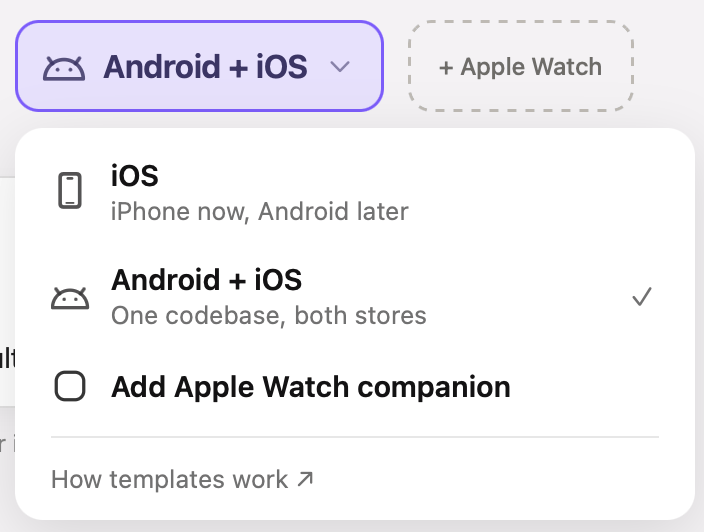
The platform word that scaffolds this tree. 'Android + iOS' emits the Kotlin Multiplatform shape on day one; 'iOS' starts Swift-only and converges on it.
What about widgets and background work?
Home-screen widgets are ordinary Android surfaces in the app module: Memory Lane ships a feed widget and a quick-capture widget that render projections of shared state — plain values a sync worker writes — rather than mounting reducers of their own. The iOS twin ships its widgets the same way, as a WidgetKit extension beside the app target. Background work follows the platform’s rules described in How Android apps work: push messages arrive through a service, deferred work goes through scheduled workers, and each of them enters the shared core the same way the UI does — by sending actions.Common questions
Is this just a Kotlin Multiplatform project I could set up myself?
Is this just a Kotlin Multiplatform project I could set up myself?
Structurally yes — it is Gradle,
commonMain modules and a Kotlin/Native framework, with nothing proprietary in the tree. What the scaffold fixes on top of raw KMP is the feature shape (state, actions, effects, one reducer per module), the recorded fixtures as the behavior contract, and the CI gate that replays them on both platforms. Those conventions are the part a from-scratch setup has to invent and enforce.Can I open it in Android Studio?
Can I open it in Android Studio?
Yes.
src-kmp/ is a standard Gradle build: Android Studio opens it, indexes it, runs the app and the JVM tests. The iPhone half opens in Xcode from the same repository.Where is the iOS app in this tree?
Where is the iOS app in this tree?
Under
src-ios/, as an ordinary Xcode project. It consumes the identical compiled feature modules through the apple-umbrella Kotlin/Native framework — there is no Swift re-implementation of any reducer in the repository. Kotlin/Native GC and Swift ARC describes how that framework’s collector and the app’s Swift code share objects.Why is there only one activity?
Why is there only one activity?
Because navigation is feature state, not activity plumbing. Which screen is showing, which sheet is up, what the back stack holds — each is a value a reducer owns, so it is recorded and replayed like any other behavior, and the activity’s job shrinks to hosting the Compose tree and persisting the route spine so a system-killed process comes back on the same screen.
Modaal scaffolds this tree for you — say you’re building a Production app for Android + iOS in the sentence on the home screen.
Sources and further reading
- Kotlin Multiplatform — the language feature the shared core builds on
- Guide to app architecture — Google’s recommendation the feature shape aligns with: unidirectional data flow, state as data
- Guide to Android app modularization — the per-feature Gradle module pattern in general form
- Save UI states — the saved-state contract the route spine rides
- The Duet framework on GitHub — both flavors, the toolchain and the versioned contracts
Read next
Inside a Duet iPhone app
The same repository’s iPhone side: the Kit package over the Kotlin framework, the Main package, theming and the app target.
How Android apps work
The standard anatomy this page builds on: the manifest, activities, Compose and the Gradle build.
How to build testable Android apps
What Duet fixes in place that a blank Android project leaves open, and what that buys in tests.
Duet overview
What Duet is, the two combinations that scaffold it, and how a feature gets built.
Duet glossary
Every term on this page — reducer, shell, worker, mount, fixture — defined with one link each.
Duet tutorials
This tree built by hand: the first Compose shell, host and Activity in Tutorial 2, the workers in Tutorial 4, the back policy and the route restore in Tutorial 5.