
.svg?fit=max&auto=format&n=rBROILWhBGfA_4EY&q=85&s=0185f3e9df88428c430b0b130b94d569)
duet CLI (0.34.0 or later) and the published Duet packages.What will you build?
The splash feature exists twice at the end. The Swift twin is Swift Tutorial 1’s package,src-ios/Subtrees/Splash/SplashFeature; this page adds one test to it, in the exercise. The Kotlin twin is src-android/subtrees/splash/logic, a kotlin.jvm module with no Apple target, written from Tutorial 1’s Kotlin files. The Swift scenario stays the one writer of the four recordings under parity/fixtures/; on the Kotlin side a golden test replays them and a second scenario checks them without writing. The four recordings at the end are byte-identical to Swift Tutorial 1’s; the one record on this page is in the last step, and git checkout undoes it.
The iOS app links Swift packages only, and the Android app compiles the Kotlin twin. Neither app contains a line of feature logic. The splash reveals the app’s name over 1.6 seconds, reports the end of the reveal to its store, and the host swaps in a placeholder that names which path completed it.
You will have at the end:
src-android/subtrees/splash/logic: the Kotlin twin, with nine passing tests: four golden replays of the Swift recordings, a scenario that checks them, and four test-clock tests.src-android/replay-runner: the Kotlin replay runner, driven beside the Swift one bytools/duet protocol-run --platform both.src-ios/Subtrees/Splash/SplashNode: the shell, the builder and the SwiftUI view over the Swift twin, with four passing shell tests on virtual time.src-ios/App: the iOS app, generated from an XcodeGen spec and built with Xcode alone.src-android/app: the Android app, with two passing host tests on the JVM.tools/duet verifyreporting eight fixture reports, four per lane, andtools/duet doctorreporting two target declarations.
Where do you start?
Opentutorial2-twins-start from the duet-tutorials repository. It is Swift Tutorial 1’s finished tree plus one failing test, the closing exercise: the splash feature in Swift in src-ios/Subtrees/Splash/SplashFeature, its Swift scenario as the writer of four recordings, a generated SplashEnvironmentMock, and the Swift replay runner in src-ios/Libraries/Replay. It has no Kotlin and no UI. It pins Duet 0.7.0, duet-tools 0.34.0 and swift-sourcery-templates 0.10.2. You need Xcode 26.6 or later, a JDK 25, XcodeGen (brew install xcodegen) and the Android SDK with platform 36; the series index lists them. Run the checks once before you edit anything:
Tutorial2ExerciseMountBracketTests.testASecondMountArmsAFreshNet, reported as failed - Tutorial 2 exercise: mount a second store and pin the fresh net; that is the exercise, and everything else is green. TUTORIAL_SKIP_STUBS=1 tools/duet verify skips the stub, which reports Test skipped - the closing exercise; unset TUTORIAL_SKIP_STUBS to run it, and ends with duet verify: PASS. The steps below run verify and record with TUTORIAL_SKIP_STUBS=1 until the exercise is done: a bare tools/duet record runs the Swift package’s tests, fails on the stub, and ends with duet record: FAIL — fixtures not (fully) regenerated.
The steps
Add the Kotlin plane
src-android/, beside src-ios/. Every Kotlin module of the tree goes in it: the splash module in this step, the replay runner in step 6 and the Android app in step 10. Copy the Gradle wrapper and its settings from Tutorial 1’s tree, tutorial1-complete/src-kmp/ in the same repository: gradlew, gradlew.bat, gradle/wrapper/, gradle/gradle-daemon-jvm.properties and gradle.properties. Copy the version catalog, gradle/libs.versions.toml, from tutorial2-complete/src-kmp/, and delete its skie and kotlin-multiplatform entries. Copy the root build file from tutorial2-complete/src-kmp/build.gradle.kts and delete its kotlin.multiplatform and skie plugin lines; it then registers kotlin.jvm, the serialization plugin, KSP, the Android application plugin and the Compose compiler plugin once each with apply false, and its subprojects block leaves out every test class named Tutorial*Exercise* when TUTORIAL_SKIP_STUBS=1 is set. Write the settings file with Tutorial 1’s pluginManagement and dependencyResolutionManagement blocks, which declare the Duet family’s Maven host, then the root name and one module:kotlin.jvm plugin where Tutorial 1’s applied kotlin.multiplatform with a JVM target and three Apple targets. It compiles for the JVM only, so its dependencies sit in the plain dependencies block, with the test libraries under testImplementation:kotlin.jvm and serialization plugins and ends with Tutorial 1’s test-task block, which declares parity/fixtures as a test input so that a changed recording re-runs the tests. Declare the Kotlin plane in the manifest, below replayRunner::kotlinCore: jvm, lint accepts a Kotlin path under src/main and refuses one that names a multiplatform source set such as commonMain. Add Gradle’s outputs to .gitignore:BUILD SUCCESSFUL; the module has no source yet. lint prints lockstep-lint: OK (1 feature(s), 4 fixture(s), ledger: 0 waiver(s) / 0 island(s), mocks: 1 generator(s)).Write the Kotlin twin
SplashFeature.kt and SplashSerializers.kt from tutorial1-complete/src-kmp/subtrees/splash/logic/src/commonMain/kotlin/dev/modaal/foyer/splash/ to src/main/kotlin/dev/modaal/foyer/splash/ in the new module. SplashFeature.kt and SplashFeature.swift declare the same things in the same order: configuration, effect ids, state, actions, delegate events, effect payloads and the reducer. Kotlin spells each case as a PascalCase class with a @SerialName that equals the Swift case name. One case uses a different word on each side: Swift names the delegate payload notifyListener, and Kotlin names the class NotifyHost and gives it the serial name notifyListener, which is the name the recordings carry:inout state and returns the effects; the Kotlin reducer returns a Reduced value that carries the new state and the effects. Both arm the safety net once, and both notify the host every time a completion path fires. Swift Tutorial 1 generated the Swift coders with tools/duet canonical-sum; the Kotlin twin registers each sum case by hand in SplashSerializers.kt, where inline = true marks NotifyHost, whose single value encodes bare like the unlabeled Swift case notifyListener(SplashDelegateEvent). Name the Kotlin twin in the manifest row, below the Swift one:swift: and kotlin: declared, lint compares the twins’ declarations: the state’s property names, and the action and effect-payload cases by wire name. A Kotlin case’s wire name is its @SerialName, so NotifyHost matches the Swift notifyListener. lint also checks that both twins sit in the same subtree layout, Subtrees/Splash/ on the Swift side and subtrees/splash/ on the Kotlin side. Run ./src-android/gradlew -p src-android :subtrees:splash:logic:compileKotlin, then tools/duet lint; Gradle ends with BUILD SUCCESSFUL, and lint prints the same lockstep-lint: OK line as in step 1.Replay the Swift recordings on the Kotlin core
parity/fixtures/ were written by the Swift scenario in Swift Tutorial 1. Kotlin’s FixtureRunner replays a recording against the pure reducer, with no store and no effect handler: it feeds each recorded action to the reducer from the recorded starting state and compares the state and effects the reducer returns with the recorded ones, in canonical bytes. The golden test is Tutorial 1’s file, unchanged; copy it to src/test/kotlin/dev/modaal/foyer/splash/ in the module:BUILD SUCCESSFUL, and the report under src-android/subtrees/splash/logic/build/reports/tests/test/ lists four tests and no failures: the Kotlin reducer reproduces every state and effect in four files that Swift wrote. verify now runs two lanes, the Swift package’s tests and the Kotlin module’s tests, expects one report per recording from each, and prints duet verify: 8/8 fixture report(s) passed before duet verify: PASS.Write the Kotlin scenario beside the Swift one
SplashScenarioTest.kt in src/test, with three changes: its doc comment, its source path under src-android/, and its last call. One branch on each side:ScenarioRunner.verifyOrRecord: it writes one fixture per branch when tools/duet record runs it, and checks the committed fixtures on every other run. The Kotlin scenario ends in ScenarioRunner.verify, which checks the committed fixtures against the Kotlin reducer and writes nothing, even when Gradle runs with -PregenFixtures=1:scenario: key still names the Swift file, so the Swift scenario stays the one writer of record. Run ./src-android/gradlew -p src-android :subtrees:splash:logic:test again; the report lists five tests and no failures. TUTORIAL_SKIP_STUBS=1 tools/duet verify still prints duet verify: 8/8 fixture report(s) passed and duet verify: PASS.Write the Kotlin runtime half
SplashEnvironment.kt and SplashRuntime.kt, in src/main. The environment is the feature’s door to the platform on both sides: a clock to wait on and a sink for the delegate event.armSafetyNet into a sleep on the environment’s clock followed by safetyNetElapsed, and notifyListener into a call on the environment. The Swift handler returns an AsyncStream, the Kotlin handler a Flow. The two factories differ in one parameter. The Swift Store runs on the main actor and owns its effect tasks. The Kotlin Store runs its effects on a CoroutineScope the caller passes in, which is how the Android host owns the store’s lifetime in step 10. Tutorial 1’s SplashRuntime.kt also declares splashStateFlow, which Tutorial 2’s Apple framework exported to the SwiftUI shell; leave it out, because no Swift code reads the Kotlin store in this tree.SplashEnvironmentMock over a TestClock. The Kotlin tests use LiveClock, which under runTest sleeps on the test scheduler’s virtual time:RecordingSplashEnvironment, Tutorial 1’s class in the test sources, which records every delegate event in notified. Copy RecordingSplashEnvironment.kt and SplashTestStoreTest.kt from Tutorial 1’s jvmTest to src/test, then run ./src-android/gradlew -p src-android :subtrees:splash:logic:test; the report lists nine tests and no failures.Add the Kotlin replay runner and run both protocol lanes
tools/duet verify checks each twin through its own test framework. The protocol lane checks both reducers through one driver. A replay runner is a small executable with one operation: it decodes a state and an action, reduces, and encodes the result. tools/duet protocol-run sends every recorded step through a runner and compares the bytes it returns with the recording. Swift Tutorial 1 added the Swift runner in src-ios/Libraries/Replay. The Kotlin runner is Tutorial 1’s replay-runner module, unchanged: copy it from tutorial1-complete/src-kmp/replay-runner/ to src-android/replay-runner/. It applies kotlin.jvm and application, depends on the kernel and the splash module, and is included in the settings file:--platform both builds and drives the Swift runner, then builds the Kotlin runner with Gradle’s :replay-runner:installDist and drives it, and fails if either side fails:Write the Swift shell and the SwiftUI view
src-ios/Subtrees/Splash/SplashNode, so the feature package keeps resolving the Duet family and nothing else. SplashNode depends on the feature package by path and on the Duet DuetShells product for ViewShell, StoreHost and StateTransitions:SplashViewShell, subclasses ViewShell; it owns a SplashViewState with one published field, isArmed, and two intents, appeared() and ceremonyFinished(), each of which sends one action. Its bind() runs at activate(). It hosts the store first, which registers the store’s teardown() with the shell’s StoreHost, and then adopts a StateTransitions observation over store.$state that projects each state into the view state. StoreHost unwinds in reverse registration order, so deactivate() stops the projection and then cancels the store’s effects. The store is Duet’s Swift Store: send reduces synchronously on the main actor and publishes the new state before it returns, so the shell observes the store itself.SplashBuilder.swift holds the live environment, a struct over LiveClock and a closure to the host, and the builder, which wires a mount from two parts:SplashView.swift, is Tutorial 2’s with the subtitle “One behavior, two cores”. It reads the shell’s view state, calls appeared() from onAppear, owns the 1.6-second reveal because the animation is presentation, and calls ceremonyFinished() from the animation’s completion. Create the empty directory Tests/SplashNodeTests/ before you build: Package.swift declares the test target, and without its directory swift build stops with error: 'splashnode': target 'SplashNodeTests' has overlapping sources. Then build the package with (cd src-ios/Subtrees/Splash/SplashNode && swift build); it ends with Build complete!.Test the shell on virtual time
mocks: section that writes SplashEnvironmentMock into SplashNodeTests:tools/duet mocks; it regenerates every row’s file and ends with one line per row:SplashViewShellSpec drives the shell with a SplashEnvironmentMock whose clock is a TestClock, so the safety net’s sleep ends only when the test advances that clock: first by 2,999 ms, then by 1 ms:appeared() projects back before it returns, that ceremonyFinished() reaches the environment with the ceremony path, and that the armed net never fires after deactivate(). Run (cd src-ios/Subtrees/Splash/SplashNode && swift test); it executes 4 tests with 0 failures. Tutorial 2’s shell tests run on real time, because no test dispatcher crosses the Kotlin/Native boundary; this store is Swift, so a TestClock stands where the builder puts the wall clock. tools/duet lint now ends its line with mocks: 2 generator(s)).Build the iOS app
SplashNode, which brings the Swift twin and the Duet packages with it. The XcodeGen spec declares the package and the dependency, with no pre-action and no build script:SplashDelegateEvent is a Swift enum, so the host matches it directly:AppScreen.swift renders the splash while the phase is .splash and the placeholder after; it is Tutorial 2’s file with SplashFeature and SplashNode imported in place of FoyerKit and SplashShell, a direct switch on SplashCompletionPath, and no Tutorial 3 line on the placeholder. SceneDelegate.swift builds the host, shows the window, activates the host after the window is visible, and calls teardown() in sceneDidDisconnect; it and AppDelegate.swift are Tutorial 2’s files apart from comments. Add DerivedData/, *.xcodeproj, *.xcuserdata/ and the generated src-ios/App/Foyer/Info.plist to .gitignore, then generate and build:** BUILD SUCCEEDED **. The build runs no Gradle task: its log has no line naming gradlew or assemble_kit. The command also needs no ARCHS=arm64; Tutorial 2 set it because its prebuilt framework has no x86_64 slice, and this app links no prebuilt binary.Build the Compose app
src-kmp/app module at src-android/app. Apart from comments, it differs in two places: the splash subtitle reads “One behavior, two cores”, and the placeholder has no Tutorial 3 line. Include it in the settings file:shells-compose artifact for StoreHost and RetainedRoot:SplashBuilder.kt is the Swift builder’s counterpart: a live environment over LiveClock, and the module’s makeSplashStore on a scope the host passes in. AppHost.kt registers the store in a StoreHost, tears it down on the first completion and switches the phase; it is Android-free, so a JVM test drives it in step 11. On Android the composable is the shell: it collects the store’s state, and its launched effect sends Appeared, plays the reveal, then sends CeremonyFinished. After a rotation the effect runs again; the reducer’s arming guard makes the second Appeared inert, and the host ignores a second completion.MainActivity keeps the host on a retained scope through RetainedRoot, so rotation hands back the same host with its running store, and finishing the Activity is the one teardown. AppRoot collects the phase and shows SplashScreen or the placeholder. Tutorial 2 walks through each file. Build with ./src-android/gradlew -p src-android :app:assembleDebug; it ends with BUILD SUCCESSFUL.Test the host on the JVM
AppHostTest.kt, in src-android/app/src/test/kotlin/dev/modaal/foyer/app/. The store runs on the test scope, so the safety net waits on virtual time. The first test drives the ceremony path and checks that the torn-down store’s net never fires; the second advances the clock past the net’s duration and lands on the safety-net placeholder:./src-android/gradlew -p src-android :app:testDebugUnitTest; it ends with BUILD SUCCESSFUL, and the report under src-android/app/build/reports/tests/testDebugUnitTest/ lists two tests.Declare the targets and run both apps from the command line
tools/duet doctor reads the tree’s declaration file and cross-checks it against what is on disk. Declare the two app targets, paired under one name. The file’s top-level template and its duet block name the template duet-twins and the flavor twins:tools/duet doctor; it ends with duet doctor: PASS — 2 target declaration(s), 16 Swift source file(s) scanned.Then run both apps from the command line. Boot an iPhone 17 simulator (xcrun simctl boot "iPhone 17", then open -a Simulator to show it), build into a derived-data directory inside the app folder, install the app and launch it:dev.modaal.foyer, and the Activity’s class is in the namespace dev.modaal.foyer.app:Splash completed by the ceremony.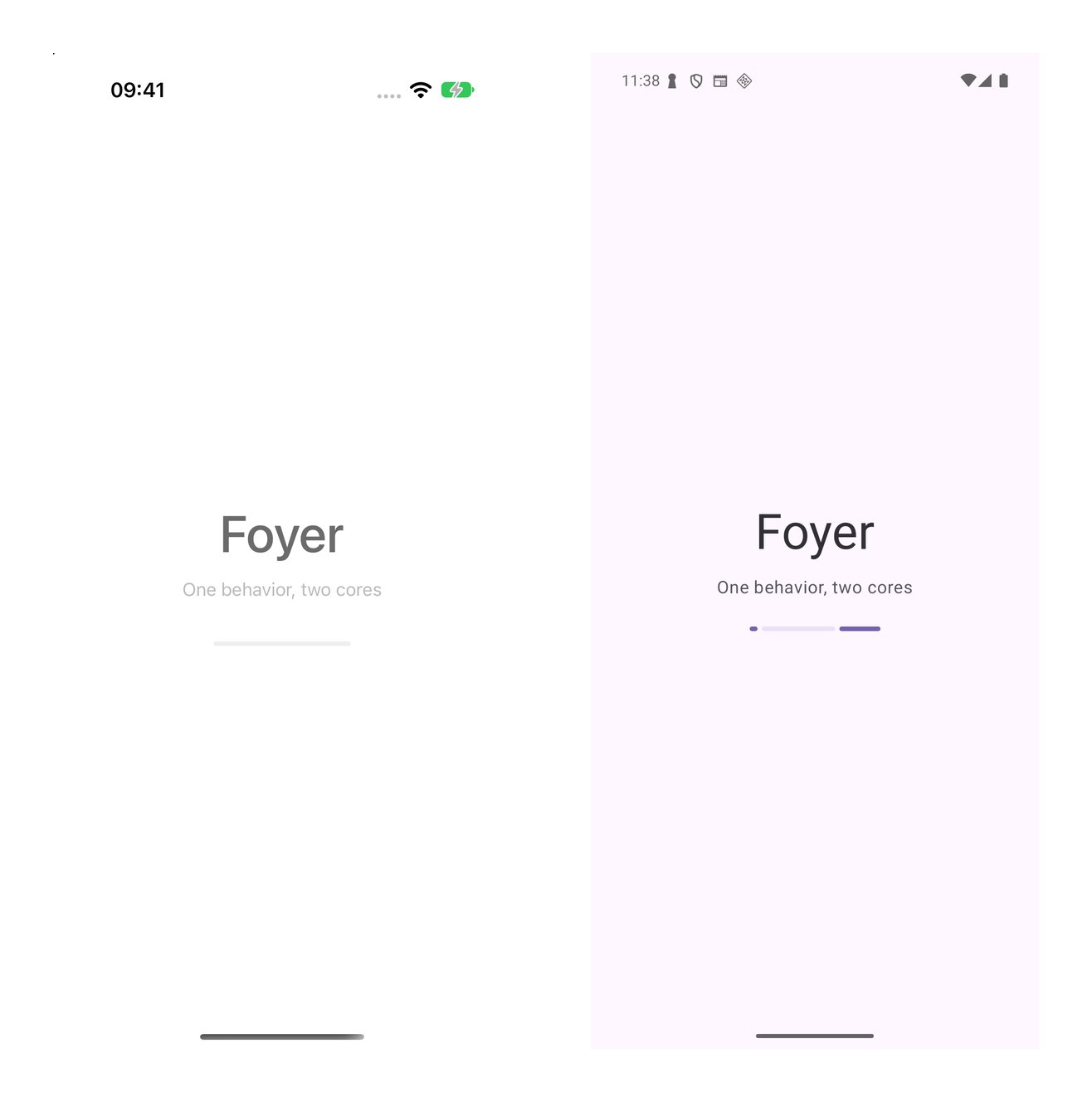
The splash mid-reveal, 0.8 seconds after launch: an iPhone 17 simulator on iOS 27.0 running the Swift core on the left, and a Pixel 8 emulator at API 36 running the Kotlin core on the right, from tutorial2-twins-complete at Duet 0.7.0 and duet-tools 0.34.0.
Change one behavior, in Swift first
git checkout undoes the step. The duration is a constant in each twin:safetyNetMillis to 2_500 in SplashFeature.swift, then record:armSafetyNet payload, and every branch starts from the root step that arms the net, so the Swift scenario rewrites all four recordings. No line carries the (metadata-only) tag, because the behavioral fields changed:TUTORIAL_SKIP_STUBS=1 tools/duet verify. The Swift lane passes on the recordings it just wrote. The Kotlin lane fails on each of the four recordings at the same field, the duration in the first step’s effect:SAFETY_NET_MILLIS to 2_500L in SplashFeature.kt and run TUTORIAL_SKIP_STUBS=1 tools/duet verify again; it prints duet verify: 8/8 fixture report(s) passed and duet verify: PASS. Restore the tree with git checkout -- src-ios src-android parity/fixtures.What you now have
- A Swift twin and a Kotlin twin of the splash, each with its scenario and its test-clock suite, checked against one set of four recordings written by the Swift scenario.
- The Kotlin twin on a plain
kotlin.jvmmodule undersrc-android/, declared withkotlinCore: jvm, replaying the Swift recordings in its golden test. - Both replay runners passing
tools/duet protocol-run --platform both. - A Swift shell with its builder, view and four virtual-time tests in
src-ios/Subtrees/Splash/SplashNode, and a Compose screen with its builder, host and two tests insrc-android/app. - Two apps, each on its own core, that land on the same placeholder, both built and run from the command line.
TUTORIAL_SKIP_STUBS=1 tools/duet verifypassing with eight fixture reports, and a doctor report with two targets.
Exercise: finish the mount-bracket test
tutorial2-twins-start carries Tutorial2ExerciseMountBracketTests.swift in the Swift feature package’s tests. Its given is written: one test store over a SplashEnvironmentMock on a TestClock, armed, then torn down. Delete its XCTSkipIf call and finish it so it pins that a second store over the same environment arms a fresh net, and that after advancing the clock by the net’s duration environment.notifyHostArgs holds exactly one .completed(path: .safetyNet), the second store’s. The first store’s net was cancelled at teardown, and first.finish() fails on any action that arrived there. Then write the same test for the Kotlin twin in the splash module’s src/test, on the Kotlin TestStore under runTest with a RecordingSplashEnvironment. Run the checks without TUTORIAL_SKIP_STUBS: swift test in src-ios/Subtrees/Splash/SplashFeature executes 6 tests with 0 failures, the Kotlin module’s report lists 10 tests, and tools/duet verify prints duet verify: 8/8 fixture report(s) passed and duet verify: PASS. tutorial2-twins-complete carries the finished tests as SplashMountBracketTests.swift and SplashMountBracketTest.kt.
Common questions
Which scenario writes the recordings, and why only one?
Which scenario writes the recordings, and why only one?
scenario: key names the Swift file, so the Swift scenario writes. One writer means each recording’s bytes come from one runtime and its scenario.source names one file. The Kotlin scenario calls ScenarioRunner.verify, which never writes. tools/duet record --feature splash --platform kotlin refuses, and names the command to use instead:What happens if I add a branch to one scenario only?
What happens if I add a branch to one scenario only?
tools/duet record. lint fails until the manifest’s fixtures: list names it (fixture on disk but not in manifest), verify fails until parity/feature-specs/splash.md mentions it, and then verify fails on the Kotlin lane, which ran and did not replay it:SplashGoldenTest.kt. Added to the Kotlin scenario only, the branch has no recording, and verify fails on the Kotlin lane with fixture missing or unreadable. The recording has to come from the Swift scenario, the writer, so the branch goes there too.Why is the Kotlin module not multiplatform?
Why is the Kotlin module not multiplatform?
kotlin.jvm module builds with the JDK and Gradle alone, without the Kotlin/Native toolchain Tutorial 2’s framework downloads on its first build. kotlinCore: jvm in the manifest declares this for every Kotlin module of the tree, and lint then refuses a Kotlin path in a multiplatform source set such as commonMain.Why does the Swift shell hold the store directly?
Why does the Swift shell hold the store directly?
Store is a main-actor ObservableObject. send reduces synchronously, and the new state is published through its @Published state before send returns, which is the ordering StateTransitions and the other shell helpers assume. Tutorial 2’s shell needs the BridgedStore mirror because a Kotlin StateFlow bridged into Swift delivers every value one continuation hop later.What does the iPhone app link?
What does the iPhone app link?
SplashNode, which brings SplashFeature and the Duet Swift packages. The build runs no Gradle task. A Release build’s executable has 2,310 symbols, none with Kotlin/Native’s kfun: prefix, and the app bundle has no Frameworks directory. Kotlin/Native GC and Swift ARC describes what the shared-core version links into the iPhone app.What does a behavior change cost?
What does a behavior change cost?
record from the Swift scenario. The last step shows the order: the Swift edit and the new recordings first, then the Kotlin lane fails until the Kotlin edit lands. The shared-core version edits one reducer; What does sharing the logic cost? gives Modaal’s measured cost of a change shipped to both apps on that version.Does Modaal create this tree?
Does Modaal create this tree?
duet command-line tool. Duet Twins lists what Modaal adds for this shape.Sources and further reading
- The Duet framework repository — the Swift
Store, theDuetShellspackage this page’s shell subclasses (ViewShell,StoreHost,StateTransitions),DuetTesting(ScenarioRunner,TestStore,TestClock), the Kotlinkernel-testartifact (FixtureRunner,ScenarioRunner.verify,TestStore), and two contracts:contracts/store-kernel-contract.mdfor the reducer and store shape on each platform, andcontracts/serialization.mdfor the fixture format both twins replay. - The duet-tools repository — the
duetcommand-line tool, andcontracts/manifest.md, the manifest grammar:kotlinCore, the declaration-parity check across twins, and themocks:rows. - swift-sourcery-templates — the
Mockstemplatetools/duet mocksruns to generateSplashEnvironmentMock. - The duet-tutorials repository —
tutorial2-twins-startandtutorial2-twins-complete, and the checks CI runs on them. - Duet Twins — the architecture this tutorial builds, compared with the Kotlin Multiplatform flavor.
- Tutorial 2: One Behavior, Two Apps — the same step with one Kotlin core in both apps.
- XcodeGen — the project spec format
src-ios/App/xcodegen.ymluses. - The Duet glossary — twin, scenario, replay, shell and the Swift and Kotlin lanes.