
.svg?fit=max&auto=format&n=rBROILWhBGfA_4EY&q=85&s=0185f3e9df88428c430b0b130b94d569)
The new-project flow
You start a project by completing one sentence above the composer, describing the app in the composer, and pressing Start new project. There is no second step: nothing else is asked, and the name, the identifiers and the device families are derived from your description.1. Complete the sentence
The sentence reads I’m building akind for platform, with an + Apple Watch chip beside it. Each word is a button that opens a menu.
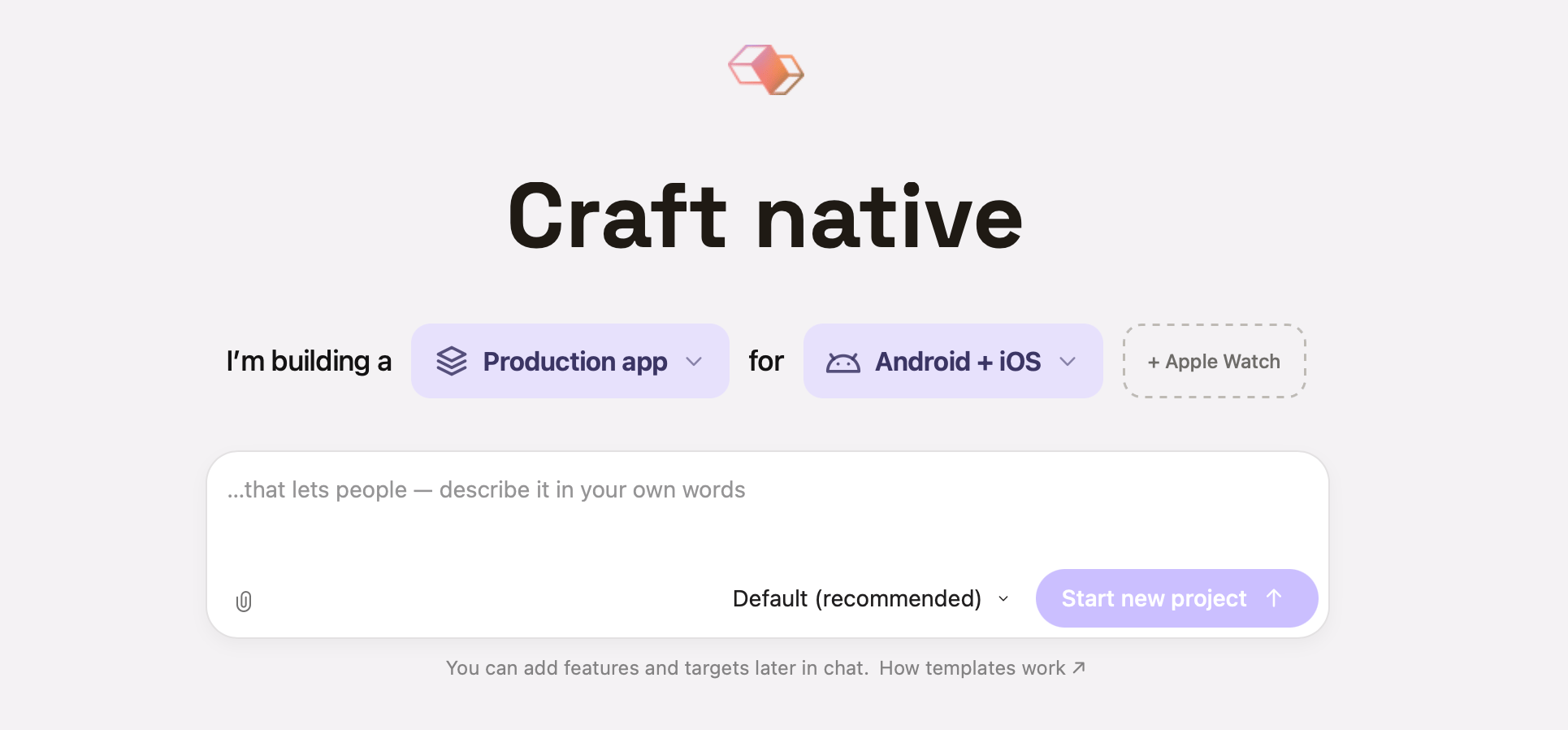
The home screen: the sentence above the composer, the composer below it. The paperclip attaches source materials; the selector beside Start new project picks the agent and model.
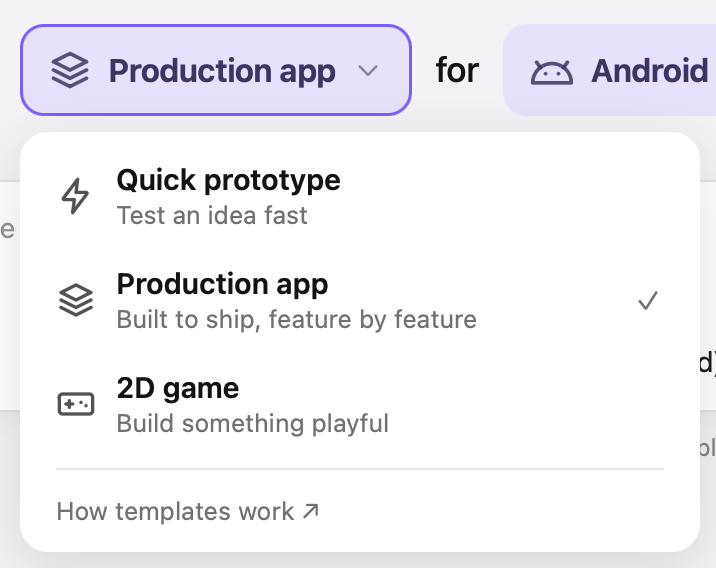
Word 1 — the kind. Production app is the opening selection; the check marks the current one.
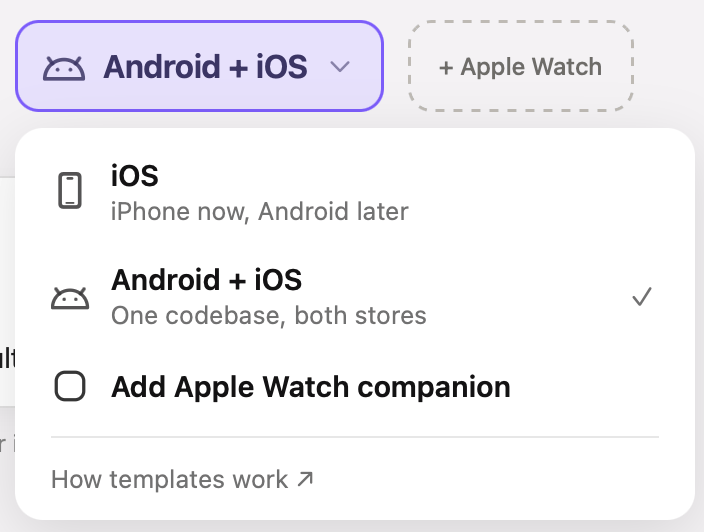
Word 2 — the platform, with the Apple Watch companion as a checkbox row. Android + iOS is selected here.
2. Describe the app in the composer
Type your idea into the composer — the placeholder continues the sentence: “…that lets people — describe it in your own words”. The paperclip attaches source materials: a PRD, a screenshot, a design doc, a Figma link. The selector beside the send button picks the agent and model that will do the work. Your description is used three ways: it names the app, it sets the device families (name iPad in it and the project is created for iPhone and iPad), and the agent writes the PRD from it on the first turn. Nothing is created while you type, and nothing is created if you never press the button — no project record, no folder, no git repository.3. Press Start new project
Modaal names the app
The project is created
The template is scaffolded
xcodegen.yml, build configurations, an app icon, and a passing test suite. Any files you attached are copied into the project.Your original prompt is sent as the first message
4. The first turn: PRD and first feature spec
The sentence has already answered the structural questions, so the agent’s first turn starts at product scope. It:- Reads your description (and any attachments — images, PDFs, Figma links).
- Writes a structured
PRD.mdat the project root. - Plans a workable first iteration and writes it to
specs/001-<feature>/spec.md.
.modaal/project.json, so that turn neither asks which architecture to use nor re-scaffolds. It may ask a product question if your scope is ambiguous.
When the plan looks right, turn Plan off and say “let’s build this”. See Modes and prompts for how the Plan toggle works from there on.
The name and identifiers
Three values are set at creation without asking you. Two of them are one chain — the product name and the organization identifier are the inputs, the bundle identifier is the output:- Product name is the user-facing field: the display name under the icon, the default name of the App Store listing, and the name of the project folder Modaal creates. It is taken from your description, and editable afterwards in the Project Settings tab.
- Organization identifier is an internal naming convention and nothing more. Modaal reuses the one your last project was created with, or suggests one from your account. The custom is to take a domain you control and write it back to front: a personal site
janedoe.devgivesdev.janedoe, a company siteacme.comgivescom.acme. Following the custom keeps your bundle identifiers unique without any registry, because nobody else owns that domain. Nothing verifies it, though: no check confirms the domain exists or that you own it, the string is never shown to users, and it is not registered with Apple or Google on its own. Its only consequence is the prefix it contributes to the bundle identifier. - Bundle identifier is the field with external consequences, derived as
<organization identifier>.<product name without spaces>. iOS uses it to tell apps apart on a device, and App Store Connect uses it to tie every uploaded build to one app record, so it must be unique across the App Store. Wherever the app is registered — the Apple Developer portal, App Store Connect, TestFlight, Firebase — it is the bundle identifier that is registered, never the organization identifier or the product name.
The templates at a glance
The sentence has six combinations, and each one names a template:.xcconfig-based build configurations (Debug / AdHoc / AppStore), an Icon Composer app icon, a localization catalog (Localizable.xcstrings + SwiftGen), a theming module with semantic design tokens, and a test suite that passes from the first build (Swift Testing in Quick prototype, XCTest in 2D game, scenario tests and recorded fixtures in the two Production app combinations).
ios-ribs), the two Apple Watch templates (watchos, watchos-ios-ribs) and the empty project (empty). Projects already created from them are fully supported, keep building, and keep getting features — see CombineRIBs projects, and What each template scaffolds for the two watch templates. A workspace with no app targets is what an imported repository is; ask the agent to add targets to it in chat.What each template scaffolds
Production app for Android + iOS — Duet, Kotlin Multiplatform flavor
Production app for Android + iOS — Duet, Kotlin Multiplatform flavor
Given/When/Then scenario, then tools/duet record to compile it into fixtures, then the reducer until the scenario passes, then a SwiftUI screen and a Compose screen that read state and send actions. tools/duet verify replays every fixture on both platforms and compares byte-for-byte; the same gate runs in CI on every push.The iPhone app consumes the same compiled Kotlin logic as the Android app, so there is no second implementation of a reducer to keep in step.See Duet for the full picture and Handling platform-specific UI for where the shared/native line falls. The Duet tutorials write by hand what this combination scaffolds, one feature at a time, so you can read an emitted project and know what each file is for.Production app for iOS — Duet, Swift flavor
Production app for iOS — Duet, Swift flavor
Quick prototype — MVVM
Quick prototype — MVVM
Features/, each with a SwiftUI View and an @Observable ViewModel. Navigation is a Route enum driving a NavigationStack. Services are injected through @Environment. Tests target the ViewModels.CombineRIBs — the ios-ribs template (existing projects)
CombineRIBs — the ios-ribs template (existing projects)
watchos-ios-ribs template gets.Builder (constructs it), Router (attaches and detaches children), Interactor (business logic), View (SwiftUI or UIKit). Children attach to parents, so the router hierarchy is where the app’s navigation state lives, and you can read the whole app off it. Mocks are generated automatically by Sourcery from /// sourcery: CreateMock annotations, so every module is unit-testable in isolation.A Splash RIB and a Main RIB come pre-wired under Root, so the app runs the moment it’s created.2D game — RIBs + SpriteKit
2D game — RIBs + SpriteKit
SKScene or an SKNode instead of a SwiftUI view, and the whole app has exactly one view controller — the scene navigator that owns the SKView.SKNode subclass you addChild into the host scene. A node reads no ambient state (self.scene, UIScreen, the view) and lays out against the metrics its host hands it, so the same node can be attached into a different scene without edits. Animation is SKAction choreography rather than a per-frame game loop, and layoutScene() runs on presentation, on rotation and on every safe-area change.The SpriteKit machinery — BaseScene, the scene navigator, the routing protocols, the sound pool, the atlas loader, the button control — is the open-source modaal-foundation-spritekit package, pinned by URL in the app module’s Package.swift. It is a versioned dependency: you import its products, and it is upgraded by moving the pin.The scaffolded app runs immediately: splash → menu → a tap-the-target sample game with a score and a sound effect, plus a settings screen that persists sound volume. The sample game and the four placeholder sprites in Art/Game/ are there to be replaced — only the sample game in RIBs/Game uses them.See Building 2D games with SpriteKit for what this looks like in practice.Apple Watch companion — the chip on a Production app
Apple Watch companion — the chip on a Production app
src-ios/App/xcodegen.yml that builds and runs on a watchOS simulator, a bundle identifier of <iOS bundle id>.watchkitapp with WKCompanionAppBundleIdentifier pointing at the phone app, a watchOS 10.0 deployment target, a row in .modaal/project.json, and an entry in the Run picker. WatchRootView is a placeholder: the first watch feature replaces it.The Duet feature packages target iOS, so the watch app links none of them and its screens are written for the wrist rather than shared. Ask the agent for them the way you ask for any other screen.Forgot the chip? Ask the agent to add the watch target later — it takes the same path the chip takes.Watch only and Watch + iPhone — MV (existing projects)
Watch only and Watch + iPhone — MV (existing projects)
watchos) is a standalone Apple Watch app with no iPhone app in the project; Watch + iPhone (watchos-ios-ribs) pairs a CombineRIBs iPhone app with an MV watch companion. Projects on either keep building and keep getting features.MV (Model-View) is a simplified MVVM: there is no ViewModel layer. Views observe @Observable services directly through @Environment. At watch-screen scope a ViewModel per screen adds a layer without adding testable logic, so MV omits it. Tests target the services.For a new project, the watch is the + Apple Watch chip on a Production app, which puts the watch target in a Duet tree.Empty project (existing projects)
Empty project (existing projects)
.modaal/project.json — the template at the project level, and the architecture per target. Both the agent and Modaal’s tooling read it, which is why you never have to restate your architecture in a prompt.Choosing a template
Four questions, in this order. The first is the one that decides the most: platform reach comes before architecture.1. Will this ship on Android, now or later?
Yes, or probably → Production app, and the platform word decides which Duet flavor you get. On both, each feature’s logic is written once, both apps render it natively, and recorded fixtures gate the two against each other in CI. Android + iOS is part of Pro (plans on modaal.dev).2. Is this a prototype or a product?
A prototype — idea validation, an investor demo, a personal utility with a fixed scope → Quick prototype. Pure SwiftUI, a View and a ViewModel per screen, no module boilerplate beyond that, and a working app in hours. A product — something that will live long, grow past a dozen screens, or earn money → Production app, even when only iPhone is planned. Production app for iOS is the production template for an Apple-only product.3. Is the screen drawn rather than laid out?
Sprite artwork placed at coordinates, animated per frame, hit-tested where it is drawn → 2D game. It is the only template that scaffolds a SpriteKit scene host, so it is the answer for a game. The section below covers where that line falls.4. Does the product reach the wrist?
Turn the + Apple Watch chip on, and keep the platform word set to where the phone app ships. The watch app is a companion target in the same project, on the same Duet architecture, and the chip is the only way to get one at creation — the kind stays Production app even when the wrist is the part you care about.Which template for which situation?
CombineRIBs projects
The Production app kind in the sentence creates a Duet project. The template that used to carry that name,ios-ribs, scaffolds RIBs (Router-Interactor-Builder, via CombineRIBs): explicit module boundaries, a navigation tree that lives in the router hierarchy, and protocol contracts between modules. The sentence does not create it, because the two Duet combinations cover every app it scaffolds — with a recorded behavior corpus and a route to Android on top. Three things follow:
- Projects already on it are fully supported. They keep building, features written today follow the same RIBs patterns, and the agent knows them.
- A game is the exception. No Duet template scaffolds a SpriteKit scene host, so 2D game, which is RIBs with a SpriteKit view layer, is reachable from the sentence and is the answer for a game.
- There is a way across. A CombineRIBs project can be carried to the Duet shape feature by feature, in place — Migrating a CombineRIBs app to Duet walks through the stages, what each one costs, and where you can stop. Starting a new project on Production app means that migration is never needed.
When to pick 2D game
Pick it when the screen is drawn rather than laid out — sprite artwork placed at coordinates, animated per frame, hit-tested where it is drawn. Games, arcade and puzzle apps, animated lessons, and kids’ apps where the play is the product. Stay on a conventional kind for a conventional app, including an animation-heavy one. Rich SwiftUI animation is not a reason to move to SpriteKit. Building a single playful screen on a scene tree means that screen takes on the scene lifecycle, the layout pass and the atlas pipeline, and its UI is assembled fromSKNode subclasses rather than from your existing SwiftUI views.
Picking a template for a real app
1. Workout interval timer → Quick prototype
1. Workout interval timer → Quick prototype
TimerViewModel with @Observable holding timer state, a NavigationStack with NavigationLink and .sheet(), @Environment for the persistence service, and tests against the ViewModel with zero navigation mocks.A few hours after describing the idea, Max has a working MVP. If he later adds a WidgetKit widget or a watch companion, the main app’s architecture doesn’t constrain them — those targets run on pure SwiftUI either way.Takeaway. For 3–10 screens with a clear, bounded scope, MVVM is the right call. Don’t “play it safe” with a heavier architecture just in case.2. Mobile banking → Production app for Android + iOS
2. Mobile banking → Production app for Android + iOS
- Android in six months. Production app for Android + iOS is the only combination that emits an Android app target. Picking it at creation makes Android a target rather than a migration, and the six-month date stops being a second project plan.
- Navigation. KYC is a multi-step flow with branches (document photo → selfie → verification → waiting → result, with back-navigation). Transfers are another flow behind an auth gate. In Duet those transitions are reducer state, recorded as fixtures — so the flow is pinned byte-for-byte and both apps replay the same recording.
- Regulatory scrutiny. Every flow ends up with a written spec under
parity/feature-specs/and an executable recording of what it does. That corpus is produced by ordinary feature work, not by a separate documentation effort. - Security. Features are separate modules with typed boundaries. The payments module has no access to KYC’s internal state, and the compiler enforces that rather than convention.
- Native SDK work. Biometrics, document-verification SDKs and custom PIN entry live in workers behind ports, with one implementation per platform. The reducer names the effect; the platform supplies the I/O.
3. Local services marketplace → Production app for iOS
3. Local services marketplace → Production app for iOS
- “Android not now” commonly becomes an urgent requirement 6–8 months after launch. On a Production app that is a scheduled port; on Quick prototype it is a second project.
- Navigation is a real flow: pick service → pick date → confirm → pay → result, with an auth gate (browse without an account, book with one). Chat is a separate real-time flow.
- Integrations: Stripe, WebSockets, push, geolocation.
4. Corporate directory → Quick prototype
4. Corporate directory → Quick prototype
5. The prototype that took off
5. The prototype that took off
- A — Evolve the MVVM codebase. Keep adding features, and for complex flows (paywall, challenge onboarding) add lightweight flow coordinators:
@Observablestate machines that own navigation for a single flow. Not full MVVM+C — no coordinator protocol, no coordinator tree, no parent-child lifecycle. Just one concrete object per complex flow. - B — Restart on a Production app. MVVM has no migration path in Modaal, so this is a new project rather than a conversion: the agent rebuilds the app on a Duet template, and the business logic — models, services, CloudKit code — carries across as-is, because it lives in SPM modules rather than the architectural layer. The screens are written again.
Changing your mind later
Not everything the sentence sets is permanent. Here’s what is:PRD.md from your description. If you would rather bring your own, the app requirements document template sets out what to put in each section.
Modaal currently supports Duet in two flavors for multiplatform projects, MVVM, RIBs and RIBs + SpriteKit for iOS, and MV for watchOS. Duet is pre-release; Android support is available to every account.